1
4.5. “Status” area
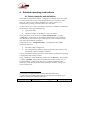
This area is always visible on the right end of the window. It includes a number
of indicators that display the codec status, possible alarm conditions, and the
status of the links (for a codec on a switched network).
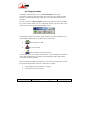
After having read the codec status, the area generally appears as follows:
Function and meaning of the items in this area:
•
PC-Codec link: this indicator is green when the link between the PC
and the codec is operating correctly, and red when it fails. The
indicator “lights off” when closing the link or if the data displayed in
the area have low reliability (e.g. if this information was not recently
updated).
•
Power supply: red indicator in case of a power supply alarm in the
codec.
•
Clock 1: red indicator in case of a clock fault on X24/X21/V35
transmission interface n° 1. This indicator is relevant only for a leased
line interface.
•
Clock 2: red indicator in case of a clock fault on X24/X21/V35
transmission interface n° 2. This indicator is relevant only for a leased
line interface, and only in dual codec mode.
20
TeleScoop 2 - User Manual
This document is the property of AAS and can not be duplicated without authorisation
October 2008
55 000 032 – Ed. E
55 000 032-E TeleScoop 2 (en).doc