1
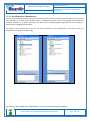
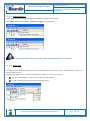
“Rethinking sensing technology” Document type : User Manual Document version : 2.5 BeanDevice® User Manual – SmartSensor product lines dBm. You can easily configure the TX Power on your BeanDevice from your BeanScape WSN software supervision. Try to configure your receiver antenna and your transmitter antenna on the same antenna pattern (cf. the Beam with of your antenna) Use a high gain antenna ( in outdoor use only) for a better RF Link Budget Fix your BeanDevice & BeanGateway on a top of a mast or a building. For further information, read the application note on “How to extend your wireless range?” Internal temperature monitoring An internal temperature sensor is used for onboard & battery temperature monitoring Battery charge monitoring Battery charge is based on current accumulation. The BeanDevice® integrates a current accumulator circuit which facilitates remaining capacity estimation by tracking the net current flow into and out of the battery. Current flow into the battery increments the current accumulator while current flow out of the battery decrements it. Voltage measurement corresponds to battery voltage. 11.3.1 System maintenance Warning: This area is reserved for persons with extensive experience in Wireless sensor networks. Configuring wrongly on such an interface may cause malfunction your BeanDevice®. Please consider the environnement before printing this document. Page : 143 / 152