1
8. Recording
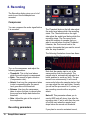
The Recording dialog gives you a lot of
control over how the samples are
recorded.
Compressor
You can compress the audio signal before
it is recorded.
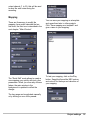
The Threshold knob on the left side adjust
the audio level above which the recording
starts. The Threshold knob on the right
side adjust the audio level below which the
recording stops. The Pre-record knob
adjust the number of samples that you
want to record before the start Threshold.
Likewise, the Post-record knob is the
number of seconds that you want to record
after the stop threshold.
The following illustration shows how these
parameters affect the recording:
Turn on the compressor and adjust the
following parameters:
· Threshold: This is the level above
which the audio signal is compressed.
· Ratio: The amount of gain reduction
(Compression ratio).
· Attack: How long the compressor takes
to start compressing after the sound
level goes above the threshold.
· Release: How long the compressor
takes to return the gain to normal after
the sound level drops back below the
threshold.
· Gain: Adjust the gain at the output of
the compressor.
Recording parameters
15
Samplit User manual
Note that the sample start is not at the
same position than the threshold. The
sample start is automatically adjusted to a
better position to avoid any click. The pre
record is an extra security, it will record
some audio before the sample start so that
you can adjust the start point later. Usually
you will set the pre record to 0, unless you
are recording sounds with a very slow
attack.
Note off: This parameter allows you to
send a MIDI note off at any time after the
recording start. If set to auto then the note
off will be sent when the sample level
drops below the record out threshold.
If you plan to record a sustained sound,