1
im Vertrieb von
CAMBOARD
Electronics
Contents
Contents
1
2
3
4
5
5.1
5.2
5.3
6
7
7.1
7.2
Introduction
Getting Started
Overview
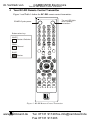
Your RC-IR2 Remote Control Transmitter
Your Remote Receiver
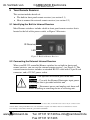
Identifying the Built-in Infrared Receiver
Connecting the External Infrared Receiver
Using the RC-IR2 Remote Control Transmitter
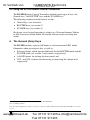
The General (Gray) Keys
The Router Mode Keys
Configuration
Initializing the RC-IR2
1
1
2
3
5
5
5
7
7
8
8
9
7.2.1
7.2.2
Assigning the ROUTER Number
Assigning the GROUP Number
9
9
7.3
Using the RC-IR2 keys in the ROUTER Mode
11
7.3.1
7.3.2
7.3.3
7.3.3.1
7.3.3.2
7.3.4
7.3.4.1
7.3.5
7.3.5.1
7.3.5.2
The <0/10> Selector Key
Switching an Input to an Output
The STO and RCL Keys
Storing an Input/Output Configuration
Recalling an Input/Output Configuration
The TAKE Key
Confirming a Switching Action
The VIDEO, AUDIO and AFV Keys
Setting the Audio-Follow-Video Option
Setting the Breakaway Option
11
12
12
12
12
13
13
13
13
13
7.4
Controlling a Presentation Switcher
14
7.4.1
7.4.1.1
7.4.1.2
7.4.2
7.4.2.1
7.4.2.2
Controlling the VP-23N via the RC-IR2
Switching an Input to an Output
Adjusting the Volume of the VP-23N
Controlling the VP-26 via the RC-IR2
Switching an Input to an Output
Adjusting the Volume of the VP-26
14
14
15
16
16
17
7.5
8
8.1
9
Controlling an Expanded Series 16x16 Matrix Switcher
Operating in the Scaler Mode
The Volume keys in the SCALER Mode
Technical Specifications
18
19
19
19
www.camboard.de
i
Tel. 07131 [email protected]
Fax 07131 911203