1
im Vertrieb von
CAMBOARD Electronics
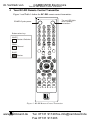
Your RC-IR2 Remote Control Transmitter
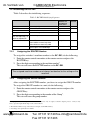
Table 1: RC-IR2 Remote Control Transmitter Features
Keys
Selector ROUTER Mode
Buttons
SCALER Source
Mode
Selector
FREEZE
OUT
STO
RCL
- Single Digit Mode
-- Double Digit Mode
GROUP
LOCK
Auto Image
Auto Gain
MODE
SCALE
Navigation Control
(5 keys)
PIP
SWAP
BRIGHT
CONT
VOLVOL+
ROUTER
SCALER
MENU
ALL
OFF
ESC
TAKE
VIDEO
AUDIO
AFV
Function
20 buttons for selecting the channels, the group, the machine number, machine
type and so on (see section 7)
18 source selector keys: AV1, AV2, AV3, AV4, YC1, YC2, YC3, YC4, COMP1,
COMP2, COMP3, COMP4, VGA1, VGA2, VGA3, VGA4, DVI1 and DVI2
Pauses the output video
Selects the output resolution
Stores the current setting
Recalls the stored data
Press the - key to select the single digit mode (the 0/10 key is designated as 10)
Press the - - key to select the double digit mode (the 0/10 key is designated as 0)
Selects the # of a specific group (see section 7.2.2)
Locks a unit or all the units
Assesses the image and automatically improves its quality via phase, frequency
and position adjustment
Automatically adjusts the brightness and contrast
For the VP-719xl, VP-720xl, VP-723xl and VP-724xl: Toggle between each of
the following modes: Normal, Presentation, Cinema, Nature, User 1 and User 2
For the VP-725DS and VP-725DSA: Toggle between each of the following
groups: video, audio, video and audio, scaler, master, and scaler and master
Toggles between each of the following Aspect Ratios:
Normal, Wide Screen, Pan & Scan, 4:3 Output, and 16:9 Output
Allows maneuvering within an OSD screen (all keys); adjusts the zoom position
(4 keys); moves the PIP location when the Source Prompt is OFF (4 keys);
resizes the PIP when the Source Prompt is ON (2 keys)
Toggles the picture-in-picture function
Toggles between the PIP content and the screen source content
Displays the brightness status (adjust using the / keys)
Displays the contrast status (adjust using the / keys)
Decreases the volume1. When in the SCALER mode, see section 8.1
Increases the volume1. When in the SCALER mode, see section 8.1
Enables the switcher functions (keys are colored white)
Enables the scaler functions (keys are colored blue)
Displays the OSD Menu screen and locks/unlocks the front panel
Pressing ALL before pressing an INPUT key, connects that input to all
outputs2 (ALL= All Outputs)
Pressing OFF after pressing an OUTPUT key disconnects that output from the
input. To disconnect all the outputs, press the ALL key and then the OFF key
Press ESC to cancel the last key(s) pressed (when the action requires
another key)
Press TAKE, key-in several actions and then press TAKE once again to
simultaneously activate the multiple switches
Affects video (the default)
Affects audio
Audio-follow-video
1 See section 7.4.1.2 when adjusting the volume for the VP-23N and the VP-23RC
2 For example, press ALL and then Input key # 2 to connect that input to all outputs
4
www.camboard.de
KRAMER: SIMPLE CREATIVE TECHNOLOGY
Tel. 07131 911201
[email protected]
Fax 07131 911203