1
im Vertrieb von
CAMBOARD Electronics
Using Your Universal Room Controller
5.1 Operating the RC-8RK
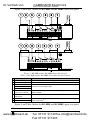
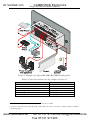
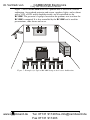
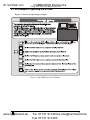
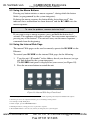
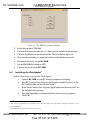
In the following example1 that is illustrated in Figure 8, the RC-8RK is
labeled with specific functions and each button is programmed2 to perform
several tasks3 as defined in Table 7.
Each button may be assigned with up to 15 commands.
Table 7: The Commands Configuration
The
Label
ON
ON
OFF
Vol
UP
DVD
PC
Vol
VCR
HELP
DESK
DOWN
Figure 8: RC-8RK Labels Setup
The Macro Sequence
Power up the projector
Power up the power amplifier
Power up the DVD player
Power up the video player
Roll down the projector screen
Turn on the speakers
1 minute delay [for the projector to
heat up]
Turn lights off
The projector selects the PC input
OFF
Turn lights on
Power down the projector
Power down the power amplifier
Stop the DVD player
Power down the DVD player
Stop the video player
Power down the video player
Roll up the projector screen
Turn off the speakers
DVD
Stop the video player
The projector selects the DVD
input
Play the DVD
VCR
Stop the DVD
The projector selects the VCR
input
Play the VCR
PC
Stop the DVD
Stop the VCR
The projector selects a PC input
Vol UP
Power amplifier volume up
Vol
DOWN
Power amplifier volume down
HELP
DESK
Call for technical assistance
1 This is only one example among numerous possibilities, each button can be configured as required
2 By the technical installer
3 A macro sequence, including up to 15 commands per button, carried out one after the other
10
www.camboard.de
KRAMER: SIMPLE CREATIVE TECHNOLOGY
Tel. 07131 911201
[email protected]
Fax 07131 911203