1
im Vertrieb von
CAMBOARD Electronics
Using Your Universal Room Controller
5.3 Using the Macro Buttons
Pressing any button initiates a macro sequence1, during which the button
blinks (as programmed by the system integrator).
If during the macro sequence the button blinks faster than usual2, this
indicates that a malfunction has been detected3 and the RC-8RK exits the
macro sequence.
4
To solve the problem, summon technical help
If you want to stop a macro sequence, press and hold that button for 5
seconds. The sequence will come to an end. You can resume operation by
pressing any of the buttons5. The unit will carry out the macro sequence
commands from the beginning.
5.4 Using the Internal Web Page
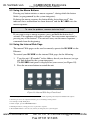
The internal Web page can be used to remotely operate the RC-8RK via the
Ethernet.
To control your RC-8RK via the internal Web page, do the following:
1.
Type the unit’s IP number6 in the Address bar of your browser (or type
any link defined by the system integrator).
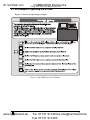
The RC-8RK front panel is displayed on your screen (see Figure 10).
2. Press the on-screen buttons to control the unit.
Figure 10: Internal Web Page Front Panel
1 The macro sequence can be carried out instantly or can take a while, depending on the delay times included in the sequence
2 Six times per second, as compared with twice per second during normal operation
3 For example, a faulty DVD player
4 In this example, press the HELP DESK button
5 Including the button you kept pressed to stop the macro sequence
6 The default IP number is 192.168.1.39, and may be changed by the system integrator
12
www.camboard.de
KRAMER: SIMPLE CREATIVE TECHNOLOGY
Tel. 07131 911201
[email protected]
Fax 07131 911203