1
MSA_init
change module parameters if required
enable measurement: ENABLE_MEAS=1
set POINTS_NO
set SWEEPS
MSA_fill_memory
MSA_start_measure( 0)
0
finished
MSA_test_if_busy
1
2
still running wait for initial trigger
3
wait for current trigger
MSA_read_data (add to a buffer)
MSA_read_status
(check for possible overflow)
MSA_get_current_sweep
Current sweep < SWEEPS AND overflow
Yes
No
MSA_fill_memory
End
MSA_start_measure( 1)
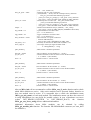
Fig1: Measurement with accumulation up to 65535 sweeps
Filling memory (MSA_fill_memory ) is not required for MSA-1000 ( done by hardware).
Error Handling
Each MSA DLL function returns an error status. Return values >= 0 indicate error free
execution. A value < 0 indicates that an error has occurred. The meaning of a particular error
code can be found in msa_def.h file and can be read using MSA_get_error_string. We
recommend to check the return value after each function call.
Using DLL functions in LabView environment
8