1
Each DLL function can be called in LabView program by using ‘Call Library’ function node. If
you select Configure from the shortcut menu of the node, you see a Call Library Function
dialog box from which you can specify the library name or path, function name, calling
conventions, parameters, and return value for the node.
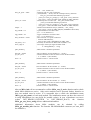
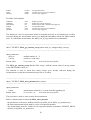
You should pay special attention to choosing correct parameter types using following
conversion rules:
Type in C programs
Type in LabView
char
signed 8-bit integer, byte ( I8)
unsigned char
unsigned 8-bit integer, unsigned byte ( U8)
short
signed 16-bit integer, word ( I16)
unsigned short
unsigned 16-bit integer, unsigned word ( U16)
long, int
signed 32-bit integer, long ( I32)
unsigned long, int
unsigned 32-bit integer, unsigned long ( U32)
__int64
signed 64-bit integer, quad ( I64)
unsigned __int64
unsigned 64-bit integer, unsigned quad ( U64)
float
4-byte single, single precision ( SGL)
double
8-byte double, double precision ( DBL)
char *
C string pointer
float *
pass Pointer to Value ( Numeric, 4-byte single)
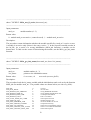
For structures defined in include file xxx_def.h user should build in LabView a proper cluster.
The cluster must contain the same fields in the same order as the C structure.
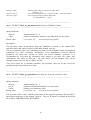
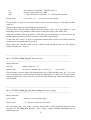
If a pointer to a structure is a function parameter, you connect to the node the proper cluster
and define parameter type as ‘Adapt to Type’ (with data format = ‘Handles by Value’).
Connecting clusters with the contents which do not exactly correspond to the C structure fields
can cause the program crash.
Problems appear if the structure and the corresponding cluster contain string fields - due
to the fact that LabView sends to the DLL handles to LabView string instead of the C string
pointers for strings inside the cluster.
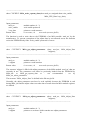
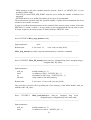
In such case special version of the DLL function must be used which is prepared especially for
use in LabView. Such functions have ‘_LV’ letters after ‘XXX’ ( for example
XXX_LV_get_module_info ), and if found in xxx_def.h file they should be used in ‘Call
Library’ function node instead of the standard function.
Another solution is to write extra C code to transform these data types, create .lsb file and use
it in 'Code Interface' node (CIN) instead of 'Call Library'.
Experienced LabView and C users can prepare such CINs for every external code.
9