1
im Vertrieb von
CAMBOARD
Electronics
Contents
Figures
Figure 1: Configuring the VS-66FW as a 2x2 Port FireWire Hub
Figure 2: Configuring the VS-66FW as a 6 Port FireWire Hub
Figure 3: VS-66FW 6 Port FireWire Switcher
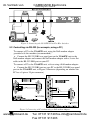
Figure 4: Connecting the VS-66FW 6 Port FireWire Switcher
Figure 5: Connecting a PC without using a Null-modem Adapter
Figure 6: Dipswitch Settings
Figure 7: REMOTE Connector
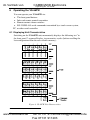
Figure 8: VS-66FW Unit Characteristics
Figure 9: Storing and Recalling using the LEAF Buttons
Figure 10: Splash Screen
Figure 11: Atmel – Flip Window
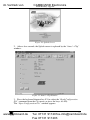
Figure 12: Open Configuration File Select Window
Figure 13: Atmel – Flip Window (RS-232 Communication)
Figure 14: RS-232 Window
Figure 15: Atmel – Flip Window (Connected)
Figure 16: Atmel – Flip Window (Operation Completed)
4
5
6
9
9
10
11
12
14
17
17
18
18
19
19
20
Tables
Table 1: Front Panel VS-66FW 6 Port FireWire Switcher Features
Table 2: Rear Panel VS-66FW 6 Port FireWire Switcher Features
Table 3: Dipswitch Settings
Table 4: Machine # Dipswitch Settings
Table 5: Technical Specifications of the VS-66FW 6 Port FireWire Switcher
Table 6: Hex Table for the VS-66FW
Table 7: Protocol Definitions
Table 8: Instruction Codes for Protocol 2000 (Relevant to the VS-66FW)
ii
www.camboard.de
7
7
10
11
21
21
22
23
KRAMER: SIMPLE CREATIVE TECHNOLOGY
Tel. 07131 911201
[email protected]
Fax 07131 911203