1
im Vertrieb von
CAMBOARD
Electronics
Contents
7.6.2
Setting the Breakaway Option
22
7.7
7.8
8
9
9.1
9.2
Setting the Audio Input Gain
Using the IR Transmitter
Operating Multiple VP-8x8TP Units Remotely via RS-232
Operating the VP-8x8TP Remotely via your Web Browser
Connecting to the VP-8x8TP via your Browser
The Main Switching Matrix Page
22
23
23
24
25
26
9.2.1
9.2.2
9.2.3
9.2.4
9.2.5
Switching an Input to an Output
Setting the AFV Mode
Operating in the Offline Mode
Storing and Recalling Setups
Locking the Front Panel Buttons
27
28
28
29
31
9.3
9.4
10
11
11.1
12
13
14
15
16
16.1
Audio Input Gain Control Page
The Configuration Page
EDID
Firmware Upgrade
Wiring the TP RJ-45 Connectors
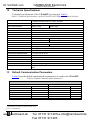
Technical Specifications
Default Communication Parameters
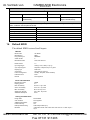
Default EDID
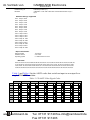
Tables of Hex Codes for Serial Communication (Protocol 2000)
Kramer Protocol
Switching Protocols
31
32
33
33
34
35
35
36
38
39
40
16.1.1 Switching Protocols via the Front Panel Buttons
16.1.2 Switching Protocols via Protocol Commands
16.2
Kramer Protocol 3000
40
40
40
16.2.1 Protocol 3000 Syntax
16.2.2 Command Parts Details
40
41
16.3
47
Kramer Protocol 2000
Figures
Figure 1: VP-8x8TP 8x8 UXGA/Audio Matrix Switcher Front Panel
Figure 2: VP-8x8TP 8x8 UXGA/Audio Matrix Switcher Rear Panel
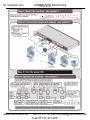
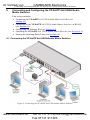
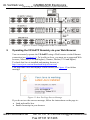
Figure 3: Connecting the VP-8x8TP 8x8 UXGA/Audio Matrix Switcher
Figure 4: The RS-485 TERM Dipswitch
Figure 5: Local Area Connection Properties Window
Figure 6: Internet Protocol (TCP/IP) Properties Window
Figure 7: Connect Window
Figure 8: Device Properties Window
Figure 9: Status Display Five Seconds After Turn On
Figure 10: Status Display During Normal Operation
Figure 11: Status Display Showing INPUT 3, Gain -4.5
ii
www.camboard.de
6
6
10
12
13
14
15
16
18
18
19
KRAMER: SIMPLE CREATIVE TECHNOLOGY
Tel. 07131 911201
[email protected]
Fax 07131 911203