1
im Vertrieb von
CAMBOARD
Electronics
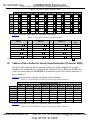
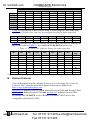
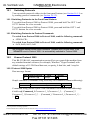
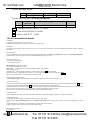
Contents
Contents
1
2
2.1
3
3.1
3.2
3.3
3.4
4
5
6
6.1
6.2
Introduction
Getting Started
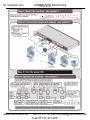
Quick Start
Overview
Terminology Used in this User Manual
Shielded Twisted Pair and Unshielded Twisted Pair
Defining the EDID
The Power Connect™ Feature in the VP-8x8TP
Defining the VP-8x8TP 8x8 UXGA/Audio Matrix Switcher
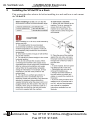
Installing the VP-8x8TP in a Rack
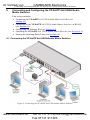
Connecting and Configuring the VP-8x8TP 8x8 UXGA/Audio Matrix Switcher
Connecting the VP-8x8TP 8x8 UXGA/Audio Matrix Switcher
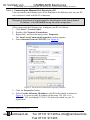
Connecting to the VP-8x8TP 8x8 UXGA/Audio Matrix Switcher via RS-485
1
1
1
3
4
4
5
5
6
9
10
10
11
6.2.1
6.2.2
Setting the RS-485 Bus Termination
Setting the RS-485 Bus Machine Number
12
12
6.3
6.4
Connecting to VP-8x8TP via the RS-232 Port
Configuring the Ethernet Port
12
12
6.4.1
6.4.2
Connecting via the Ethernet Port
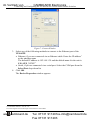
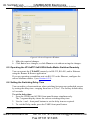
Ethernet Port Configuration
12
14
6.5
6.6
7
7.1
Operating the VP-8x8TP 8x8 UXGA/Audio Matrix Switcher Remotely
Setting the Switching Delay Time
Operating the VP-8x8TP 8x8 UXGA/Audio Matrix Switcher
Switching Inputs and Outputs
16
16
17
17
7.1.1
7.1.2
7.1.3
7.1.4
Switching an Input to an Output
Switching an Input to all Outputs
Disconnecting an Input from an Output
Disconnecting all Inputs from Outputs
17
17
17
18
7.2
The 7-Segment Status Display Modes
18
7.2.1
7.2.2
7.2.3
Status Display Immediately After Power is Turned On
Status Display During Normal Operation
Status Display During Audio Level Setting
18
18
19
7.3
Confirming Settings
19
7.3.1
7.3.2
Toggling between the At Once and Confirm Modes
Confirming a Switching Action
19
20
7.4
Storing/Recalling Input-Output Configurations
20
7.4.1
7.4.2
Storing an Input-Output Configuration
Recalling an Input-Output Configuration
20
21
7.5
7.6
Locking the Front Panel
Choosing the Audio-Follow-Video or Breakaway Option
21
21
7.6.1
Setting the Audio-Follow-Video Option
22
www.camboard.de
i
Tel. 07131 [email protected]
Fax 07131 911203