1
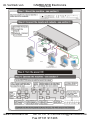
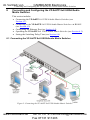
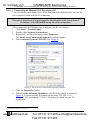
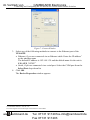
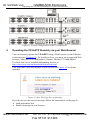
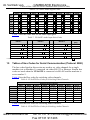
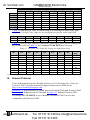
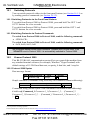
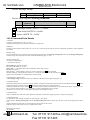
im Vertrieb von CAMBOARD Electronics Connecting and Configuring the VP-8x8TP 8x8 UXGA/Audio Matrix Switcher To connect 1 the VP-8x8TP, as illustrated in the example2 in Figure 3: 1. Connect up to eight UXGA computer video graphics sources to the INPUT 15-pin HD connectors. 2. Connect up to eight unbalanced stereo audio sources (for example, audio sources of the computer and stereo audio sources) to the eight INPUT 3.5mm mini jacks. 3. Connect the eight OUTPUT RJ-45 connectors via STP cable to up to eight compatible TP receivers (for example, TP-122) via STP cable (with a range of more than 100m (330ft)). 4. Optional—Connect a PC and/or controller to the: RS-232 port RS-485 port (see Section 6.2) Ethernet (see Section 6.2.1) 5. Connect the power cord 3 (not shown in Figure 3). 6.2 Connecting to the VP-8x8TP 8x8 UXGA/Audio Matrix Switcher via RS-485 You can operate the VP-8x8TP via the RS-485 port from a distance of up to 1200 meters (3900ft) using any device equipped with an RS-485 port (for example, a PC). For successful communication, you must set the RS-485 machine number and bus termination correctly. To connect a device with a RS-485 port to the VP-8x8TP: 1. Connect the VP-8x8TP to the device as follows: Connect the TxD+ pin on the RS-485 port of the PC to the A (+) pin on the RS-485 port on the rear panel of the VP-8x8TP Connect the TxD- pin on the RS-485 port of the PC to the B (-) pin on the RS-485 port on the rear panel of the VP-8x8TP If shielded twisted pair cable is used, the shield may be connected to the G (ground) pin on the unit 2. Set the VP-8x8TP unit to a Machine number between 2 and 16 (see Section 6.2.2). 3. Set the RS-485 TERM DIP-switch On (see Section 6.2.1) if it is the only machine being controlled via the RS-485 bus. 1 You do not need to connect all inputs and outputs 2 Switch OFF the power on each device before connecting it to your VP-8x8TP. After connecting your VP-8x8TP, switch on its power and then switch on the power on each device. DO NOT push in the rear panel Flash Program “PROG” button, it is used only for upgrading to the latest Kramer firmware 3 We recommend that you use only the power cord that is supplied with this machine www.camboard.de 11 Tel. 07131 [email protected] Fax 07131 911203