1
ISA-Bus Interface User Manual
Installation
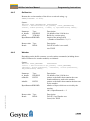
Foe correct operation the driver requires registry entries. These can be found in
the file lonusb.reg. In order to integrate the driver into a Windows CE image, the
contents of this file has to be copied into the file platform.reg.
; LONUSB - Driver
[HKEY_LOCAL_MACHINE\Drivers\USB\LoadClients\3596\Default\De
fault\LonUsb]
"DLL"="lonusb.dll"
"Prefix"="LON"
"DebugFlag"=dword:0
"ReadTimeout"=dword:FFFFFFFF
2.3.6
DOS Driver
The network driver for MS-DOS supplied with the Easylon Interface card has
been designed in accordance with the specifications by Echelon Corporation. For
information on the network driver interface which is required to develop applications, please refer to the "LONWORKS Host Application Programmer's Guide"
from Echelon.
The driver can be taken form the CD-ROM’s „DOS“ directory. There are two
versions:
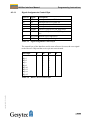
Driver without interrupt
Driver with interrupt
„lpcdrv.exe“
„lpcdrv2.exe“.
The driver files „lpcdrv.exe“ or „lpcdrv2.exe“ have to be copied onto the hard
disk of your computer, e.g. into a directory named C:\easylon.
The network driver for the Easylon Interface cards requires 1.6 Kbytes of resident program code, 2 Kbytes of output buffer and 2, 4 or 8 Kbytes of input buffer.
2.3.6.1
Installation
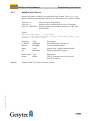
The network driver will be installed in the system as device with the first free
name starting with „LON1:“ by adding in the "config.sys" file the line
device ={path}\lpcdrv2.exe /A[port address] /Q[irq nr]
or
Archiv/96A0016E01, V3.9, June 2014
devicehigh ={path}\lpcdrv2.exe /A[port address] /Q[irq nr]
{path} is describing the location to which the of the driver file was copied. The
[port address] is the I/O address previously set on the card by means of the DIP
switches. To set the default port address, the IRQ 10 (0Ah) and use the path proposed above, the correct entry here would be:
device=C:\easylon/lpcdrv2.exe /A340 /QA
20/45