1
Page 3/5
Instruction Manual
You can display additional information for use in Audi
systems if the analyzer integrates the ring by pressing
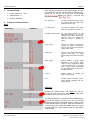
and holding the [Setup] function key along with the [Return] function key until the list of all MOST devices appears. Select the analyzer and press "Entry." The following screen appears:
IRC
LD MOST Analyzer
al messages ("Block trigger on" setting). Select the
"Block trigger" display by repeatedly pressing the
"MODE" button (10). Press and hold the "MODE" button
to switch this function on or off.
Individual message
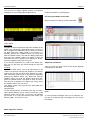
Scale the time axis so you can recognize about 20 individual bits.
MOST
Devicename: LD MOST Analy...
SW-Nummer: 7402013
SW-Index: 1.02
SW-Date: 30.07.09
HW-Number: 7402013
HW-Index: 038
Parameter
TP
TMC
4-R
On/Off
Startup
Step 1
Plug the enclosed power supply into a power socket and
connect the cable to socket 1. The "15 V OK" LED lights
up, and an indicator continuously scrolls through the display (3).
Step 2
Insert the plug at the end of the enclosed orange fiber
optic cable into fiber optic socket 6. Plug the two loose
ends of the orange fiber optic cable into the plexiglass
coupler on the MOST systems 740 2010, 740 2012 or
739 5841. If you wish to use another system, e.g. an
original vehicle, you must produce a fiber optic adapter,
e.g. using parts from the set 740 20821.
Step 3
Now switch the MOST system on. Press the "MODE"
button (10) once. Upon a successful ring formation, the
display (3) shows the device's network address. The
"LIGHT" (11) and "LOCKED" (12) LED's also light up.
MOST messages on an oscilloscope
Basic settings
Connect a digital storage oscilloscope with a bandwidth
of at least 100 MHz using 3 BNC cables as follows:
Channel 1 on BNC socket "MOST Signal Physical" (7)
[physical bus signal]
Channel 2 on BNC socket "MOST Signal Binary" (8) [binary signal]
External trigger input on BNC socket "MOST Signal Trigger" (9)
You now have the option to set a trigger either at the
beginning of a message ("Block trigger off" setting) or at
the beginning of a "block," i.e. a sequence of 16 individu-
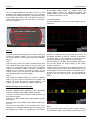
Channel 1 represents the light signals on the bus, so
essentially switching on and off. Channel 2 represents
the binary data, so the sequence of zeros and ones,
which the processor in the control unit must analyze.
Connect Channel 1 to BNC socket "MOST Signal Trigger" (9) and change the trigger setting on the oscilloscope to "Channel 1."
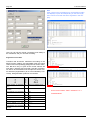
Scale the time axis so you see a complete message. The
voltage change in the trigger signal indicates the end of
the message's synchronous range and therefore the beginning of its asynchronous range. You can display the
length in bytes in menu item 3, "Synchronous Bandwidth."
Block
Now change the trigger setting to "Block trigger" following
the description above. Also change the time axis so you