1
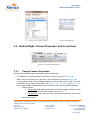
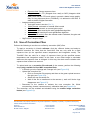
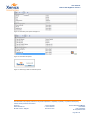
User Manual Bobcat-640-GigE&CL Camera Figure 3-8 Reconnect to camera with onboard correction Figure 3-9 Enable image correction 3.4. Bobcat-CL: Camera Properties and Corrections 3.4.1. Change Camera Properties Perform the following steps to change the camera properties: - To change the camera properties, press the <Camera> icon (see Figure 3-4). When using the camera for the first time, use the Beginner mode (see Figure 3-4). In the beginner mode, the following properties can be modified by the user. For more information on the camera properties, see (Ref. 3), (Ref. 4), (Ref. 5) and (Ref. 8), or click on the property (Right-button-click) and select <Show property documentation>. o Device control: Device gain: High Gain or Low Gain to set the feedback capacitor value (6.7fF or 85fF) of the CTIA readout. See also (Ref. 5) Temperature: (read only): this value gives the temperature of the focal plane array. o Acquisition control Company confidential. This document is the property of Xenics. It may not be reproduced – completely or partially – or passed to a third party without written permission from Xenics. Xenics nv Ambachtenlaan 44 BE-3001 Leuven Belgium T +32 16 38 99 00 F +32 16 38 99 01 www.xenics.com Doc Ref: ENG-2012-UMN020 Issue: R002 Date: 31/03/2014 XF-104_02/20-01-2012 Page 21 of 31