1
Security
User Guide
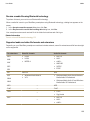
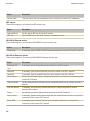
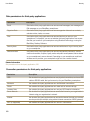
Connection options for OCSP and CRL servers
Option
Description
Friendly Name
Type a display name for the certificate server.
Server URL
Type the web address of the certificate server.
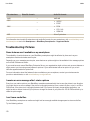
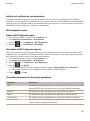
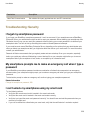
Connection options for LDAP-enabled servers
Option
Description
Friendly Name
Type a display name for the server.
Server Name
Type the network address of the server.
Base Query
Type the base query information for the server using X.509 certificate syntax (for
example, o=test.rim.net).
Port
Type the port number for your organization’s network. The default port number
is 389.
Authentication Type
Specify whether you must log in to the server.
Connection Type
Specify whether your BlackBerry smartphone uses an SSL connection or a TLS
connection to connect to the server.
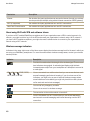
Send connection information for a certificate server
1.
2.
3.
4.
On the Home screen or in a folder, click the Options icon.
Click Security > Advanced Security Settings > Certificate Servers.
Highlight a certificate server.
key > Email Server or PIN Server.
Press the
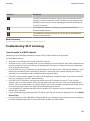
Delete a certificate server
1.
2.
3.
4.
On the Home screen or in a folder, click the Options icon.
Click Security > Advanced Security Settings > Certificate Servers.
Highlight a certificate server.
Press the
key > Delete.
317