1
PTC-20 User Manual
________________________________________________________________________________________________________________
6.1.
PTC-20 and the HCMIS Micro-Incubator
Connection
Connect the HCMIS using the ALA DIN cable to one of the SENSOR connectors (28 or 25,
Figure 1). The right polarity is ensured automatically.
Operation
Heating
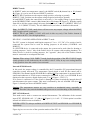
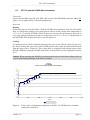
Follow the steps as described above. With the HCMIS micro-incubator from ALA Scientific
Instr. it is likely that you have to use more gain in order to reach a steady state temperature of
35 °C to 36 °C without INTEGRATION. In that case increase the gain stepwise and wait in
every step until the temperature reaches a steady state level of 35 °C to 36 °C and then turn on
the INTEGRATION as described above (see also Figure 6).
Cooling
It is characteristic for Peltier elements that when they cool on one side the other side gets very
hot. When cooling the upper side of the HCMIS gets hot and it must be ensured that the heat
from the upper side is carried off. This is best done by using the fluid cooling system of the
HCMIS. Without cooling the HCMIS with fluid it is not possible to reach temperatures below
20 °C.
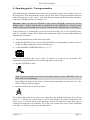
Caution: When operating the HCMIS in cooling mode always use the fluid cooling system to
avoid overheating and damage of the Peltier elements.
PTC-20
with HCMIS
effects of several gain positions and integrator
40
38
36
temperature (°C)
34
gain9
Integrator
gain8
32
gain7
gain6
30
gain5
gain4
28
26
24
22
gain3
20
0
500
1000
1500
2000
2500
3000
time (s)
temperature channel A
Figure 6:
Time course of temperature regulation of the PTC-20, HCMIS micro-incubator
connected to channel A
___________________________________________________________________________
version 3.8
page 18