1
Working with Sorestim
If you are using Sorestim for the first time, please take some time and explore the functionality until
you are familiar with its operation. Nothing happens to any of the "edited" images lists until either
“Finish” button is pressed in the wizard or “Execute Batch Job” button is clicked. Until then, you
can cancel the listings and start again at any time by, clicking "Remove all items from both lists."
Hint:
Hovering over (activated) buttons further explains button features.
The work area
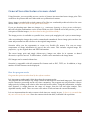
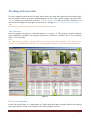
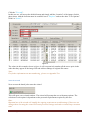
Start the program. It opens as a shared workspace (see figure 2). The program specifies minimal
screen definition 1024x800. The program still works if you have a smaller screen. The resolution
1024 x 768 is tolerable.
HintThe main program window is optimised for screen sizes greater than 1024x800. If a smaller screen
is used, it is recommended to maximise the main program window for optimal visual performance.
Figure 2
Work areas Explained
On the left side (1) there is a combination of a Quick help description, together with all the settings
and control panels. All the user settings for the entire program are here.
Sorestim – Quick Start User Guide
Page 8