1
MAUSI User's guide
ch: MIDI channel
controller #92 (Tremolo)
This controller sets the LFO frequency (see PERFORMANCE menu 2). The settings made here will not be stored in MAUSI’s
memory, which means that the default factory setting will be restored when MAUSI is powered up.
M CONTROL ch 92 n
n: 0...127 LFO frequency
ch: MIDI channel
controller #121 (All Controllers Off)
If you transmit this controller message to MAUSI, modulation intensity will be decreased down to 0 (however, the LFO runs
on), and the Glide function will be switched off.
M CONTROL ch 121 n
n: 0...127
ch: MIDI channel
controller #123 (All Notes Off)
If you transmit this controller message to MAUSI, the gate signal will be switched off, and all notes left in MAUSI’s memory
will be deleted. All control voltages remain on the voltage level currently selected.
M CONTROL ch 123 n
n: 0...127
ch: MIDI channel
4.6 Reset
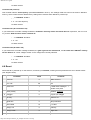
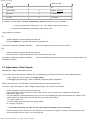
When MAUSI is powered up for the first time, its memory is initialized, meaning that all parameters are set to default values
(see diagram below).
Parameter
Value
Comment
Channel
0
MIDI channel 1
ref. note
36
C3
clock time
1
1 MIDI clock message = 1
SYNC clock pulse
clock polarity
0
Positive: [Abbildung]
«
retrigger
0
Legato (no retrigger
lfo freq.
glide time
0
No portamento
bend width
12
1 octave
assign cv2
0
Velocity
assign mode
0
High note
About 3 Hz
http://www.doepfer.de/maus_m_e.htm[09.12.2013 13:05:45]