1
MAUSI User's guide
CONFIG Menu 3 / Ref. Offset
This parameter sets the voltage offset for the basic note (usually 0 V).
m Increase or decrease of voltage offset.
H If you keep pressing the INC or DEC keys, the value will increase or decrease rapidly.
CONFIG Menu 4 / scale
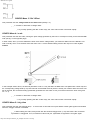
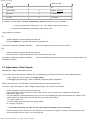
This parameter sets the fine scale, causing the pitch voltage generated by the DAC to correspond exactly to the received MIDI
note (see fig. on the opposite page).
In other words, when you have selected the basic note and the voltage offset, you transmit a MIDI note to the MAUSI. This
note is usually one or more octaves above the basic note. A correct SCALE setting ensures the output of a note in pure
octaves.
In the example shown above, the SCALE parameter is set in a way that after the MIDI basic note (MIDI note number 36) and
the corresponding voltage offset (0 V) have been set and the MIDI note 84 (which is exactly four octaves above the basic note
36) is received, the connected analog synthesizer generates the note which is four pure octaves above the basic note (pitch
CV = 4 V).
m Increase or decrease of voltage offset.
H If you keep pressing the INC or DEC keys, the value will increase or decrease rapidly.
CONFIG Menu 5 / rtrig. time
This parameter sets the gate retrigger time, i. e. the amount of time that has to pass before another gate signal is transmitted
when the retrigger function is activated.
H When setting this value, always start with the shortest retrigger time (1 ms) and check if the connected
synthesizer is retriggered. If not, increase this value until your synthesizer recognizes the new gate signal.
http://www.doepfer.de/maus_m_e.htm[09.12.2013 13:05:45]