1
MAUSI User's guide
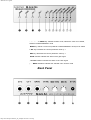
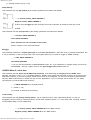
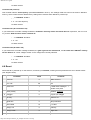
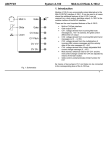
CV 2 jack sends CV 2 (generated by DAC 2)
‘ CV 1 jack sends CV 1 (generated by DAC 1)
’ GATE jack sends gate pulses
“ SYNC jack sends SYNC pulses
” MIDI THRU jack forwards MIDI messages received at the MIDI In jack
• MIDI IN jack receives MIDI messages
A jack Connect your external power unit here
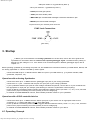
SYNC Jack Connections
(plan view)
3. Startup
H Before you connect MAUSI to an analog synthesizer for the first time, refer to the user’s guide of the
synthesizer for information about the nature of the required gate/trigger signal. The default factory setting of
MAUSI is a gate voltage of +5 V. If the device to be connected requires a different gate/trigger signal, refer to
chapter 4.7.
Before powering up MAUSI by connecting the power unit, first establish all connections between your MIDI device, MAUSI, and
the analog synthesizer or a device controlled by SYNC signals.
Connect the MIDI IN jack • of MAUSI with the MIDI OUT jack of your MIDI device (e. g. keyboard controller, MIDI
synthesizer, sequencer, etc.).
Operation with an Analog Synthesizer
Connect the GATE jack ’ of MAUSI with the gate/trigger input jack of your analog synthesizer.
Connect the CV 1 jack ‘ of MAUSI with the pitch CV input jack of your analog synthesizer.
If your synthesizer features input jacks for other voltage-controlled components, connect the CV 2 jack of MAUSI with
the appropriate CV input jack (for example, jacks allowing to control the synthesizers cutoff frequency).
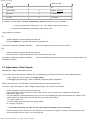
Power up MAUSI. The flashing GATE indicator shows MAUSI's software version (one flash = v1, etc.). If not, check the
power unit for proper functioning and correct polarity of the low-voltage plug.
In CONFIG and PERFORMANCE menues, select suitable parameter values for your synthesizer.
Operation with a SYNC-controlled device
Connect the GATE jack ‘ of MAUSI with the SYNC input jack of your device. Use an appropriate cable for this
connection (e. g. a stereo DIN cable). Do not use a MIDI cable!
Power up MAUSI. The flashing GATE indicator suggests MAUSI's software version (1 flash = v1, etc.). If not, check the
power unit for proper functioning and correct polarity of the low voltage plug.
In CONFIG and PERFORMANCE menues, select suitable parameter values for your device.
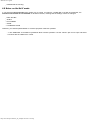
4.1 Operating Concept
http://www.doepfer.de/maus_m_e.htm[09.12.2013 13:05:45]