1
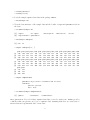
1. The package has sample array and experimental data, sample.mat and vlist.
> data(sample.mat)
> dim(sample.mat)
[1] 613
32
> data(vlist)
> vlist
$patient
[1] 1 1 1 1 2 2 2 2 3 3 3 3 4 4 4 4 5 5 5 5 6 6 6 6 7 7 7 7 8 8 8 8
Levels: 1 2 3 4 5 6 7 8
$dose
[1] 0 1 2 3 0 1 2 3 0 1 2 3 0 1 2 3 0 1 2 3 0 1 2 3 0 1 2 3 0 1 2 3
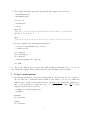
2. Generate exprSet class data using neweS function.
> test.eS <- neweS(sample.mat, vlist)
> class(test.eS)
[1] "exprSet"
attr(,"package")
[1] "Biobase"
> identical(sample.eS, test.eS)
[1] TRUE
c.f. If you have different types of array data, such as RGList, marrayRaw, and so on, you can
convert them into exprSet class by using as method after installing convert package.
3
G-log transformation
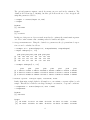
1. Estimating parameters for g-log transformation. The linear model is not applied to
the raw data, but to transformed and normalized data. Many people use a log transform.
LMGene uses a log-like transform involving two parameters.
We estimate the parameters λ
p
and α of the generalized log transform log (y − α + (y − α)2 + λ) = sinh−1 ( y−α
λ ) + log(λ)
using the function tranest as follows:
> tranpar <- tranest(sample.eS)
> tranpar
$lambda
[1] 726.6187
$alpha
[1] 56.02754
3