1
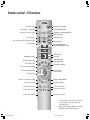
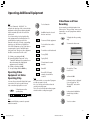
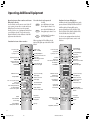
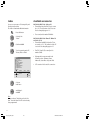
Remote control – TV functions
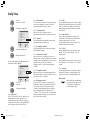
Sound off/on (mute)
Switch on/off – in standby
✳ VCR or DVD display LED
Switching over to operate VCRs
Switching over to operate the TV
VCR
TV
DVD
Switching over to operate DVD players
Picture menu on/off
T-C
For TV: no function
Sound menu on/off
DISC-MENU
Video operation with video operating lin on/off
For TV: no function
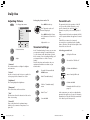
Programme info on/off
SV
RADIO
000
abc
def
ghi
jkl
mno
pqrs
tuv
wxyz
EPG
AV
PIP
Call menu /in menu: back
Teletext mode on/off
SP/LP
IN
XT
FO
TE
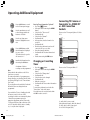
P+/P– select program up/down
Select programme directly
in menu: enter numbers or letters
Call AV selection
No function
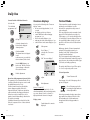
Status display on/off
/in menu: hide menu
END
U
MEN
Radio mode on/off
Call up main information
P+
V–/V+ volume quieter/louder
V–
OK
V+
Station table list on
/in menu: confirm
in menu: select/set
P–
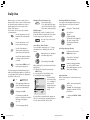
Red key: to call up normal settings
Green key: no function
For TV mode: no function
For TV mode: no function
For TV mode: no function
Blue key: to display subtitles
Yellow key: last station
For TV mode: no function
For TV mode: no function
For TV mode: no function
✳ You can switch over the remote control of the
TV set to operate Loewe video recorders and
Loewe DVD players.
When operating in VCR or DVD mode the display
(LED) lights up via the VCR or DVD button.
3
LCD_023_RC4_GB
3
3
10.08.2004, 14:08 Uhr