1
2.8.2 Installing the backplane
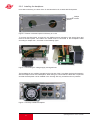
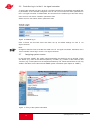
In its state on delivery, the back of the U 100 base device is covered with blind panels:
Phillips
screws
Figure 2: Position of the blind panel on delivery of U 100
To remove the blind panel, unscrew the two Phillips screws indicated in the above figure and
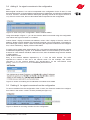
remove the blind panel. The cables now visible must be connected to the backplane coded
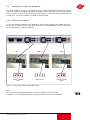
according to chapter 2.8.1, as shown in the following figure:
Figure 3: Connecting the voltage supply and signal lines
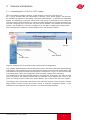
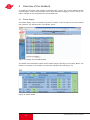
The backplane is now carefully inserted into the free slot of the U 100 base device and screwed in
with the Phillips screws of the backplane. When doing so, ensure that the cables are not jammed
and that the backplane can be installed in the housing with only a small amount of pressure.
Figure 4: Correctly installed backplane
8
Operating Manual U 100-C Controller