1
ENGLISH
Implementation
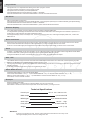
There are two types of file dump mode described as below :
Open Loop Mode
RECEIVER
CONTROLLER
MIDI OUT
MIDI IN
MIDI IN
MIDI OUT
Close Loop Mode
RECEIVER
CONTROLLER
MIDI OUT
MIDI IN
STAGE 4824
NOTE
NUMBER
Decimal
Hex
22 - 69
70 - 117
118
119
120
121
122
123
124
125
126
(16H-45H)
(46H-75H)
(76H)
(77H)
(78H)
(79H)
(7AH)
(7BH)
(7CH)
(7DH)
(7EH)
MIDI IN
MIDI OUT
STAGE 2412
VELOCITY
FUNCTION
Program Master
channel light
Turn On or Off program 1-48
activate Channel 1-48
FULL-ON
DARK
HOLD
Turn On or Off AUDIO
CHNS < > SCENES
DOUBLE PRESET Mode
SINGLE PRESET Mode
Step
BLACK OUT
NOTE Nº
22 - 69
70 - 93
94
95
96
97
98
99
100
101
102
VELOCITY
Program Master
channel light
FUNCTION
Turn On or Off program 1-48
activate Channel 1-24
FULL-ON
DARK
HOLD
Turn On or Off AUDIO
CHNS < > SCENES
DOUBLE PRESET Mode
SINGLE PRESET Mode
Step
BLACK OUT
Brief of Main Functions
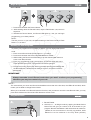
Reverse the direction of the scene
Reverse the direction of all the scenes. Press the ALL REV Button, all the scenes should change their directions.
Reverse the chasing direction of all the programs with speed control. Press the Chase Rev Button.
Reverse the chasing direction of all the programs with standar beat. Press the Beat Rev Button.
Reverse chasing direction of any program. Press and hold down the Rec One Button, then press down the Flash Button correspondin to
your desired program and release together.
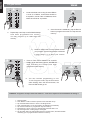
Fade Time
The amount of time it will take for the dimmer to go from zero output to maximum output, and vice verse.
Fade time is adjusted through the Fade Time Slider, which varies from instant to 10 minutes.
Tap Sync Button:
The Tap Sync button is used to set and synchronize the chase rate (the rate at which all scenes will sequence) by taping the button several
times. The chase rate will synchronize to the time of the last two taps. The LED above the Step Button will flash at the new chase rate. The
chase rate may be set anytime whether or not a program is running.
Tap Sync will override any previous setting of the speed slider control until the slider is moved again.
Use of Tap Sync in setting a standard beat is the same with speed control slider.
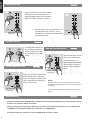
Master Slider
Master Slider control provides proportional level control over all channels and scenes with the exception of the Flash Buttons. For example:
Whenever the Master slider control is at minimum all stage outputs will be at zero excepte for any resulting from a Flash Button or FULL
ON Button.
If the Master is at 50%, all outputs will be at only 50% of the setting of current channel or scenes except for any resulting from a Flash Button
or FULL ON Button.
If the Master is at full all outputs will follow the unit setting.
Master A always controls outputs of channels. Master B controls the program or a scene except in Double Preset Mode.
10