1
Operating Instructions
Additional Function Mode
In order to enter the additional function mode,
first press buttons »L« and »E« simultaneously.
Then switch from one additional function to
the other by pressing button »E«.
In order to quit the additional function mode,
press buttons »L« and »E« simultaneously.
1 Length of the Relay Impulse
After switching to the impulse menu, an »I«
(left) and the impulse length in seconds (right)
is displayed. A standard value of 1 sec is set
at the factory.
You can set another impulse length between
1 and 99 seconds. If no relay impulse shall be
generated, select the impulse length »0«.
1. Using the middle and/or right button,
select the desired impulse length (in s).
The display flashes.
2. Confirm the new impulse length by pressing button »L«.
Once the new value has been memorized,
the display stops flashing.
Note:
This is how to end programming without
saving data:
• Switch to the next additional function:
press button »E«
• Switch to operating mode:
press buttons »L« and »E« simultaneously
2 Blocking Specific Memory Locations
After switching to the blocking menu, the
memory location »001« is displayed.
Using the buttons, select the memory
location to be blocked.
Operating Instructions
The current status of the memory location is
displayed via the two LEDs »LED-L« and
»LED-E«:
Status:
LED
»L«:
LED
»E«:
occupied
OFF
nonoccupied
ON
blocke
d
ON
ON
OFF
ON
In order to alter the status of the selected
memory location, press button »L«:
• Case a) memory location is occupied
-> memory location is blocked
• Case b) memory location is blocked
-> blocking is cancelled
Note:
It is not possible to block non-occupied memory locations.
Note:
This is how to end programming without
saving data:
• Switch to the next additional function:
press button »E«
• Switch to operating mode:
press buttons »L« and »E« simultaneously
3 Function Test
After switching to the function text menu, »F«
is displayed and the set impulse length of the
relay impulse in seconds.
Press button »L«.
The radio access control generates a relay
impulse and the relay is switched. The display
flashes for the period of the impulse length.
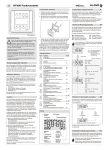
Operating Mode
(Details in chapter »Operating Mode«)
In the operating mode the access control
receives radio telegrams and generates a
relay impulse.
Learn-Delete Mode
(Details in chapter »Learn-Delete Mode«)
In the learn-delete mode you can memorize
transmitter telegrams and delete specific
memory locations.
Additional Function Mode
(Details in chapter »Additional Function
Mode«)
The additional function mode offers the following additional functions:
Additional Function
Display
Application
1 Length of the relay impulse
I..
Changing the impulse length of the relay
impulse (standard value: 1 sec) or
deactivating the relay output
2 Blocking specific memory locations
e.g. 001
Time-limited access authorization for particular visitors
3 Function test
F..
Generating a relay impulse
4 History
H
Display of the last 10 telegrams
5 Deleting the memory completely
E A
Reprogramming the radio control
6 Entering/altering the numerical code
C
Release of programming modes (learndelete mode and additional function mode)
using a numerical code
Note:
This is how to end programming without
saving data:
• Switch to the next additional function:
press button »E«
• Switch to operating mode:
press buttons »L« and »E« simultaneously
87274 1108 GB
6
Function Modes
There are three function modes:
• Operating Mode
• Learn-Delete Mode
• Additional Function Mode
87274 1108 GB
3