1
Programming Countdown Operation:
1. Press the “Timer” button replacing to scroll through the 9 ON/OFF settings
to get to the ON C setting.
2. Press the “Override” button to select whether the timer will turn ON or OFF
during teh countdown period.
3. Press the “H+” and “M+” buttons to set the hours and minutes of the
countdown.
4. Press the “Clock” button to store the setting and return to the current time
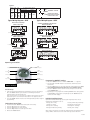
display. See the diagram below for more information.
Activate the Countdown Feature:
1. Press the “Clock” and “Override” buttons at the same time to start the
countdown function.
2. Press the “Override” button to pause and continue the countdown
function.
3. Press the “Clock” button to go view the current time display.
Summer Time Feature (DST):
Press the “H+” and “M+” buttons for 3 seconds to advance the current time
1 hour, SUMMER should appear on the display. Repeating this process will
decrease the time by 1 hour and SUMMER will disappear.
Power Back Up Feature:
In the event of a power failure, the timer will retain its settings for an
estimated 3 months assuming the power back up is fully charged.
Button Lock:
This function allows the user to lock the buttons so that they are not
accidentally pressed.
1. Press and HOLD the “Clock” button for more than 5 seconds. An
“
“ icon will appear on the display. The buttons are now locked. To
unlock the buttons repeat this step.
Manual Override:
The timer comes with the ability to control the ON and OFF function while
the timer is deactivated. Press and Hold the “Override” button to switch
between timer mode and manual mode. Timer mode will be indicated by an
A next to the ON or OFF. When the timer is in manual mode (not controlled by
timer) the A will not appear on the display. Any time the “A” is displayed the
timer is in control and will always follow the programmed settings (even if it is
temporarily deactivated by moving from ON to OFF or OFF to ON).
Random, ON/OFF Setting:
This feature allows the timer to switch ON and OFF at random times. It is
particularly useful in helping to prevent burglary as the timer is not switching
ON and OFF at regular times. The programmed settings will be executed in a
random delay varying within 30 minutes. This function will only operate if one
or more programmed switching commands are set.
1. Press both “Day” and “H+” buttons at the same time. The display will show
the “TIMER” symbol blinking. The random feature is now activated.
2. To turn the random feature off repeat step 1.
Note:
“
“ Flashing: the timer is in the manual mode with key lock.
“
“ Not flashing: the timer is in the timer mode with key lock.
Lockout a Programmed Setting (Skip a Setting):
1. Press the “Timer” button repeatedly to scroll to the setting that needs to
be skipped.
2. Press the “Override” button to lockout the time setting. The display will
display “H I : d E” and lock the hours and minutes setting.
3. Press the “Override” button again to recall the setting time. This Function
(Will not work for Lockout Countdown feature)
15136