1
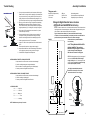
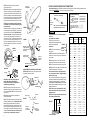
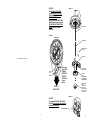
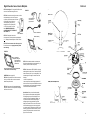
Digital Elevation Sensor Interior Wallplate STEP 19. See Figure 17. If using the SM-1000 surface mount box, feed cable through hole in box. STEP 20. Connect wires coming from sensor on roof to wall plate display in vehicle. It is important to properly connect the wires at the roof and the wall plate. (Plug will click when inserted properly.) The system is designed to use a 9 volt battery OR +12 VDC from vehicle. Do not use both! IMPROPER WIRING WILL CAUSE DAMAGE TO THE PRODUCT, SEE FIGURE 18. SM-1000 Surface Mount Box STEP 21. Pressing the button when the antenna is in a vertical position should display 24 (+1°). Display will automatically turn off after 1 minute. Parts List FIGURE 17 Cable and plug from roof sensor unit; plugs into sensor Sensor to readout cable Readout assembly STEP 22. Check connectors and cable entry points. Be sure these areas are properly sealed to prevent water damage. FIGURE 18 Bracket Snap battery in place, making sure battery terminals are firmly seated on wall plate terminals. Based on 5 minutes a day of usage, standard new alkaline batteries should last 88 days. OPERATION (Also on pages 2-3) STEP 23. Using satellite receiver, find correct elevation for your location. See the receiver manual for details of setup information. STEP 24. Press button on Winegard digital display wall plate. If antenna is in travel position, the display will show LL for Low Limit. 10 Clamp STEP 25. Crank elevation handle to raise antenna. Stop when readout displays correct elevation for your location. (Found on receiver setup menu.) Strut STEP 26. Rotate antenna VERY SLOWLY until correct satellite signal is acquired. Note: 3° and stop. DO NOT rotate continuously even if you’re rotating slowly. If the elevation angle has changed, it could be due to the following — • Vehicle is not parked level. • Antenna system mounted on slightly sloped roof. If this is the reason, after you have rotated the antenna to the approximately correct compass direction, adjust to correct elevation and continue research. Special Note: When you have found the satellite signal, adjust the antenna up/down and right/left for the strongest signal your receiver displays. Due to variation in receivers and installation methods, you may find the elevation numbers after peaking on strongest signal no long match what the receiver display recommended. This is normal. The elevation sensor should always get your close enough to pick up a signal to peak on. If display turns off while you’re searching, just push the button for another minute of operation. With a little practice, most users find the signal in 30 to 50 seconds. 11