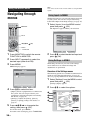
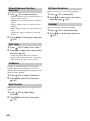
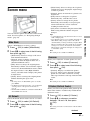
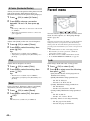
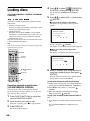
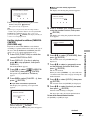
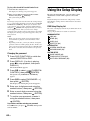
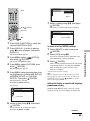
1
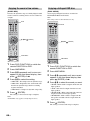
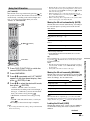
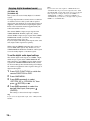
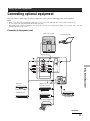
2-687-040-11(1)
Integrated Home Theatre System
Operating Instructions
TAV-L1
© 2006 Sony Corporation
Before operating the system, please read the
“Safety Information” section of this manual.
Retain this manual for future reference.
Contacting Sony
If, after reading these operating instructions, you have additional
questions related to the use of this system, please call our
Customer Information Services Center at 1-800-222-SONY
(7669) (US residents only) or 1-877-899-SONY (7669)
(Canadian residents only).
WARNING
To reduce the risk of fire or electric shock, do not
expose this apparatus to rain or moisture.
Caution – The use of optical instruments with this
product will increase eye hazard.
For customers in the U.S.A
NOTIFICATION
This equipment has been tested and found to comply with the
limits for a Class B digital device, pursuant to Part 15 of the
FCC Rules. These limits are designed to provide reasonable
protection against harmful interference in a residential
installation. This equipment generates, uses, and can radiate
radio frequency energy and, if not installed and used in
accordance with the instructions, may cause harmful
interference to radio communications. However, there is no
guarantee that interference will not occur in a particular
installation. If this equipment does cause harmful
interference to radio or television reception, which can be
determined by turning the equipment off and on, the user is
encouraged to try to correct the interference by one or more
of the following measures:
– Reorient or relocate the receiving antenna (aerial).
– Increase the separation between the equipment and
receiver.
– Connect the equipment into an outlet on a circuit different
from that to which the receiver is connected.
– Consult the dealer or an experienced radio/ TV technician
for help.
CAUTION
You are cautioned that any changes or modifications not
expressly approved in this manual could void your authority
to operate this equipment.
Note to CATV system installer:
This symbol is intended to alert the user to the
presence of uninsulated “dangerous voltage”
within the product’s enclosure that may be of
sufficient magnitude to constitute a risk of electric shock to
persons.
This symbol is intended to alert the user to the
presence of important operating and maintenance
(servicing) instructions in the literature
accompanying the appliance.
Owner’s Record
The model and serial numbers are located at the rear of the
system. Record the serial number in the space provided
below. Refer to them whenever you call upon your Sony
dealer regarding this product.
Model No. TAV-L1
Serial No.______________
This reminder is provided to call the CATV system
installer’s attention to Article 820-40 of the NEC that
provides guidelines for proper grounding and, in particular,
specifies that the cable ground shall be connected to the
grounding system of the building, as close to the point of
cable entry as practical.
The shielded inter face cable recommended in this manual
must be used with this equipment in order to comply with
The limits for a digital device pursuant to Subpart B of Part
15 of FCC Rules.
If you have any questions about this product, you may call;
Sony Customer Information Service Center 1-800-222-7669
or http://www.sony.com/
The Number below is for the FCC related matters only.
Regulatory Information
Declaration of Conformity
Trade name: SONY
Model No.: TAV-L1
Responsible Party: Sony Electronics Inc.
Address: 16530 Via Esprillo, San Diego,
CA 92127 U.S.A.
Telephone No.: 858-942-2230
This device complies with Part 15 of the FCC Rules.
Operation is subject to the following two conditions:
(1) This device may not cause harmful interference,
and (2) this device must accept any interference
received, including interference that may cause
undesired operation.
2 US
This product contains mercury. Disposal of this product may
be regulated if sold in the United States. For disposal or
recycling information, please contact your local authorities
or the Electronics Industries Alliance (http://www.eiae.org).
For customers in Canada
This Class B digital apparatus complies with Canadian
ICES-003.
Safety
• Operate the system only on 120 V AC.
• Use the AC power cord specified by Sony and suitable for
the voltage where you use it.
• The plug is designed, for safety purposes, to fit into the
wall outlet only one way. If you are unable to insert the
plug fully into the outlet, contact your dealer.
• If any liquid or solid object should fall inside the cabinet,
unplug the system immediately and have it checked by
qualified service personnel before operating it further.
• If you will not be using the system for several days,
disconnect the power by pulling the plug itself. Never pull
on the cord.
• For details concerning safety precautions, see “Important
Safety Instructions” on page 4 and “Safety information”
on page 7.
To Customers
Sufficient expertise is required for installing the specified
product. Be sure to subcontract the installation to Sony
dealers or licensed contractors and pay adequate attention to
safety during the installation.
Introduction
Thank you for choosing this Sony product.
Before operating the system, please read this manual
thoroughly and retain it for future reference.
Trademark information
• Manufactured under license from Dolby Laboratories.
“Dolby,” “Pro Logic,” and the double-D symbol are
trademarks of Dolby Laboratories.
• Manufactured under license from Digital Theater
Systems, Inc.
“DTS” and “DTS Digital Surround” are registered
trademarks of Digital Theater Systems, Inc.
•
This system incorporates
High-Definition Multimedia
Interface (HDMI™) technology. HDMI, the HDMI logo
and High-Definition Multimedia Interface are trademarks
or registered trademarks of HDMI Licensing LLC.
Installing
• The system should be installed near an easily accessible
power outlet.
• To prevent internal heat buildup, do not block the
ventilation openings.
• Do not install the system in a hot or humid place, or in a
place subject to excessive dust or mechanical vibration.
• Avoid operating the system at temperatures below 5°C
(41°F).
• If the system is transported directly from a cold to a warm
location, or if the room temperature changes suddenly, the
picture may be blurred or show poor color due to moisture
condensation. In this case, please wait a few hours to let
the moisture evaporate before turning on the system.
• To obtain the best picture, do not expose the screen to
direct illumination or direct sunlight. It is recommended to
use spot lighting directed down from the ceiling or to
cover the windows that face the screen with opaque
drapery. It is desirable to install the system in a room
where the floor and walls are not of a reflective material.
CAUTION
Use the following Sony appliance(s) only with the following
rack stand.
Use with other rack stand may cause instability and possibly
result in injury.
SONY APPLIANCE MODEL NO.
TAV-L1
SONY RACK STAND MODEL NO.
SU-32L
3 US
Important Safety Instructions
1)
2)
3)
4)
5)
6)
7)
Read these instructions.
Keep these instructions.
Heed all warnings.
Follow all instructions.
Do not use this apparatus near water.
Clean only with dry cloth.
Do not block any ventilation openings. Install
in accordance with the manufacturer’s
instructions.
8) Do not install near any heat sources
such as radiators, heat registers,
stoves, or other apparatus
(including amplifiers) that produce
heat.
9) Do not defeat the safety purpose of the
polarized or grounding-type plug. A polarized
plug has two blades with one wider than the
other. A grounding type plug has two blades
and a third grounding prong. The wide blade
or the third prong are provided for your safety.
If the provided plug does not fit into your
outlet, consult an electrician for replacement
of the obsolete outlet.
10) Protect the power cord from being walked on
or pinched particularly at plugs, convenience
receptacles, and the point where they exit
from the apparatus.
11) Only use attachments/accessories specified by
the manufacturer.
12) Use only with the cart, stand, tripod, bracket,
or table specified by the manufacturer, or sold
with the apparatus. When a cart is used, use
caution when moving the cart/apparatus
combination to avoid injury from tip-over.
13) Unplug this apparatus during lightning storms
or when unused for long periods of time.
14) Refer all servicing to qualified service
personnel. Servicing is required when the
apparatus has been damaged in any way, such
as power-supply cord or plug is damaged,
liquid has been spilled or objects have fallen
into the apparatus, the apparatus has been
exposed to rain or moisture, does not operate
normally, or has been dropped.
4 US
Table of Contents
About this manual ....................................... 7
Safety information ....................................... 7
Precautions ............................................... 11
Notes about the discs ..................................... 12
Guide to basic operations of this
system.................................................. 13
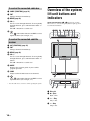
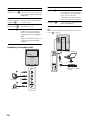
Overview of the remote ............................. 14
Overview of the system/lift unit buttons and
indicators.............................................. 16
Basic Operations
Getting Started
1: Checking the accessories......................18
2: Inserting batteries into the remote .........18
3: Connecting a cable box/satellite
receiver/VCR ........................................19
4: Connecting the FM wire antenna...........21
5: Switching on the system ........................21
6: Selecting the monitor language .............22
7: Selecting the DVD language
(Quick Setup)........................................22
Enjoying the Connected
Equipment
Programming the remote control ...............24
Viewing pictures from connected
equipment.............................................25
Using other equipment with your remote
control...................................................26
Enjoying Discs
Available discs ...........................................27
System sound feature................................29
Playing discs..............................................31
Various play modes..........................................32
(PBC Playback)
(Resume Play)
Searching for a particular point or a scene on a
disc.............................................................34
(Scan, Slow-motion Play, Freeze Frame)
(Picture Navigation)
Displaying various angles and subtitles ..........35
Enjoying the FM Radio
Listening to the FM radio ...........................36
Presetting FM radio stations ......................37
5 US
Advanced Operations
Using the Monitor Menu
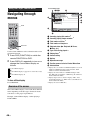
Navigating through menus ........................ 38
Video menu ............................................... 39
Screen menu............................................. 41
Parent menu.............................................. 42
Setup menu............................................... 44
Using the DVD’s Menu
Navigating through menus ........................ 47
Using the Player Control Menu
Navigating through menus ........................ 48
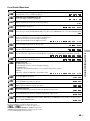
Overview of the menus.................................... 48
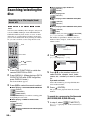
Searching/selecting the disc ..................... 50
Searching for a title/chapter/track/scene,
etc.............................................................. 50
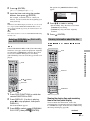
Selecting [ORIGINAL] or [PLAY LIST] on a
DVD-R/DVD-RW ........................................ 51
Viewing information about the disc ................. 51
Using the play mode ................................. 53
Creating your own program ............................ 53
(Program Play)
Playing in random order .................................. 54
(Shuffle Play)
Playing repeatedly........................................... 55
(Repeat Play)
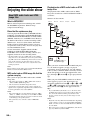
Enjoying the slide show............................. 56
About MP3 audio tracks and
JPEG image files ....................................... 56
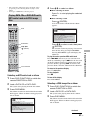
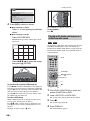
Playing DATA CDs or DATA DVDs with MP3
audio track and JPEG image files ............. 57
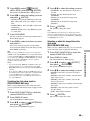
Playing audio tracks and images as a
slide show with sound ............................... 58
Locking discs............................................. 60
(CUSTOM PARENTAL CONTROL,
PARENTAL CONTROL)
Using the Setup Display............................ 62
6 US
Using the Lift Unit/Front Panel
Display
Overview of the items.......................................66
Reinforcing bass frequencies ..........................67
(SW LEVEL)
Adjusting the brightness of the display............67
(DIMMER)
Enjoying the sound at low volume....................68
(AUDIO DRC)
Enjoying a bilingual DVD disc..........................68
(DUAL MONO)
Using the lift function........................................69
(LIFT MODE)
Enjoying digital broadcast sound ....................70
(OPTICAL IN)
(COAXIAL IN)
Using Optional Equipment
Connecting optional equipment .................71
Additional Information
Specifications ............................................74
PC specifications .............................................75
Language code list (DVD function only) ..........76
Troubleshooting .........................................77
Self-diagnosis function (DVD function only).....82
Index ..........................................................83
About this manual
Safety information
• The instructions in this manual describe the controls on
the remote. You can also use the controls on the system if
they have the same or similar names as those on the
remote.
• The Control Menu items may be different depending on
the area.
• “DVD” may be used as a general term for DVD VIDEOs,
DVD+RWs/DVD+Rs, and DVD-RWs/DVD-Rs.
• The following symbols are used in this manual.
For the unit with a three-wire grounding type AC
power cord plug (Class 1 unit)
Symbol
Functions available for
DVD VIDEOs, DVD-Rs/DVDRWs in video mode, and
DVD+Rs/DVD+RWs
DVD-Rs/DVD-RWs in VR
(Video Recording) mode
VIDEO CDs (including Super
VCDs or CD-Rs/CD-RWs in
video CD format or Super VCD
format)
Super Audio CDs
Music CDs or CD-Rs/CD-RWs in
music CD format
DATA CDs (CD-ROMs/CD-Rs/
CD-RWs containing MP3* audio
tracks, JPEG image files
DATA DVDs (DVD-ROMs/
DVD-Rs/DVD-RWs/DVD+Rs/
DVD+RWs containing MP3*
audio tracks and JPEG image
files)
* MP3 (MPEG1 Audio Layer 3) is a standard format defined by
ISO/MPEG which compresses audio data.
This unit must be connected to an AC
power socket outlet with a protective
earthing connection.
AC power cord (mains
lead)
• Unplug the AC power
cord (mains lead)
when moving the
system. Do not move
the system with the
AC power cord
(mains lead) plugged in. It may damage the AC power
cord (mains lead) and result in fire or electric shock.
• If you damage the AC power cord
(mains lead), it may result in fire or
electric shock.
– Do not pinch, bend, or twist the
AC power cord (mains lead)
excessively. The core conductors
may be exposed or broken,
causing a short-circuit, which
may cause fire or electric shock.
– Do not modify or damage the AC
power cord (mains lead).
– Do not put anything heavy on the
AC power cord (mains lead). Do
not pull the AC power cord
(mains lead).
– Keep the AC power cord (mains lead) away from heat
sources.
– Be sure to grasp the plug when disconnecting the AC
power cord (mains lead).
• If the AC power cord (mains lead) is damaged, stop using
it and ask your dealer or Sony service center to exchange
it.
• Do not use the supplied AC power cord (mains lead) on
any other equipment.
• Use only an original Sony AC power cord (mains lead),
not other brands.
AC power cord (mains lead)/
cable protection
Pull out the AC power cord (mains
lead)/cable by the plug. Do not
pull on the AC power cord (mains
lead)/cable itself.
AC power source (mains)
Do not use a poor fitting mains socket.
Insert the plug fully into the mains socket.
A poor fit may cause arcing and result in
fire. Contact your electrician to have the
mains socket changed.
Continued
7 US
Magnetic influence
This system contains a strong magnet in the speaker unit that
generates a magnetic field. Keep any items susceptible to
magnetic fields away from the speaker.
Sound
If a snapping or popping sound from
the system is continuous or frequent
while the system is operating, unplug
the system and consult your dealer or
service technician. It is normal for
system’s to make occasional
snapping or popping sounds,
particularly when being turned on or
off.
Batteries
Do not dispose of batteries in a fire.
Do not short circuit, disassemble or overheat the batteries.
Caution
Danger of explosion if battery is incorrectly replaced.
Replace only with the same or equivalent type.
Disposal of used batteries
To preserve our environment, dispose of used batteries
according to your local laws or regulations.
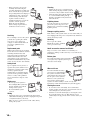
Notes about moving the lift unit up/down
• The lift unit moves up and down
automatically when the system is
turned on/off, and when the input is
switched with “AUTO” selected in
“LIFT MODE” (page 69). You can
also make the lift unit move up/down
by pressing
.
• To prevent operational mistakes, this
system features a “LOCK” function
(page 69).
• When connecting other components to the side of the
system (e.g., VIDEO 2 connections), make sure not to
place any cords under the lift unit to avoid trapping them
as the lift unit moves.
• Do not touch the lift unit (especially the circled areas in
the right illustration) while it is moving. Especially, watch
out for small children.
• Do not operate this system while the lift unit is moving.
• When you carry the system by hand, hold the system as
illustrated on the right. If you do not do so, the system may
fall and be damaged or cause serious injury. If the system
has been dropped or damaged, have it checked
immediately by qualified service personnel.
As the glass surface of the system has a special coating, be
careful to avoid touching the glass surface as much as
possible.
• When transporting it, do not subject the system to jolts or
excessive vibration. The system may fall and be damaged
or cause serious injury.
• When you carry the system in for repair or when you move
it, pack it using the original carton and packing material.
• Carrying the system requires two or more people.
Ventilation
• Never cover the ventilation holes
in the cabinet. It may cause
overheating and result in fire.
• Unless proper ventilation is
provided, the system may gather
dust and get dirty. For proper
ventilation, observe the
following:
– Do not install the system turned backwards or
sideways.
– Do not install the system turned over or upside down.
– Do not install the system on a shelf or in a closet.
– Do not place the system on a rug or bed.
– Do not cover the system with cloth, such as curtains, or
items such as newspapers, etc.
• Never install the system as follows:
Air circulation is
blocked.
Air circulation is
blocked.
Wall
Wall
Medical institutions
Do not place this system in a
place where medical equipment is
in use. It may cause malfunction
of medical instruments.
Carrying
• Before relocating the system,
perform the procedure in “On
moving the system” (page 12), then
disconnect all the cables from the
system.
8 US
Ventilation holes
• Do not insert anything in the ventilation
holes, gaps between the screen and the lift
unit or the disc slot. If metal or liquid is
inserted in these holes, it may result in fire
or electric shock.
• If anything falls into the cabinet, unplug
the unit and have it checked by qualified
personnel before operating it any further.
• Do not block the ventilation slots by putting anything on
the system. The system is equipped with a high power
amplifier. If the ventilation slots are blocked, the unit can
overheat and malfunction.
Placement
Oils
• Do not obstruct the area where the lift unit moves up and
down. It may cause a malfunction. Leave some space
around the system. Otherwise, air-circulation may be
inadequate and cause overheating, which may cause fire
or damage to the system or the lift unit.
Do not install this system in restaurants that use oil. Dust
absorbing oil may enter and damage the system.
30 cm (1 ft)
10 cm
(4 in)
10 cm
(4 in)
Leave at
least this
much
space.
Fall
Do not allow children to
climb up on or hang from
the system.
Vehicle or ceiling
Do not install this system in a
vehicle. The motion of the vehicle
may cause the system to fall down
and cause injury. Do not hang this
system from the ceiling.
Ships and other vessels
Do not place any objects under the area
where the lift unit moves up/down.
• Never place the system in hot,
humid or excessively dusty places.
• Do not install the system where
insects may enter.
• Place the system on a stable, level
surface. Otherwise, the system may
fall and cause injury.
• Do not install the system in a
location where it may protrude, such
as on or behind a pillar, or where you
might bump your head on it.
Otherwise, it may result in injury.
Do not install this system on a ship
or other vessel. If the system is
exposed to seawater, it may cause
fire or damage the system.
Damage requiring service
If the surface of the system cracks, do not touch it until you
unplug the AC power cord.
Otherwise electric shock may result.
Lightning
For added protection for this system during a lightning storm,
or when it is left unattended and unused for long periods of
time, unplug it from the wall outlet and disconnect the
antenna. This will prevent damage to the receiver due to
lightning and power-line surges.
Service
Water and moisture
Damage requiring service
• Do not use this system near
water – for example, near a
bathtub or shower room. Also do
not expose to rain, moisture or
smoke. This may result in fire or electric shock.
• Do not touch the AC power cord
(mains lead) and the system with wet
hands. Doing so may cause electric
shock or damage to the system.
Unplug the unit from the wall outlet and refer servicing to
qualified service personnel under the following conditions:
– When the power cord or plug is
damaged or frayed.
– If liquid has been spilled into the system.
– If the surface of the system cracks, do not touch it, unplug
the AC power cord.
– If the system has been exposed to
rain or water.
Moisture and flammable objects
• Do not place any objects on the
system. The apparatus shall not be
exposed to dripping or splashing and
no objects filled with liquids, such as
vases, shall be placed on the
apparatus. If any liquid or solid object
does fall through openings in the
cabinet, do not operate the system. It
may result in electric shock or
damage to the system.
Have it checked immediately by qualified service
personnel.
• To prevent fire, keep flammable objects (candles, etc.) and
electric bulbs away from the system.
– If the system has been subjected
to excessive shock by being
dropped, or the cabinet has been
damaged.
Continued
9 US
– If the system does not operate
normally when following the
operating instructions. Adjust only
those controls that are specified in
the operating instructions. Improper
adjustment of other controls may
result in damage and will often
require extensive work by a
qualified technician to restore the
system to normal operation.
– When the system exhibits a
distinct change in performance,
it indicates need for service.
Cleaning
• Unplug the AC power cord (mains lead)
when cleaning the plug and this system. If
you do not, it may result in electric shock.
• Clean the mains plug regularly. If the plug
is covered with dust and it picks up
moisture, its insulation may deteriorate
and result in fire.
Lightning storms
For your own safety, do not touch any
part of the system, AC power cord
(mains lead), or antenna lead during
lightning storms.
Damage requiring service
Servicing
Do not attempt to service the system
yourself since opening the cabinet
may expose you to dangerous
voltages or other hazards. Refer all
servicing to qualified service
personnel.
If the surface of the system cracks, do not touch it until you
have unplugged the AC power cord (mains lead). Otherwise
electric shock may result.
Servicing
Do not open the cabinet.
Entrust the system to qualified
service personnel only.
Replacement parts
Small accessories removal and fittable
When replacement parts are required,
be sure the service technician certifies
in writing that he/she has used
replacement parts specified by the
manufacturer that have the same
characteristics as the original parts.
Unauthorized substitutions may result
in fire, electric shock or other hazards.
Keep accessories out of children’s reach. If they are
swallowed, choking or suffocation may occur. Call a doctor
immediately.
Broken glass
Do not throw anything at the system. The
screen glass may explode by the impact
and cause serious injury.
Safety check
Upon completion of any service or
repairs to the system, ask the service
technician to perform routine safety
checks (as specified by the
manufacturer) to determine that the
system is in safe operating condition,
and to so certify. Ask a qualified
service technician to dispose of the
system.
Outdoor use
• Do not expose the system to
direct sunlight. The system may
heat up and this may result in
damage to the system.
• Do not install this system
outdoors.
Wiring
• Unplug the AC power cord (mains lead) when wiring
cables. When hooking up, be sure to unplug the AC power
cord (mains lead) for your safety.
• Take care not to catch your feet on the cables. It may
damage the system.
10 US
When not in use
For environmental and safety
reasons, it is recommended that
the system is not left in standby
when unused. Disconnect from
the AC power source (mains).
However, some systems may
have features which need the
system to be left in standby to work correctly. The
instructions in this manual will inform you if this applies.
Viewing the screen
• To view the screen comfortably, the recommended
viewing position is from four to seven times the screen’s
vertical length away from the system.
• View the screen in moderate light, as viewing the screen
in poor light strains your eyes. Watching the screen
continuously for long periods of time can also strain your
eyes.
Volume adjustment
• Adjust the volume so as not to trouble your neighbours.
Sound carries very easily at night time. Therefore, closing
the windows or using headphones is suggested.
• When using headphones, adjust the volume so as to avoid
excessive levels, as hearing damage may result.
• Do not turn up the volume while listening to a section with
very low level inputs or no audio signals. If you do, the
speakers may be damaged when a peak level section is
suddenly played.
Overloading
This system is designed to operate on
a 120 V AC supply only. Take care
not to connect too many appliances to
the same mains socket as this could
result in fire or electric shock.
Heat
Do not touch the surface of the system. It remains hot, even
after the system has been turned off for some time.
Corrosion
If you use this system near the seashore, salt may corrode
metal parts of the system and cause internal damage or fire.
It may also shorten the life of the system. Steps should be
taken to reduce the humidity and moderate the temperature
of the area where the system is located.
Precautions
Safety
• The unit is not disconnected from the AC power source
(mains) as long as it is connected to the wall outlet
(mains), even if the unit itself has been turned off. To
disconnect the system completely, pull the plug from the
AC power source (mains).
• Unplug the unit from the wall outlet (mains) if you do not
intend to use it for an extended period of time.
LCD Screen
• Although the LCD screen is made with high-precision
technology and 99.99% or more of the pixels are effective,
black dots may appear or bright points of light (red, blue,
or green) may appear constantly on the LCD screen. This
is a structural property of the LCD panel and is not a
malfunction.
• Do not expose the LCD screen surface to the sun. Doing
so may damage the screen surface.
• Do not push or scratch the front filter, or place objects on
top of this system. The image may be uneven or the LCD
panel may be damaged.
• If this system is used in a cold place, a smear may occur in
the picture or the picture may become dark.
This does not indicate a failure. These phenomena
disappear as the temperature rises.
• Ghosting may occur when still pictures are displayed
continuously. It may disappear after a few moments.
• The screen and cabinet get warm when this system is in
use. This is not a malfunction.
• The LCD contains a small amount of liquid crystal and
mercury. The fluorescent tube used in this system also
contains mercury. Follow your local ordinances and
regulations for disposal.
Fluorescent lamp
This system uses a special fluorescent lamp as its light
source. If the screen image becomes dark, flickers, or does
not appear, the fluorescent lamp has worn out and should be
replaced. For replacement, consult qualified service
personnel.
Installing the system
• Do not install the system in places subject to extreme
temperature, for example in direct sunlight, or near a
radiator, or heating vent or excessive dust, mechanical
vibration, or shock. If the system is exposed to extreme
temperature, the system may overheat and cause
deformation of the casing or cause the system to
malfunction.
• To obtain a clear picture, do not expose the screen to direct
illumination or direct sunlight. If possible, use spot
lighting directed down from the ceiling.
• Do not install optional components too close to the
system. Keep optional components at least 30 cm (1 ft)
away from the system. If a VCR is installed in front of the
system or beside the system, the picture may become
distorted.
• Picture distortion and/or noisy sound may occur if the
system is positioned in close proximity to any equipment
emitting electromagnetic radiation.
• Allow adequate air circulation to prevent internal heat
buildup.
Continued
11 US
• Do not place the unit on surfaces (rugs, blankets, etc.) or
near materials (curtains, draperies) that may block the
ventilation slots.
• Do not install the unit in an inclined position. It is designed
to be operated in a horizontal position only.
• Keep the unit and discs away from equipment with strong
magnets, such as microwave ovens, or large loudspeakers.
• If the unit is brought directly from a cold to a warm
location, moisture may condense inside this system and
cause damage to the lenses. When you first install the unit,
or when you move it from a cold to a warm location, wait
for about 30 minutes before operating the unit.
Handling and cleaning the screen surface/cabinet of
the system
The screen surface is finished with a special coating to
prevent strong light reflections.
To avoid material degradation or screen coating degradation,
observe the following precautions.
• Do not push on the screen, scratch it with a hard object, or
throw anything at it. The screen may be damaged.
• Do not touch the display panel after operating the system
continuously for a long period as the display panel
becomes hot.
• We recommend that the screen surface be touched as little
as possible.
• To remove dust from the screen surface/cabinet, wipe
gently with a soft cloth. If dust is persistent, wipe with a
soft cloth slightly moistened with a diluted mild detergent
solution. You can wash and repeatedly use the soft cloth.
• Never use any type of abrasive pad, alkaline/acid cleaner,
scouring powder, or volatile solvent, such as alcohol,
benzene, thinner or insecticide. Using such materials or
maintaining prolonged contact with rubber or vinyl
materials may result in damage to the screen surface and
cabinet material.
If you have any questions or problems concerning your
system, please consult your nearest Sony dealer.
• The ventilation holes can accumulate dust over time. To
ensure proper ventilation, we recommend removing the
dust periodically (once a month) using a vacuum cleaner.
On placement
At high volume, over long periods of time, the cabinet
becomes hot to the touch. This is not a malfunction.
However, touching the cabinet should be avoided.
On cleaning discs, disc/lens cleaner
Do not use a commercially available cleaning disc
or disc/lens cleaner (wet or spray type). These may
cause apparatus to malfunction.
On moving the system
When you carry the system, use the following procedure to
protect the inner mechanism.
1 Press INPUT repeatedly to select “DVD.”
2 Make sure that the disc is removed from the system.
3 Press s (stop) and POWER on the system
simultaneously.
“MECHA LOCK” appears in the front panel display.
The lift unit is now set in the shipping position (down).
4 Remove the AC power cord (mains lead) from the
wall outlet (mains).
12 US
Notes about the discs
On handling discs
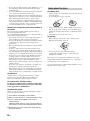
• To keep the disc clean, handle the disc by its edge. Do not
touch the surface.
• Do not stick paper or tape on the disc.
• Do not expose the disc to direct sunlight or heat sources
such as hot air ducts, or leave it in a car parked in direct
sunlight as the temperature may rise considerably inside
the car.
• After playing, store the disc in its case.
On cleaning
• Before playing, clean the disc with a cleaning cloth.
Wipe the disc from the center out.
• Do not use solvents such as benzine, thinner,
commercially available cleaners, or anti-static spray
intended for vinyl LPs.
This system can only play back a standard circular disc.
Using neither standard nor circular discs (e.g., card, heart, or
star shape) may cause a malfunction.
Do not use a disc that has a commercially available accessory
attached, such as a label or ring.
Guide to basic
operations of this
system
Using the remote
When you operate this system, press one of the
FUNCTION buttons A to have the remote control
operate the equipment you want, then select the input.
This system is a monitor with DVD player. The lift
unit of this system has built-in 2.1 channel speakers.
You can enjoy high quality and exciting sound from
DVD, FM and other connected components.
A
About the lift unit
B
C
D
E
Lift unit
When you select “AUTO” in “LIFT MODE”
(page 69), the lift unit moves up/down according to
the status. For example, when you watch monitor or
DVD, or turn the system on, the lift unit moves down.
Conversely, listening to FM radio, CD, Super Audio
CD, or turning the system off moves the lift unit up.
You can also operate the lift unit manually by pressing
.
x Direct input select buttons C
•
•
•
•
DVD: Switches the input select to DVD.
FM: Switches the input select to FM.
VIDEO 1: Switches the input select to VIDEO 1.
VIDEO 5: Switches the input select to VIDEO 5.
x Input select button B
Switches the input. Each time you press the button, the
input select changes as below.
VIDEO 1 t VIDEO 2 t VIDEO 3 t DVD t
VIDEO 5 t VIDEO 6 t VIDEO 1 t........
If you press INPUT while FM input is selected, the
input will change to VIDEO 1.
x Auto input select button E
While the input is except DVD, if you press Z or H,
the input will be changed to DVD automatically.
Continued
13 US
Using the menu
This system has various types of menus:
• MONITOR: MENU
This menu is effective for all inputs except FM
input.
• DVD: DVD MENU
DVD TOP MENU
DISPLAY
These menus are effective for DVD input.
• FM: MENU
This menu is effective for FM input.
• DVD/FM: AMP MENU
This menu is effective for all inputs.
x FUNCTION buttons A
Press one of the FUNCTION buttons to have the
remote control operate the equipment you want.
• DVD/FM: Operates the DVD player or FM radio.
• MONITOR: Operates the monitor.
• CABLE: Operates a cable box.
• SAT: Operates a satellite receiver.
After pressing one of the FUNCTION buttons, press
INPUT B or a direct input select button C to the
desired input. When one of the FUNCTION buttons is
pressed, the selected FUNCTION button lights up,
then you can operate the selected equipment.
Overview of the remote
1
2
3
wd
ws
wa
ENT
4
5
6
w;
7
8
9
ql
0
qa
qs
qd
qf
qg
qh
qk
qj
With cover opened.
14 US
Common operations
1
– Lift up/down (page 69)
POWER – On/standby (page 24)
Switches off the system temporarily. The
POWER indicator on the system (front of the lift
unit) turns off. Press again to switch on the system
from the standby mode.
MUTING – Muting
3 Number buttons
• In MONITOR mode: Enters the password.
• In DVD mode: Selects the item, title, chapter,
etc. Enters the password and area code.
• In FM mode: Selects the preset number.
The number 5 button has a tactile dot.*
• In CABLE/SAT mode: Selects channels. For
channel numbers 10 and above, enter the second
digit within two seconds.
6 VIDEO 1/DVD/VIDEO 5/FM (direct input select
buttons) (page 13)
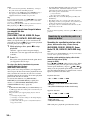
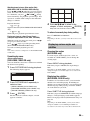
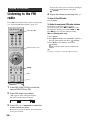
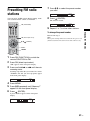
8 </M/m/,/
– Cursor, OK, ENTER (page 22)
qs VOL +/– – Volume +/–
qd SLEEP (except FM function)
Sets time to automatically switch to standby the
system to remain on before shutting off.
Press SLEEP repeatedly to set the time in minutes
(15, 30, 45, 60 or 90) for the system to remain on
before shutting off. To cancel the sleep timer,
press SLEEP repeatedly until [Sleep Off] appears.
If you press SLEEP while [Sleep] does not appear
on the display, you can check the remaining shut
off system time.
[The monitor will turn off soon] appears one
minute before the system shuts off. This message
may not appear if you are performing other
operations in the settings.
2 MONITOR (FUNCTION) (page 14)
4 ENT
Switches off the Parent settings temporarily.
9 DISPLAY
Displays the current input and the selected Wide
Mode setting. The on-screen display will be
turned off after a few seconds.
q; MENU (page 14)
qf POWER SAVING (page 45)
qg WIDE (page 41)
qk PICTURE (page 39)
To control the DVD
2 DVD (FUNCTION) (page 14)
5 AUDIO (page 32)
The AUDIO button has a tactile dot.*
SUBTITLE (page 35)
7 DVD MENU (page 47)
9 DISPLAY (page 48)
qa ./> – Next/Previous +/– (page 31)
X – Pause (page 31)
H – Play (page 31)
The H button has a tactile dot.*
,
– Replay, Advance, Step
(page 31)
m/ , M/ – Scan, Slow +/– (page 34)
x – Stop (page 31)
Z – Eject (page 31)
qd AMP MENU (page 67)
ANGLE (page 35)
qj SOUND FIELD (page 29)
qh PICTURE NAVI (page 35)
REPEAT (page 55)
SA-CD/CD (page 33)
TIME/TEXT (page 51)
ql O RETURN (page 33)
w; DVD TOP MENU (page 47)
wa INPUT (page 13)
ws CLEAR (page 50)
To control the monitor
1 FREEZE
Freezes the picture. The current program appears
in the sub screen when freeze is selected. Press
repeatedly to restore the picture. You can use this
feature to write down information such as phone
numbers, recipes, etc. Some functions will not be
available in freeze.
You can move the sub screen with </M/m/,/.
To cancel the function, press FREEZE until the
normal screen appears.
To control the FM tuner
2 FM (FUNCTION) (page 14)
q; MENU (page 14)
qa ./> – Next/Previous
Selects next (+)/previous (-) preset station.
m/ , M/ – Tuning (page 37)
qs CH +/– (page 36)
The CH + button has a tactile dot.*
Continued
15 US
To control the connected cable box
2 CABLE (FUNCTION) (page 14)
4 ENT
Changes channels immediately.
q; MENU (page 26)
qs CH +/–
Presses to scan through channels. To scan quickly
through channels, press and hold down either +/–
button.
The CH + button has a tactile dot.*
Overview of the system/
lift unit buttons and
indicators
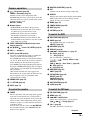
Touch panel buttons (2 – 9): Touch any of these
buttons once, to activate the panel (buttons light up), then
touch the desired button.
23 4 5
6 7 8 9 0 qa
wd
Uses
with number buttons and ENT to select
digital channels (for example, 2.1).
VOLUME
FM
DVD INPUT SELECT
UP/DOWN
POWER
To control the connected satellite
receiver
1
2 SAT (FUNCTION) (page 14)
4 ENT
Changes channels immediately.
q; MENU (page 26)
qs CH +/–
Presses to scan through channels. To scan quickly
through channels, press and hold down either +/–
button.
The CH + button has a tactile dot.*
w; GUIDE
Displays the program guide of your satellite
program provider.
ws JUMP
Jumps back and forth between two channels.
wd
ql
Uses
with number buttons and ENT to select
digital channels (for example, 2.1).
FRONT
SURROUND
2CH STEREO
NEWS
PIC OFF
SLEEP
POWER
* Use the tactile dot as a reference when operating the system.
qk
qj
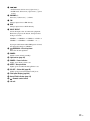
1 Disc slot
2 Z – Eject
Eject a disc.
3 H – Play
Play a disc.
4 s – Stop
Stop a disc.
16 US
qh
qg qf qdqs
5 ./>
• In DVD mode: Select next (+)/previous (–).
• In FM mode: Select next (+)/previous (–) preset
station.
6 VOLUME +/–
Increases (+)/decreases (–) volume.
7 FM
Change input select to FM directly.
8 DVD
Change input select to DVD directly.
9 INPUT SELECT
Select the input select of connected equipment.
Each time you press the button, the input select
changes as below.
VIDEO 1 t VIDEO 2 t VIDEO 3 t DVD t
VIDEO 5 t VIDEO 6 t VIDEO 1 t........
If you press this button while FM input is selected,
the input will change to VIDEO 1.
0
UP/DOWN – Lift unit up/down
Move the lift unit up/down.
qa POWER
Switch system on/off (standby).
qs Light sensor (page 46)
qd POWER – Power indicator
Lights green when system is on.
qf SLEEP – Sleep indicator
Lights up in red when the Sleep Timer is set.
qg PIC OFF – Picture Off (page 45)
Lights up in green when [Picture Off] is set.
qh Front panel display (page 66)
qj Sound Field indicator (page 29)
qk
– Remote control sensor
ql Lift unit
17 US
Getting Started
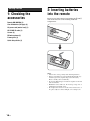
1: Checking the
accessories
Remote RM-ANP003 (1)
2: Inserting batteries
into the remote
Insert two size AA batteries by matching the 3 and #
ends on the batteries to the marking inside the
compartment.
Size AA batteries (R6 type) (2)
AC power cord (mains lead) (1)
HD 15-HD 15 cable (1)
Screws (2)
FM wire antenna (1)
Frame grille (1)
Quick Setup Guide (1)
Notes
• Observe the correct polarity when inserting batteries.
• Dispose of batteries in an environmentally friendly way.
Certain regions may regulate disposal of the battery.
Please consult your local authority.
• Do not use different types of batteries together or mix old
and new batteries.
• Handle the remote with care. Do not drop or step on it, or
spill liquid of any kind onto it.
• Do not place the remote in a location near a heat source, or
in a place subject to direct sunlight, or in a damp room.
18 US
Getting Started
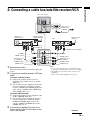
3: Connecting a cable box/satellite receiver/VCR
Rear of the system
AC power cord
(mains lead)
(supplied)
Cable box or
satellite receiver
Satellite antenna
cord (not supplied)
CATV cord (not
supplied)
VCR
S VIDEO cord
(not supplied)
S VIDEO cord (not supplied)
S VIDEO
VIDEO (yellow)
L
(MONO)
Audio/video cord
(not supplied)
AUDIO
R
AUDIO-L (white)
AUDIO-L (white)
1
AUDIO-R (red)
Remove the covers.
When all connections have been made, replace the
covers.
2
VIDEO (yellow)
VIDEO
Audio/video cord
(not supplied)
1
S VIDEO
S VIDEO
Connect your satellite receiver, VCR and
cable.
3
VIDEO IN
AUDIO-R (red)
Notes
• Do not connect the AC power cord (mains lead) to
your mains socket until all connections are complete.
• If available, use an S video cord to connect your
equipment.
• If you connect other equipment, see page 71.
To connect a satellite receiver
1 Connect the satellite antenna cord (not
supplied) to the satellite receiver’s satellite
input jack.
2 Use an audio cord (not supplied) and S video
cord (not supplied) to connect the satellite
receiver’s AUDIO and S VIDEO output jacks
to the system’s AUDIO and S VIDEO input
jacks (VIDEO (IN) 1 or 3).
To connect a VCR and cable
1 Connect the CATV cord (not supplied) to the
VCR’s VHF/UHF input jack.
2 Use an audio cord (not supplied) and video
cord (not supplied) to connect the VCR’s
AUDIO and VIDEO output jacks to the
system’s AUDIO and VIDEO input jacks
(VIDEO (IN) 1 or 3).
3
Connect the supplied AC power cord
(mains lead) to the AC IN socket on the
rear of the system.
Continued
19 US
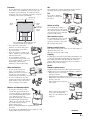
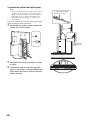
To prevent the system from toppling over
Notes
• Be sure to take measures to prevent the system from
toppling over. If you fail to do so, the system may
topple over and cause injury. Anchor the system to a
wall, pillar, etc., to prevent it from toppling over.
• Any wall alternations (drilling, etc.) are your own
responsibility.
A commercially available
strong rope or chain
Prepare a commercially available strong rope or chain
and wall anchor bracket beforehand.
1
Attach the two screws to the screw holes
on the rear of the system.
A commercially
available wall
screw
2
Secure the wall anchor bracket to a wall
or pillar.
3
Thread the rope or chain through both
holes of the screws, and then tighten the
other end of the rope or chain to the wall
anchor bracket.
20 US
5: Switching on the
system
Connect the supplied FM wire antenna for listening to
the FM radio. Thread the wire antenna through the slit
of the cover, and then replace the cover.
Install this system so that the power cord can be
unplugged from the wall socket immediately in the
event of trouble.
AC power cord
(mains lead)
POWER
POWER
VIDEO
DIGITAL
IN
DVD
DIGITAL
OUT
FM
ANTENNA
1
Connect the system to your mains socket
(120V AC, 60Hz).
2
Press POWER on the system (top of the
lift unit).
OPT
75
COAXIAL
COAX
FM wire antenna
Notes
• Be sure to fully extend the FM wire antenna.
• After connecting the FM wire antenna, keep it as
horizontal as possible.
Tip
When you switch on the system for the first time,
the Language menu appears on the screen, then go
to “6: Selecting the monitor language” (page 22).
When the system is in standby mode (the POWER
indicator on the system is off), press
POWER to switch on the system.
Note
Depending on the LIFT MODE setting or selected input,
the lift unit will move down when turning on the system.
If you have poor FM reception, use a 75-ohms coaxial cable
(not supplied) to connect the system to an outdoor FM
antenna as shown below.
Outdoor FM antenna
System
VIDEO
DIGITAL
IN
DVD
DIGITAL
OUT
FM
ANTENNA
OPT
COAX
75
COAXIAL
21 US
Getting Started
4: Connecting the FM
wire antenna
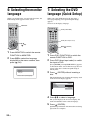
6: Selecting the monitor
language
7: Selecting the DVD
language (Quick Setup)
When you switch on the system for the first time, the
Initial Setup menu appears on the screen.
When you select DVD input for the first time, a
message prompting you to perform Quick Setup
appears.
You can set the display language.
MONITOR
DVD (FUNCTION)
DVD (direct input select)
M/m/
(OK)
M/m/
1
2
Press MONITOR to switch the remote
FUNCTION to MONITOR.
Press M/m to select the language
displayed on the menu screens, then
press
(OK).
1
Press DVD (FUNCTION) to switch the
remote FUNCTION to DVD.
2
Press DVD (direct input select) to switch
the input to DVD.
[Press [ENTER] to run QUICK SETUP.] appears
at the bottom of the screen. This message does not
appear if the disc is loaded or Quick Setup is
already done.
Initial Setup
English
Español
Français
(ENTER)
3
Please select your language
Press
disc.
(ENTER) without inserting a
The Setup Display for selecting the language used
in the on-screen display appears.
LANGUAGE SETUP
OSD:
MENU:
AUDIO:
SUBTITLE:
4
ENGLISH
ENGLISH
FRENCH
SPANISH
PORTUGUESE
Press M/m to select a language.
The system displays the on-screen display, the
menu and subtitles in the selected language.
5
Press
(ENTER).
Quick Setup is finished. All connections and setup
operations are complete.
22 US
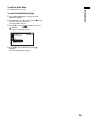
To quit the Quick Setup
Getting Started
Press DISPLAY in any step.
To recall the Quick Setup display
1 Press DVD (FUNCTION) to switch the remote
FUNCTION to DVD.
2 Press DISPLAY. (If a disc is playing, press x to stop
playback, then press DISPLAY.)
The Control Menu appears.
3 Press M/m to select
[SETUP], then press
(ENTER).
The options for [SETUP] appear.
12(27)
18(34)
:
:
DVD VIDEO
QUICK
QUICK
CUSTOM
RESET
4 Press M/m to select [QUICK], then press
(ENTER).
The Quick Setup display appears.
23 US
Enjoying the Connected Equipment
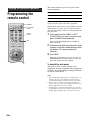
Programming the
remote control
POWER
FUNCTION
buttons
Number
buttons
The remote control is preset to operate Sony
brand equipment.
Sony Equipment
Programmable Code Number
Cable
101 (DVR)
Satellite receiver
201 (DSS)
Follow the steps below to program your system’s
remote control to operate the other equipment.
Find the three-digit code for your equipment from the
“Manufacturer’s Codes” listed on page 25. If more
than one code number is listed, try entering from the
code listed first.
1
ENT
Press and hold the CABLE or SAT
(FUNCTION) you want to program and
press POWER simultaneously.
The selected FUNCTION button (CABLE or
SAT) will flash.
2
Enter the three-digit manufacturer’s code
number using the number buttons while
the button is lit, approximately 30
seconds.
3
Press ENT.
When the programming is correct, the selected
FUNCTION button will flash twice slowly, and
when not, flashes five times quickly.
To check if the code works
Aim your system’s remote control at the
equipment, and press POWER. If the equipment
responds, the programming is completed. If not,
try the next code listed.
Notes
• If no code is input within the above specified time, or an
invalid or incorrect code number is input, the remote
control automatically goes back to the previous setting.
• In some cases, you may not be able to program your
remote control to operate other equipment. In such cases,
use the equipment’s own remote control.
• Dead batteries or removing the batteries may cause the
programmable codes to be lost and revert back to factory
settings. Reprogramming the codes may be necessary.
24 US
Manufacturer’s Codes
Cable Boxes
Code
Sony
Hamlin/Regal
Jerrold/G. I./
Motorola
101
123, 124, 125, 126, 127
102, 103, 104, 105, 106,
107, 108, 109, 117, 118,
119, 123, 133
128, 129, 130
111, 113, 120, 121, 122,
131
113, 116
132
110, 111, 112
117, 118
113, 114
Oak
Panasonic
Pioneer
RCA
Scientific Atlanta
Tocom/Philips
Zenith
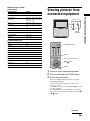
Viewing pictures from
connected equipment
DVD INPUT SELECT
DVD
INPUT
SELECT
Satellite Receivers
Manufacturer
Code
Sony
Hitachi
General Electric
Hughes
JVC/Dish Network/Echostar
Mitsubishi
Panasonic
Philips
RCA/PROSCAN
Samsung
Toshiba
201
205
202
204
210
209
203
211
202, 208
212
206, 207
FUNCTION buttons
INPUT
Direct input select buttons
M/m/
(OK)
MENU
1
2
3
Switch on the connected equipment.
Press the desired FUNCTION button.
Switch the input select.
You can switch the input select by one of the
following procedures:
– Press the desired direct input select button on the
remote or system.
– Press INPUT on the remote or INPUT SELECT on the
system repeatedly.
– Press MONITOR, then press MENU, select [Inputs].
Choose the desired input from [Inputs] menu using M/
m/
(OK).
Continued
25 US
Enjoying the Connected Equipment
Manufacturer
VIDEO 5 (HDMI IN):
Digital audio/video signal is input through the VIDEO 5
(HDMI IN) jack. Audio input signal is analogue only if
the equipment has been connected using the DVI and
audio out jack.
VIDEO 6 (PC IN):
RGB input signal through the PC connectors VIDEO 6
(PC IN), and audio input signal through the jack PC
AUDIO IN.
Using other equipment
with your remote
control
To operate other connected equipment with your
system, first turn to page 25 and program the
necessary code. For operating other equipment, press
INPUT or direct input select button repeatedly until
you see the input on the screen for your connected
equipment. Remote control operation tips are
provided below.
Note
Some functions cannot be operated depending on the
equipment. In that case, operate by the remote control
supplied with the equipment.
Operating a Cable Box
To Do This ...
Activate the remote control to
operate the cable box
Turn on/off
Select a channel
Change channels
Display cable menu
Display channel number
Move highlight (cursor)
Select item
Press ...
CABLE (FUNCTION)
POWER
0-9, ENT,
CH +/–
MENU
DISPLAY
</M/m/,
(OK)
Operating a Satellite Receiver
To Do This ...
Activate the remote control to
operate the satellite receiver
Turn on/off
Select a channel
Change channels
Back to previous channel
Display channel number
Display SAT Guide
Display SAT Menu
Move highlight (cursor)
Select item
26 US
Press ...
SAT(FUNCTION)
POWER
0-9, ENT,
CH +/–
JUMP
DISPLAY
GUIDE
MENU
</M/m/,
(OK)
Note about CDs/DVDs
Enjoying Discs
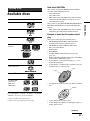
Available discs
Format of discs
Disc logo
DVD VIDEO
DVD-RW
DVD+RW/
DVD+R
VIDEO CD
Super Audio CD*1
Example of discs that the system cannot
play
The system cannot play the following discs:
• CD-ROMs/CD-Rs/CD-RWs other than those
recorded in the formats listed on page 27.
• CD-ROMs recorded in PHOTO CD format.
• Data part of CD-Extras.
• DVD Audios.
• DVD-RAMs.
• A DVD VIDEO with a different region code
(page 28).
• DATA CDs/DATA DVDs that do not contain MP3
audio tracks or JPEG image files.
• A disc that has a non-standard shape (e.g., card
shaped, heart shaped).
• A disc that has a commercially available accessory
attached, such as a label or ring.
Ring
Label
Audio CD*2
CD-R/CD-RW
(audio data)
(MP3 files)
(JPEG files)
• An adapter to convert an 8 cm (3 in) disc to standard
size.
Adapter
The “DVD VIDEO,” “DVD-R,” “DVD-RW,” “DVD+RW,”
“DVD+R,” and “CD” logos are trademarks.
*1 Except for multi-channel playback area.
*2 CD text data can be displayed (disc title only).
• A disc with paper or stickers on it.
• A disc that has the adhesive of cellophane tape or a
sticker still left on it.
Continued
27 US
Enjoying Discs
DVD-R
The system can play CD-ROMs/CD-Rs/CD-RWs
recorded in the following formats:
– audio CD format.
– video CD format.
– MP3 audio tracks and JPEG image files of format
conforming to ISO 9660 Level 1/Level 2, or its
extended format, Joliet.
The system can play DVD-ROMs/DVD+RWs/DVDRWs/DVD+Rs/DVD-Rs recorded in the following
formats:
– MP3 audio tracks and JPEG image files of format
conforming to UDF (Universal Disc Format).
Notes about CD-R/CD-RW/DVD-R/DVD-RW/DVD+R/
DVD+RW
In some cases, CD-R/CD-RW/DVD-R/DVD-RW/DVD+R/
DVD+RW cannot be played on this system due to the
recording quality or physical condition of the disc, or the
characteristics of the recording device and authoring
software.
The disc will not play if it has not been correctly finalized.
For more information, see the operating instructions for the
recording device.
Note that discs created in the Packet Write format cannot be
played.
Note that some playback functions may not work with some
DVD+Rs/DVD+RWs, even if they have been correctly
finalized. In this case, view the disc by normal playback.
Also some DATA CDs/DATA DVDs created in Packet
Write format cannot be played.
Music discs encoded with copyright protection
technologies
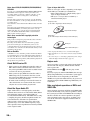
Types of Super Audio CDs
There are two types of discs, depending on the Super
Audio CD layer and CD layer combination.
• Super Audio CD layer: A high-density signal
layer for Super Audio CD
• CD layer*1: A layer that is readable by a
conventional CD player
Single layer disc
(a disc with a single Super Audio CD layer)
Super Audio CD layer
Hybrid disc*2
(a disc with an Super Audio CD layer and a CD layer)
This product is designed to play back discs that conform to
the Compact Disc (CD) standard.
Recently, various music discs encoded with copyright
protection technologies are marketed by some record
companies. Please be aware that among those discs, there are
some that do not conform to the CD standard and may not be
playable by this product.
Note on DualDisc
A DualDisc is a two sided disc product which mates DVD
recorded material on one side with digital audio material on
the other side. However, since the audio material side does
not conform to the Compact Disc (CD) standard, playback on
this product is not guaranteed.
CD layer*3
Super Audio CD layer*3
*1 You can play the CD layer on a conventional CD player.
*2 Since both layers are on one side, it is not necessary to turn the
disc over.
*3 To select a layer, see “Selecting a playback layer for a Super
Audio CD (Super Audio CD only)” (page 33).
Region code
About Multi Session CD
• This system can play Multi Session CDs when an
MP3 audio track is contained in the first session.
Any subsequent MP3 audio tracks recorded in later
sessions can also be played back.
• This system can play Multi Session CDs when a
JPEG image file is contained in the first session.
Any subsequent JPEG image files recorded in later
sessions can also be played back.
• If audio tracks and images in music CD format or
video CD format are recorded in the first session,
only the first session will be played back.
About the Super Audio CD
Super Audio CD is a new high-quality audio disc
standard where music is recorded in the DSD (Direct
Stream Digital) format (conventional CDs are
recorded in the PCM format). The DSD format, using
a sampling frequency 64 times higher than that of a
conventional CD, and with 1-bit quantization,
achieves both a wide frequency range and a wide
dynamic range across the audible frequency range,
and so provides music reproduction extremely faithful
to the original sound.
28 US
Your system has a region code printed on the back of
the unit and will only play DVDs labeled with the
same region code.
DVD VIDEOs labeled ALL will also play on this
system.
If you try to play any other DVD VIDEO, the message
[Playback prohibited by area limitations.] will appear
on the monitor screen. Depending on the DVD
VIDEO, no region code indication may be given even
though playing the DVD VIDEO is prohibited by area
restrictions.
Note on playback operations of DVDs and
VIDEO CDs
Some playback operations of DVDs and VIDEO CDs
may be intentionally set by software producers. Since
this system plays DVDs and VIDEO CDs according to
the disc contents the software producers designed,
some playback features may not be available. Also,
refer to the instructions supplied with the DVDs or
VIDEO CDs.
Copyrights
This product incorporates copyright protection
technology that is protected by U.S. patents and other
intellectual property rights. Use of this copyright
protection technology must be authorized by
Macrovision, and is intended for home and other
limited viewing uses only unless otherwise authorized
by Macrovision. Reverse engineering or disassembly
is prohibited.
System sound feature
\
This system incorporates with Dolby*1 Digital and
Dolby Pro Logic (II) adaptive matrix surround
decoder and the DTS*2 Digital Surround System.
*1 Manufactured under license from Dolby Laboratories.
“Dolby,” “Pro Logic,” and the double-D symbol are
trademarks of Dolby Laboratories.
*2 Manufactured under license from Digital Theater Systems,
Inc.
“DTS” and “DTS Digital Surround” are registered trademarks
of Digital Theater Systems, Inc.
FRONT
2CH STEREO
SURROUND
NEWS
Sound field indicator
Continued
29 US
Enjoying Discs
You can take advantage of this front surround sound
simply by selecting one of system's preprogramed
sound fields. They bring the exciting and powerful
sound of movie theaters into your home.
The system
2 m (6 ft 69 in)
FRONT SURROUND area
x 2CH STEREO
This mode outputs 2 channel sound regardless of the
audio signal type being input.
x NEWS
This mode suits spoken programs such as the news.
SOUND FIELD
x HP 2CH
This sound field is only for headphones. When you
connect headphones, the sound field is HP 2CH only.
With cover opened.
1
Press SOUND FIELD.
The present sound field appears in the front panel
display.
2
Press SOUND FIELD repeatedly until
the sound field you want appears in the
front panel display.
The selected sound field indicator lights up.
Available sound fields
x FRONT SURROUND (FRONT SUR)
You can enjoy surround sound in the FRONT
SURROUND area, as illustrated below. This sound
system employs S-Force PRO Front Surround
technology*.
30 US
* About S-Force PRO Front Surround
Sony’s long-term involvement in surround technology (and the
vast amounts of acoustic data accumulated as a result) has led
to the development of all-new processing method and
advanced DSP to handle this task effectively, which we call SForce PRO Front Surround. Compared with previous front
surround technologies, S-Force PRO Front Surround
reproduces a more convincing sense of distance and space,
resulting in a true surround sound experience without the need
for rear speakers.
Notes
• When the system receives signals other than Super Audio
CD, the default sound field setting is FRONT
SURROUND.
• When using headphones, the sound field is HP 2CH
regardless of source.
• The sound field for Super Audio CDs is 2CH STEREO
only.
• The surround effect might be difficult to hear depending
on the type of source signals (e.g., digital stereo signals,
digital multi signals, etc.) except for DVD multi-channel
signals.
• When the selected input is other than Super Audio CD,
you can change the sound field setting.
Depending on the DVD VIDEO or VIDEO CD, some
operations may be different or restricted.
Refer to the operation details supplied with your disc.
Playing discs
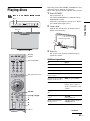
1
The system turns on.
Press DVD (FUNCTION) to switch the remote
FUNCTION to DVD.
Unless the system input is already set to “DVD,”
press DVD (direct input select).
Z H
VOLUME
FM
DVD INPUT SELECT
Press POWER.
UP/DOWN
POWER
Load a disc.
Push the disc into the disc slot until the disc is
pulled in automatically.
Disc slot
Label facing forward.
3
Press H.
The system starts playback (continuous play).
Adjust the volume.
MUTING
POWER
Additional operations
DVD (FUNCTION)
DVD (direct input select)
./>
,
H
x
X
To
Press
Stop
x
Pause
X
Resume play after pause
X or H
Go to the next chapter,
track, or scene
> (except for JPEG)
Go back to the preceding
chapter, track, or scene
. (except for JPEG)
Mute the sound
MUTING. To cancel
muting, press it again or
VOL + to adjust the sound
volume.
Stop play and remove the
disc
Z
Replay the previous
scene*1
(instant replay)
during playback.
Briefly fast forward the
current scene*2
(instant advance)
during playback.
Z
VOL +/–
Continued
31 US
Enjoying Discs
2
*1 DVD VIDEOs/DVD-RWs/DVD-Rs only. The button can be
used except for MP3 audio tracks and JPEG image files.
*2 DVD VIDEOs/DVD-RWs/DVD-Rs/DVD+RWs/DVD+Rs
only. The button can be used except for MP3 audio tracks and
JPEG image files.
Various play modes
Changing the sound
(DVD VIDEO, DVD-VR, VIDEO CD, CD, DATA
CD, DATA DVD only)
When playing a DVD VIDEO recorded in multiple
audio formats (PCM, Dolby Digital, MPEG audio, or
DTS), you can change the audio format. If the DVD
VIDEO is recorded with multilingual tracks, you can
also change the language.
With VIDEO CDs, CDs, or DATA CDs/DATA
DVDs (MP3 audio), you can select the sound from the
right or left channel and listen to the sound of the
selected channel through both the right and left
speakers of the lift unit.
1
Press AUDIO during playback.
The following display appears.
1:ENGLISH DOLBY DIGITAL 3/2.1
2
Press AUDIO repeatedly to select the
desired audio signal.
x When playing a DVD VIDEO
The choice of language varies depending on the
DVD VIDEO.
When 4 digits are displayed, they indicate a
language code. Refer to “Language code list
(DVD function only)” (page 76) to see which
language the code represents. When the same
language is displayed two or more times, the DVD
VIDEO is recorded in multiple audio formats.
x When playing a DVD-R/DVD-RW
The audio streams recorded on a disc are
displayed.
Example:
• [1: AUDIO]
• [2: AUDIO]
Note
[2: AUDIO] does not appear when one audio stream is
recorded on the disc.
x When playing a VIDEO CD, CD, or DATA CD/
DATA DVD (MP3 audio)
• [STEREO]: The standard stereo sound.
• [1/L]: The sound of the left channel (monaural).
• [2/R]: The sound of the right channel
(monaural).
32 US
x When playing a Super VCD
Note
While playing a Super VCD on which the audio track 2 is not
recorded, no sound will come out when you select
[2:STEREO], [2:1/L], or [2:2/R].
Selecting a playback layer for a Super
Audio CD
(Super Audio CD only)
Some Super Audio CDs consist of a Super Audio CD
layer and a CD layer. You can select the playback
layer you want to listen to.
Press SA-CD/CD. (If a disc is playing, press
x to stop playback, then press SA-CD/CD.)
Each time you press the button, a Super Audio CD
layer or a CD layer is alternately selected. When
playing a Super Audio CD layer, “SA-CD” lights up
in the front panel display.
Notes
• For details about Super Audio CD discs, see page 28.
• Each play mode function works only within the selected
layer.
To check the audio signal format
(DVD VIDEO only)
Playing VIDEO CDs with PBC functions
(Ver.2.0)
If you press AUDIO repeatedly during playback, the
format of the current audio signal (PCM, Dolby
Digital, DTS, etc.) appears on the screen. This
function is prohibited on some discs.
(PBC Playback)
Example: Dolby Digital 5.1 ch
Surround (L/R)
LFE
(Low Frequency Effect)
1:ENGLISH DOLBY DIGITAL 3 / 2 .1
(VIDEO CD only)
With PBC (Playback Control) functions, you can
enjoy simple interactive operations, search functions,
and other such operations.
PBC playback allows you to play VIDEO CDs
interactively by following the menu on the monitor
screen.
1
Front (L/R) +
Center
Example: Dolby Digital 3 ch
Front (L/R)
Surround
(Monaural)
2:SPANISH DOLBY DIGITAL 2 / 1
Start playing a VIDEO CD with PBC
functions.
The menu for your selection appears.
2
Select the item number you want by the
number buttons.
3
4
Press
(ENTER).
Follow the instructions in the menu for
interactive operations.
Refer to the operation details supplied with the
disc, as the operating procedure may differ
depending on the VIDEO CD.
To go back to the menu
Press O RETURN.
Continued
33 US
Enjoying Discs
• [1:STEREO]: The stereo sound of the audio
track 1.
• [1:1/L]: The sound of the left channel of the
audio track 1 (monaural).
• [1:2/R]: The sound of the right channel of the
audio track 1 (monaural).
• [2:STEREO]: The stereo sound of the audio
track 2.
• [2:1/L]: The sound of the left channel of the
audio track 2 (monaural).
• [2:2/R]: The sound of the right channel of the
audio track 2 (monaural).
Notes
• You cannot use Program Play, Shuffle Play, or Repeat
Play with Video CDs with PBC playback.
• Depending on the VIDEO CD, [Press ENTER] in step 3
may appear as [Press SELECT] in the instructions
supplied with the disc. In this case, press H.
Tip
To play without using PBC, press ./> or the number
buttons while the system is stopped to select a track, then
press H or
(ENTER).
You cannot play still pictures such as a menu. To return to
PBC playback, press x twice, then press H.
Resuming playback from the point where
you stopped the disc
• For DVD-Rs/DVD-RWs in VR mode, CDs, Super Audio
CDs, DATA CDs, and DATA DVDs the system
remembers the resume playback point for the current disc.
The resume point is cleared when:
– you eject the disc.
– the system enters standby mode.
• Resume Play does not work during Program Play and
Shuffle Play.
• This function may not correctly work with some discs.
• Depending on where you stop the disc, the system may not
resume playback from exactly the same point.
• If you play a disc for which Parental Control is set, this
function does not work.
Tip
To play from the beginning of the disc, press x twice, then
press H.
(Resume Play)
(DVD VIDEO, DVD-VR, VIDEO CD, Super
Audio CD, CD, DATA CD, DATA DVD only)
When you stop the disc, the system remembers the
point where you pressed x and you can start playback
from the point you stopped the disc.
1
While playing a disc, press x to stop
playback.
“Resume” appears in the front panel display.
If “Resume” does not appear, Resume Play is not
available.
2
Press H.
The system starts playback from the point where
you stopped the disc in step 1.
To enjoy a disc that is played before by resume
playback (Multi-disc Resume)
(DVD VIDEO, VIDEO CD only)
This system stores the point where you stopped the
disc for up to 40 discs and resumes playback the next
time you insert the same disc. If you store a resume
playback point for the 41st disc, the resume playback
point for the first disc is deleted.
To activate this function, set [MULTI-DISC
RESUME] in [CUSTOM SETUP] to [ON]. For
details, see “[MULTI-DISC RESUME] (DVD
VIDEO/VIDEO CD only)” (page 65).
Notes
• If [MULTI-DISC RESUME] in [CUSTOM SETUP] is set
to [OFF] (page 65), the resume point is cleared when you
change the input.
• The point where you stopped playing may be cleared
when:
– you change the play mode.
– you change or reset the settings on the Setup Display.
– you change the input.
– you disconnect the AC power cord (mains lead) for a
long period of time.
Searching for a particular point or a
scene on a disc
Searching for a particular point on a disc
(Scan, Slow-motion Play, Freeze Frame)
(DVD VIDEO, DVD-VR, VIDEO CD, Super
Audio CD, CD, DATA CD, DATA DVD only)
Note
Depending on the DVD/VIDEO CD, you may not be able to
do some of the operations described.
Locating a point quickly by playing a disc in fast
forward or fast reverse (Scan)
(except for JPEG)
Press
m or M
while playing a disc. When
you find the point you want, press H to return to
normal speed. Each time you press
m or M
during scan, the playback speed changes. With each
press the indication changes as shown below. Actual
speeds may differ with some discs.
Playback direction
×2B t 1M t 2M t 3M
3M (DVD VIDEO/DVD-R/DVD-RW/VIDEO
CD only)
×2B (DVD VIDEO/Super Audio CD/CD only)
Opposite direction
×2b t 1m t 2m t 3m
3m (DVD VIDEO/DVD-R/DVD-RW/
VIDEO CD only)
×2b (DVD VIDEO only)
With each press, playback speed becomes faster.
34 US
Watching frame by frame (Slow-motion Play)
(DVD VIDEO, DVD-R, DVD-RW, VIDEO CD only)
Press
m or M
when the system is in pause
mode. To return to the normal playback speed, press
H. Each time you press
m or M
during
Slow-motion Play, the playback speed changes. Two
speeds are available. With each press the indication
changes as follows:
Playback direction
4
y1
Opposite direction (DVD VIDEO/DVD-R/DVD-RW
only)
2
y1
With each press, playback speed becomes faster.
Playing one frame at a time (Freeze Frame)
(except for Super Audio CD, CD, MP3, and JPEG)
When the system is in the pause mode, press
(step) to go to the next frame.
Press
(step) to go to the preceding frame
(DVD VIDEO/DVD-R/DVD-RW only).
To return to normal playback, press H.
2
3
4
5
6
7
8
9
Press </M/m/, to select a title,
chapter, or track, and press
(ENTER).
Playback starts from the selected scene.
To return to normal play during setting
Press O RETURN or DISPLAY.
Note
Depending on the disc, you may not be able to select some
items.
Displaying various angles and
subtitles
Note
You cannot search for a still picture on a DVD-R/DVD-RW
in VR mode.
Changing the angles
(DVD VIDEO only)
Searching by scene
If various angles (multi-angles) for a scene are
recorded on a DVD VIDEO, you can change the
viewing angle.
(Picture Navigation)
(DVD VIDEO, VIDEO CD only)
You can divide the screen into 9 subscreens and find
the desired scene quickly.
Press ANGLE during playback.
1
Press PICTURE NAVI during playback.
Note
The following display appears.
Depending on the DVD VIDEO, you may not be able to
change the angle even if multi-angles are recorded on the
DVD VIDEO.
CHAPTER VIEWER
Each time you press ANGLE, the angle changes.
ENTER
Displaying the subtitles
(DVD VIDEO, DVD-VR only)
2
Press PICTURE NAVI repeatedly to
select an item.
• [TITLE VIEWER] (DVD VIDEO only)
• [CHAPTER VIEWER] (DVD VIDEO only)
• [TRACK VIEWER] (VIDEO CD only)
3
Press
(ENTER).
The first scene of each title, chapter, or track
appears as follows.
If subtitles are recorded on a disc, you can turn the
subtitles on or off while playing. If multilingual
subtitles are recorded on the disc, you can change the
subtitle language while playing, or turn the subtitles
on or off whenever you want.
Press SUBTITLE during playback.
Each time you press SUBTITLE, the subtitle language
changes. A 4-digit language code number appears.
Refer to “Language code list (DVD function only)” on
page 76.
Note
Depending on the DVD VIDEO, you may not be able to
change the subtitles even if multilingual subtitles are
recorded on it. You also may not be able to turn them off.
35 US
Enjoying Discs
2
1
You can also select a preset station by entering its
number with number buttons, then press
(ENTER).
Enjoying the FM Radio
Listening to the FM
radio
Preset FM radio stations in the system’s memory first
(see “Presetting FM radio stations” (page 37)).
FM (FUNCTION)
4
Adjust the volume by pressing VOL +/–.
To turn off the FM radio
Press POWER.
To listen to non-preset FM radio stations
Use manual or automatic tuning in step 2.
For manual tuning, press M or m repeatedly.
For automatic tuning, press and hold M or m.
Press x when you stop the automatic tuning.
When an FM program is noisy
1 Press MENU.
2 Press M/m repeatedly until “FM MODE?” appears in
the front panel display, then press
(ENTER).
3 Press M/m to select “MONO”, then press
FM (direct input select)
(ENTER).
Sound will not be stereo, but the reception will
improve.
Tip
To improve reception, reorient the supplied antenna.
m/M
VOL +/–
CH +/–
1
Press FM (FUNCTION) to switch the
remote FUNCTION to FM.
2
Press FM (direct input select).
“FM” appears in the front panel display.
The last received station is tuned in.
TUNED ST
3
Press CH + or – repeatedly to select the
preset station you want.
Each time you press the button, the system tunes
in one preset station.
36 US
Presetting FM radio
stations
You can preset 20 FM stations. Before tuning, make
sure to turn down the volume to minimum.
7
Press M/m to select the preset number
you want.
TUNED ST
8
Press
(ENTER).
The station is stored.
TUNED ST
FM (FUNCTION)
9
Repeat 1 to 7 to store other stations.
Restart from step 1.
FM (direct input select)
Note
These preset settings will be reset when the AC power cord
(mains lead) is disconnected for more than a half of a day.
M/m/
(ENTER)
MENU
m/M
1
Press FM (FUNCTION) to switch the
remote FUNCTION to FM.
2
Press FM (direct input select).
“FM” appears in the front panel display.
3
Press and hold M or m until the auto
scanning starts.
Scanning stops when the system tunes in a station.
“TUNED” and “ST” (for stereo program) appear
in the front panel display.
TUNED ST
4
5
Press MENU.
6
Press
Press M/m repeatedly until “Memory?”
appears in the front panel display.
(ENTER).
A preset number appears in the front panel
display.
TUNED ST
37 US
Enjoying the FM Radio
To change the preset number
Note
Using the Monitor Menu
You cannot use the monitor menus while receiving the FM
signals.
Navigating through
menus
Using Inputs in MENU
The Inputs feature lets you select the inputs connected
to your system. You can also assign a label using
Label Video Inputs in the Setup settings (see page 45).
1
MONITOR
Select [Inputs] from the MENU control
panel and press
(OK).
The Inputs list appears. Make your selection.
Inputs
Return
Video 1
Video 2
Video 3
DVD
Video 5
Video 6
INPUT
</M/m/,
(OK)
Video 1
Video 2
Video 3
DVD
Video 5
Video 6
MENU
O RETURN
Select:
1
Press MONITOR to switch the remote
FUNCTION to MONITOR.
2
Press INPUT repeatedly to select the
desired input (other than FM).
3
Press MENU.
2
MENU
Using Settings in MENU
1
Exit:
MENU
2
Press M/m to select the item.
• [Inputs]: Selects equipment that is connected to
the system. You can assign a label to your
equipment or skip unused inputs conveniently.
For details, see page 45.
• [Settings]: Adjusts the [Video], [Screen],
[Parent], or [Setup] settings. For details, see
page 38.
Press </M/m/, to change/set the
setting, then press
(OK).
To exit the menu, press MENU.
To return to the last display, press O RETURN.
38 US
Select [Settings] from the MENU control
panel and press
(OK).
[Settings] display appears.
Select from connected equipment
5
Press M/m to select the desired input and
press
(OK).
The following options are available in each menu. For
details on navigating through menus, see page 39.
Also, see page in parentheses for details of each menu.
Settings
4
MENU
Overview of the Settings menus
Inputs
Set:
Exit:
The Settings feature lets you enter to the settings
screen where most of advanced settings and
adjustments are performed.
MENU display appears.
Select:
Set:
Press M/m to select the options.
Video 1
Video
1
2
3
4
Picture Mode:
Vivid
Reset:
Picture:
Max
Brightness:
40
Color:
60
Hue:
0
Sharpness:
18
Color Temp.:
Cool
CineMotion:
Off
Black Corrector:
On
NR:
Low
Backlight:
Max
Select:
Back:
Set:
Exit:
MENU
Video
1
Picture Mode (39)
Reset (39)
Picture/Brightness/Color/Hue/Sharpness
(40)
Color Temp. (40)
CineMotion (40)
Black Corrector (40)
NR (40)
Backlight (40)
2
4
Parent
Lock (42)
Select Country (43)
Change Password (43)
Picture Mode:
Vivid
Reset:
Picture:
Max
Brightness:
40
Color:
60
Hue:
0
Sharpness:
18
Color Temp.:
Cool
CineMotion:
Off
Black Corrector:
On
NR:
Low
Backlight:
Max
Select:
The options you can adjust vary depending on the situation.
Only the options that can be operated are displayed.
Back:
Set:
Exit:
MENU
You can select the options listed below on the Video
menu. To select options, see “Navigating through
menus” (page 38).
Tips
• You can alter the Video settings for each mode.
• [Color], [Hue], [Sharpness], [CineMotion], [Black
Corrector] and [NR] are not available for PC input.
Picture Mode
Selects the picture mode.
1
2
Press
(OK) to select [Picture Mode].
Press M/m to select one of the following
picture modes, then press
(OK).
• [Vivid]: For enhanced picture contrast and
sharpness.
• [Standard]: For standard picture. Recommended
for home entertainment.
• [Pro]: Selects for professional monitor like
appearance settings.
Setup
Caption Vision (44)
Info Banner (44)
Label Video Inputs (45)
Language (45)
Auto YC (45)
Power Saving (45)
Light Sensor (46)
Note
Video 1
Video
Tips
• You can also change the picture mode by pressing
PICTURE repeatedly.
• You can alter the Picture Mode options for each video
input.
Reset
Reset all the picture settings to the factory settings.
1
2
Press
(OK) to select [Reset].
Press M/m to select [OK], then press
(OK).
Continued
39 US
Using the Monitor Menu
3
Screen
Wide Mode (41)
4:3 Default (41)
Overscan (41)
V Center (41)
H Center (42)
Phase (42)
Pitch (42)
Reset (42)
Video menu
Picture/Brightness/Color/Hue/
Sharpness
1
Press
(OK) to select the option.
• [Picture]: Adjusts to increase picture contrast, or
decrease picture contrast.
• [Brightness]: Adjusts to brighten or darken the
picture.
• [Color]: Adjusts to increase or decrease color
intensity.
• [Hue]: Adjusts to increase or decrease the green
tones.
• [Sharpness]: Adjusts to sharpen or soften the
picture.
2
Press </, to set the level, then press
(OK).
Color Temp.
1
2
Press
(OK) to select [Color Temp.].
Press M/m to select one of the following,
then press
(OK).
• [Cool]: Gives the white colors a blue tint.
• [Neutral]: Gives the white colors a neutral tint.
• [Warm]: Gives the white colors a red tint.
CineMotion
Provides an optimized display by automatically
detecting film content and applying a reverse 3-2
pulldown process. Moving pictures will appear clearer
and more natural-looking.
1
2
Press
(OK) to select [CineMotion].
Press M/m to select [On], then press
(OK).
Black Corrector
Enhances the black colors to give the picture strong
contrast.
1
Press
(OK) to select [Black
Corrector].
2
Press M/m to select [On], then press
(OK).
40 US
NR (Noise Reduction)
Reduces the noise level of connected equipment.
1
2
Press
(OK) to select [NR].
Press M/m to select one of the options,
and then press
(OK).
Backlight
Adjusts to brighten or darken the backlight.
1
2
Press
(OK) to select [Backlight].
Press M/m to set the level, then press
(OK).
• [Wide Zoom]: Selects to enlarge the 4:3 picture
to fill the 16:9 screen, keeping the original image
as much as possible.
• [Normal]: Selects to return the 4:3 picture to its
original size.
• [Full]: Selects to enlarge the 4:3 picture
horizontally only, to fill the 16:9 screen.
• [Zoom]: Selects to enlarge the 4:3 picture
horizontally and vertically to an equal aspect
ratio that fills the 16:9 screen. Useful for
watching Letterbox movies.
• [Off]: Selects to continue using the current Wide
Mode setting when the channel or input is
changed.
Screen menu
Video 1
Screen
Wide Mode:
4:3 Default:
Overscan:
V Center:
H Center:
Phase:
Pitch:
Reset:
Select:
Wide Zoom
Wide Zoom
Normal
0
0
Back:
Set:
Exit:
MENU
You can select the options listed below on the Screen
menu. To select options, see “Navigating through
menus” (page 38).
Tips
Wide Mode
Selects a Wide Mode to use for 4:3 sources.
1
2
Press
(OK) to select [Wide Mode].
Press M/m to select one of the following,
then press
(OK).
• [Wide Zoom]: Selects to enlarge to fill screen
with minimum distortion.
• [Normal]: Selects to display 4:3 picture in
original size when the original source is 4:3
(Standard definition source).
• [Full]: Selects to enlarge the original picture
horizontally to fill the screen when the original
source is 4:3 (Standard definition source). When
the original source is 16:9 (High definition
source), select this mode to display 16:9 picture
in original size.
• [Zoom]: Selects to enlarge the original picture
without distorting the aspect ratio.
This setting is not available for VIDEO 6.
Overscan
Allows you to adjust the viewable picture area size.
1
2
Press
(OK) to select [Overscan].
Press M/m to select one of the following,
then press
(OK).
• [Normal]: Displays a standard size picture.
• [+1]/[+2]: Allows you to adjust the viewable
picture area size. This is useful for viewing
ticker tape or banners at the top or bottom of the
screen.
Tips
Note
• To change from one Wide Mode option to another,
press WIDE.
• For Wide Zoom and Zoom modes, you can adjust the
vertical position of the picture. For details, see
page 41.
• Normal, Full1 and Full2 are available for Wide Mode
when VIDEO 6 is selected.
This setting is not available for VIDEO 6.
4:3 Default
Selects the default Screen mode to use for 4:3 sources.
1
2
Note
Press
(OK) to select [4:3 Default].
Press M/m to select one of the following,
then press
(OK).
V Center (Vertical Center)
Allows you to move the position of the picture up and
down in the window. Available only in Wide Zoom
and Zoom modes.
1
2
Press
(OK) to select [V Center].
Press M/m to choose a correction
between -10 and +10, then press
(OK).
Tip
The setting of V Center can be between –50 and +50 for
VIDEO 6.
Continued
41 US
Using the Monitor Menu
• 4:3 Default functions only when the monitor receives
480i or 480p signals.
• If 4:3 Default option is set to anything but [Off], the
Wide Mode setting changes only for the current
channel. When you change channels (or inputs), Wide
Mode is automatically replaced with the 4:3 Default
setting for 4:3 sources. To retain the current Wide
Mode setting as channels and inputs are changed, set
4:3 Default to [Off].
H Center (Horizontal Center)
Allows you to move the position of the picture left and
right in the window. This function allows for
horizontal adjustment of the picture being displayed.
1
2
Press
Parent menu
Video 1
Parent
Lock:
Select Country:
Change Password
(OK) to select [H Center].
Off
U.S.A.
Press M/m to choose a correction
between -10 and +10, then press
(OK).
Tips
• The setting of H Center can be between –50 and +50
for VIDEO 6.
• This feature is useful if the monitor is connected to
game equipment.
Phase
Press
Set:
Back:
Exit:
MENU
You can select the options listed below on the Parent
menu. To select options, see “Navigating through
menus” (page 38).
Tip
Adjusts after [Pitch] to fine tune overall sharpness.
1
2
Select:
(OK) to select [Phase].
Press M/m to select the setting, then
press
(OK).
Tips
• This function is available only for VIDEO 6.
• Adjust [Phase] and [Pitch] with [Wide Mode] set to
[Normal].
You need your password for any future access into the Parent
settings. If you lose your password, enter the following
master password: 4357. The master password clears your
previous password and allows you to enter a new password.
Notes
• Use number buttons to enter a four-digit password.
• The first time you create a password, confirm the
password by entering it again.
• This function is not available when DVD is selected.
• To set DVD PARENTAL CONTROL, see page 61.
Lock
Pitch
Adjusts uneven sharpness on screen.
Turns ratings on/off and select a rating system.
1
2
1
2
Press
(OK) to select [Pitch].
Press M/m to select the setting, then
press
(OK).
Tips
• This function is available only for VIDEO 6.
• Adjust [Phase] and [Pitch] with [Wide Mode] set to
[Normal].
Reset
Clears [V Center], [H Center], [Phase], and [Pitch]
adjustments you made to the factory settings.
1
2
Press
(OK) to select [Reset].
Press M/m to select [OK], then press
(OK).
Tip
This function is available only for VIDEO 6.
42 US
Press
(OK) to select [Lock].
Press M/m to select one of the following,
then press
(OK).
• [Off]: Parental lock is off. No programs are
blocked from viewing.
• [Child]: Maximums ratings permitted are:
– US: TV-Y, TV-G, G
– Canada: C, G, TV-Y, TV-G
• [Youth]: Maximums ratings permitted are:
– US: TV-PG, PG
– Canada: C8+, PG, 8ans+, TV-PG
• [Young Adult]: Maximums ratings permitted
are:
– US: TV-14, PG-13
– Canada: 14+, 13ans+, TV-14
• [Custom]: Selects to set ratings manually.
– US: See page 43 for details.
– Canada: See page 43 for details.
Tips
• If you are not familiar with the Parental Guideline
rating system, you should select [Child], [Youth], or
[Young Adult] to help simplify the rating selection.
To set more specific ratings, select [Custom].
• For descriptions of [Child], [Youth], and [Young
Adult] ratings, see page 43.
Description
Movie Rating
[G]: All children and General
Audience.
[PG]: Parental Guidance
suggested.
[PG-13]: Parental Guidance for
children under 13.
[R]: Restricted viewing,
parental guidance is
suggested for children under
17.
[NC-17 and X]: No one 17 or
under allowed.
TV Rating
Blocks programs by their
rating, content or both.
[TV-Y]: All children.
[TV-Y7]: Directed to children
age 7 and older.
[TV-G]: General Audience.
[TV-PG]: Parental Guidance
suggested.
[TV-14]: Parents Strongly
cautioned.
[TV-MA]: Mature Audience
only.
Select Country
Selects country settings.
1
2
Press
(OK) to select [Select Country].
Press M/m to select one of the following,
then press
(OK).
• [U.S.A.]: Selects to use USA ratings (see
page 43).
• [Canada]: Selects to use Canadian ratings (see
page 44).
Age-Based
Ratings
Change Password
Changes your password.
1
Press
(OK) to select [Change
Password].
2
Enter a new 4-digit password using
number buttons.
[Confirm password] appears.
3
Enter a new 4-digit password again
using the number buttons.
Selecting custom rating options (for US
model)
For US model, the custom rating menu includes the
following options. For Canadian model, see page 44.
Tips
• The Content-Based Ratings are linked to the level of the
Age-Based Rating. For example, a program with the AgeBased Rating of [TV-PG V] (Violence) rating may
contain moderate violence, while a [TV-14 V] (Violence)
rating may contain more intense violence.
• To ensure maximum blocking capability, set the AgeBased Ratings.
• If you block unrated TV programs, be aware that the
following types of programs may be blocked: programs
broadcast from another country, emergency broadcasts,
political programs, sports, news, public service
announcements, religious programs and weather.
ContentBased
Ratings
Unrated
[FV]: Fantasy Violence.
[D]: Suggestive Dialogue.
[L]: Strong Language.
[S]: Sexual situations.
[V]: Violence.
Blocks programs or movies
that are broadcast without a
rating.
[Allow]: Allows programs and
movies that are broadcast
without a rating.
[Block]: Blocks all programs
and movies that are
broadcast without a rating.
Viewing blocked programs
You can view blocked programs by entering the
password. Press ENT when tuned to a blocked
program, then enter the password. This temporarily
switches off Parent settings. To reactivate the Parent
settings, turn off the system. When the system is
turned on again, your Parent settings are reactivated.
Continued
43 US
Using the Monitor Menu
Option
Selecting custom rating options (for
Canadian model)
For Canadian model, the custom rating menu includes
the following options. For US model, see page 43.
Setup menu
Video 1
Setup
Option
Description
English
Rating
[C]: All children.
[C8+]: Children 8 years and
older.
[G]: General programming.
[PG]: Parental Guidance.
[14+]: Viewers 14 and older.
[18+]: Adult programming.
French Rating
[G]: General programming.
[8ans+]: Not recommended for
young children.
[13ans+]: Not recommended
for ages under 13.
[16ans+]: Not recommended
for ages under 16.
[18ans+]: Programming
restricted to adults.
Caption Vision:
Info Banner:
Label Video Inputs
Language:
Auto YC:
Power Saving:
Light Sensor:
Select:
U.S.A. Rating
English
On
Standard
Off
Back:
Set:
Exit:
MENU
You can select the options listed below on the Setup
menu. To select options, see “Navigating through
menus” (page 38).
Option
Description
Caption
Vision
Allows you to select from
several closed caption modes
(for programs that are
broadcast with closed caption).
[Off]: [Caption Vision] is
turned off.
[CC1]/[CC2]/[CC3]/[CC4]:
Displays a printed version of
the dialog or sound effects of
a program. (Should be set to
[CC1] for most programs.)
[Text1]/[Text2]/[Text3]/
[Text4]: Displays network/
station information
presented using either half or
the whole screen (if
available).
Info Banner
Set to [On] or [Off]. When
[On], displays the program
name (if the broadcaster offers
this service). Displays for up to
four seconds when DISPLAY
is pressed.
See “Selecting custom rating
options (for US model)” on
page 43 for details.
Viewing blocked programs
You can view blocked programs by entering the
password. Press ENT when tuned to a blocked
program, then enter the password. This temporarily
switches off Parent settings. To reactivate the Parent
settings, turn off the system. When the system is
turned on again, your Parent settings are reactivated.
44 US
Off
Off
Option
Description
Option
Description
Label Video
Inputs
Allows you to identify A/V
equipment you connected to
the system, such as a cable box,
satellite receiver, etc. For
example, if you have a cable
box connected to the VIDEO
(IN) 1 jack, you can select the
label Cable Box for the VIDEO
(IN) 1 input. Then when you
press VIDEO 1 to change
inputs, the video label you
assigned to that input appears
on screen.
Auto YC
When connecting both VIDEO
IN and S VIDEO IN, you can
select the jack from which the
system receives the input
signal. The system is factory
set to receive S VIDEO input
signals.
1 Press INPUT
2
1 Press M/m to highlight
You can select from the
following labels for each
input:
[Video 1-3]: Video 1-3,
VHS, DVD, Receiver,
Satellite, Cable Box,
8mm, DTV, Game, LD,
Beta, Skip
[DVD]: DVD, Skip
[Video 5]: Video 5, DVD,
Satellite, Cable Box,
DTV, HD, Game, PVR,
Skip
[Video 6]: Video 6, PC,
DVD, HD, Game, Skip
Tip
If you have assigned video labels,
you can access the [Inputs] list on
the MENU screen.
Note
If you select Skip, your system
skips this input when you press
INPUT.
Language
Press M/m to select [On],
then press
(OK).
To watch the pictures input
from the VIDEO input
jack:
Press M/m to select [Off],
then press
(OK).
3 Press MENU to exit
settings.
Note
When you set [Off], the system
accepts the signals from the
VIDEO input only.
Power Saving
[Standard]: Selects to view
picture without the benefit of
[Power Saving].
[Reduced]: Selects to view
picture with reduced power
consumption.
It also enhances the black
level.
[Picture Off]: Selects to turn
off the picture. Audio stays
on with your selected
volume setting.
Tip
You can also change the Power
Saving setting by pressing
POWER SAVING repeatedly.
Selects to display all on-screen
settings in your language of
choice: English, Español,
Français.
Continued
45 US
Using the Monitor Menu
2
the video input (VIDEO
1, 2, 3, 5, 6 or DVD) to
which you want to
assign a label. Then
press
(OK) to select
the input.
Press M/m to highlight
one of the displayed
labels. Then press
(OK) to select the
label.
repeatedly until the
desired video input
appears.
After selecting the
[Auto YC] option, to
watch the pictures
input from the S
VIDEO input jack:
Option
Description
Light Sensor
Selects [On] to enable the
automatic brightness control.
The light sensor measures the
room brightness which allows
the system to automatically
adjust the picture brightness
based on the picture settings
and the ambient room light
conditions.
Tip
In low light ambient the range of
the backlight control is reduced
when the light sensor is set to
[On].
Note
Be sure not to put anything
around the sensor, as its
function may be affected.
See page 16 on the sensor.
46 US
Using the DVD’s Menu
Navigating through
menus
A DVD is divided into a lot of sections, which make
up a picture or music feature. These sections are called
“titles.” When you play a DVD which contains several
titles, you can select the title you want using DVD
TOP MENU.
When you play DVDs that allow you to select items
such as the language for the subtitles and the language
for the sound, select these items using DVD MENU.
DVD
Using the DVD’s Menu
Number buttons
DVD TOP MENU
DVD MENU
</M/m/,
(ENTER)
1
Press DVD (FUNCTION) to switch the
remote FUNCTION to DVD.
2
Press DVD TOP MENU or DVD MENU.
The disc’s menu appears on the monitor screen.
The contents of the menu vary from disc to disc.
3
Press </M/m/, or the number buttons
to select the item you want to play or
change.
4
Press
(ENTER).
47 US
Using the Player Control Menu
Control Menu items
12 3
Navigating through
menus
4
12 (27)
18 (34)
T
1:32:55
OFF
OFF
DISC
TITLE
CHAPTER
qs
DVD VIDEO
5
6
7
8
9
DVD
qa
REPEAT
ENTER
Quit:
DISPLAY
0
1 Currently playing title number*1
2 Currently playing chapter number*2
3 Total number of titles*1
4 Total number of chapters*2
DISPLAY
Use the Control Menu to select a function and to view
related information.
1
2
5 Playback status (N Playback, X Pause,
x Stop, etc.)
6 Type of disc being played*3
7 Playing time*4
Press DVD (FUNCTION) to switch the
remote FUNCTION to DVD.
8 Current setting
Press DISPLAY repeatedly to turn on or
change the Control Menu display as
follows:
q; Operation message
, Control Menu display 1
m
Control Menu display 2 (appears for certain discs only)
m
Control Menu display off
To turn off the display
Press DISPLAY.
Overview of the menus
The Control Menu display 1 and 2 will show different
items depending on the disc type. For details about
each item, see the pages in parentheses.
Example: Control Menu display 1 when playing a
DVD VIDEO.
48 US
9 Options
qa Function name of selected Control Menu item
qs Selected item
*1 Displays the scene number for VIDEO CDs (PBC is on), track
number for VIDEO CDs/Super Audio CDs/CDs, album
number for DATA CDs/DATA DVDs.
*2 Displays the index number for VIDEO CDs/Super Audio
CDs, MP3 audio track number, or JPEG image file number for
DATA CDs/DATA DVDs.
*3 Displays Super VCD as “SVCD.” Displays “MP3” in the
Control Menu display 1 or “JPEG” in the Control Menu 2 for
DATA CDs/DATA DVDs.
*4 Displays the date for JPEG files.
List of Control Menu items
Item
Item Name, Function, Relevant Disc Type
[TITLE] (page 50)/[SCENE] (page 50)/[TRACK] (page 50)
Selects the title, scene, or track to be played.
[CHAPTER] (page 50)/[INDEX] (page 50)
Selects the chapter or index to be played.
[INDEX] (page 50)
Displays the index and selects the index to be played.
[TRACK] (page 50)
Selects the track to be played.
[ORIGINAL/PLAY LIST] (page 51)
Selects the type of titles (DVD-R/DVD-RW) to be played, the [ORIGINAL] one, or an edited [PLAY LIST].
[TIME/TEXT] (page 50)
Checks the elapsed time and the remaining playback time.
Input the time code for picture and music searching.
Displays the DVD/CD text or the MP3 track name.
[PROGRAM] (page 53)
Selects the track to play in the order you want.
[SHUFFLE] (page 54)
Plays the track in random order.
[REPEAT] (page 55)
[PARENTAL CONTROL] (page 60)
Sets to prohibit playback on this system.
[SETUP] (page 62)
[QUICK] Setup (page 22)
Use Quick Setup to choose the desired DVD language.
[CUSTOM] Setup
In addition to the Quick Setup setting, you can adjust various other settings.
[RESET]
Returns the settings in [SETUP] to the default setting.
[ALBUM] (page 50)
Selects the album to be played.
[FILE] (page 50)
Selects the JPEG image file to be played.
[DATE] (page 53)
Displays the date when the picture was taken.
[INTERVAL] (page 59)
Specifies the duration for which the slides are displayed on the screen.
[EFFECT] (page 59)
Selects the effects to be used for changing slides during a slide show.
[MODE (MP3, JPEG)] (page 58)
Selects the data type; MP3 audio track (AUDIO), JPEG image file (IMAGE) or both (AUTO) to be played when
playing a DATA CD/DATA DVD.
Tip
The Control Menu icon indicator lights up in green
when you select any item except
t
[OFF] ([PROGRAM], [SHUFFLE], [REPEAT] only). The
[ORIGINAL/PLAY LIST] indicator lights up in green when
you select [PLAY LIST] (default setting).
49 US
Using the Player Control Menu
Plays the entire disc (all titles/all tracks/all albums) repeatedly or one title/chapter/track/album repeatedly.
x When playing a Super Audio CD
[TRACK]
[INDEX]
Searching/selecting the
disc
x When playing a CD
[TRACK]
x When playing a DATA CD/DATA DVD (MP3
audio)
Searching for a title/chapter/track/
scene, etc.
[ALBUM]
[TRACK]
x When playing a DATA CD/DATA DVD (JPEG
file)
[ALBUM]
[FILE]
Example: when you select
[CHAPTER]
[** (**)] is selected (** refers to a number).
The number in parentheses indicates the total
number of titles, chapters, tracks, indexes, scenes,
albums or files.
You can search a DVD by title or chapter, and you can
search a VIDEO CD/Super Audio CD/CD/DATA
CD/DATA DVD by track, index, or scene. As titles
and tracks are assigned unique numbers on the disc,
you can select the desired one by entering its number.
Or, you can search for a scene using the time code.
DVD
12(27)
18(34)
T
1:32:55
DVD VIDEO
Selected row
CLEAR
4
Press
(ENTER).
[** (**)] changes to [– – (**)].
M/m/
12(27)
(34)
T
1:32:55
(ENTER)
DISPLAY
1
Press DVD (FUNCTION) to switch the
remote FUNCTION to DVD.
2
Press DISPLAY. (When playing a DATA
CD/DATA DVD with JPEG image files,
press DISPLAY twice.)
5
Press M/m to select the search method.
x When playing a DVD VIDEO/DVD-R/DVD-RW
[TITLE]
[CHAPTER]
[TIME/TEXT]
Select [TIME/TEXT] to search for a starting point
by inputting the time code.
x When playing a VIDEO CD without PBC
Playback
[TRACK]
[INDEX]
x When playing a VIDEO CD with PBC Playback
[SCENE]
50 US
Press M/m or the number buttons to
select the title, chapter, track, index,
scene, etc., number you want to search
for.
If you make a mistake
Cancel the number by pressing CLEAR, then
select another number.
The Control Menu appears.
3
DVD VIDEO
6
Press
(ENTER).
The system starts playback from the selected
number.
To search for a scene using the time code
(DVD VIDEO/DVD-R/DVD-RW only)
1
In step 2, select
[TIME/TEXT].
[T **:**:**] (playing time of the current title) is
selected.
2
Press
The options for [ORIGINAL/PLAY LIST]
appear.
(ENTER).
[T **:**:**] changes to [T --:--:--].
3
1 (44)
3 ( 28)
T
1:30:50
PLAY LIST
PLAY LIST
ORIGINAL
Input the time code using the number
buttons, then press
(ENTER).
For example, to find the scene at 2 hours, 10
minutes, and 20 seconds after the beginning, just
enter [2:10:20].
Tip
When the Control Menu display is turned off, you can search
for a chapter (DVD VIDEO/DVD-R/DVD-RW) or track
(Super Audio CD/CD) by pressing the number buttons and
(ENTER).
4
Selecting [ORIGINAL] or [PLAY LIST]
on a DVD-R/DVD-RW
Press M/m to select a setting.
• [PLAY LIST]: Plays the titles created from
[ORIGINAL] for editing.
• [ORIGINAL]: Plays the titles originally
recorded.
Note
You cannot search for a scene on a DVD+R/DVD+RW using
the time code.
DVD-VR
5
Press
(ENTER).
Viewing information about the disc
Some DVD-Rs/DVD-RWs in VR (Video Recording)
mode have two types of titles for playback: originally
recorded titles ([ORIGINAL]) and titles that can be
created on recordable DVD players for editing
([PLAY LIST]). You can select the type of title to be
played.
DVD
Using the Player Control Menu
DVD
DISPLAY
M/m/
(ENTER)
DISPLAY
TIME/TEXT
x
1
Press DVD (FUNCTION) to switch the
remote FUNCTION to DVD.
2
Press DISPLAY. (If a disc is playing,
press x to stop playback, then press
DISPLAY.)
The Control Menu appears.
3
Press M/m to select
PLAY LIST], then press
[ORIGINAL/
(ENTER).
With cover opened.
Viewing the playing time and remaining
time in the front panel display
You can check disc information, such as the
remaining time, total number of titles in a DVD, tracks
in a VIDEO CD, Super Audio CD, CD, or MP3 using
the front panel display (page 66).
Continued
51 US
1
Press DVD (FUNCTION) to switch the
remote FUNCTION to DVD.
2
Press TIME/TEXT.
Each time you press TIME/TEXT while playing
the disc, the display changes 1 t 2 t ... t
1 t ...
When playing a DVD VIDEO or DVD-R/DVD-RW
1 Playing time and number of the current title
2 Remaining time of the current title
3 Playing time and number of the current chapter
4 Remaining time of the current chapter
5 Disc name
6 Title and chapter
When playing a VIDEO CD (without PBC functions),
Super Audio CD, or CD
1 Playing time of the current track
2 Remaining time of the current track
3 Playing time of the disc
4 Remaining time of the disc
5 Disc name
6 Track and index*
* Except for CD.
When playing an MP3
1 Playing time and current track number
2 Track (file) name
Notes
• The system can only display the first level of the DVD/CD
text, such as the Disc name or title.
• If an MP3 file name cannot be displayed, “*” will appear
in the front panel display instead.
• The disc name or track name may not be displayed
depending on the text.
• Playing time of MP3 audio tracks may not be displayed
correctly.
Checking the playing time and remaining
time
You can check the playing time and remaining time of
the current title, chapter, or track, and the total playing
time or remaining time of the disc. You can also check
the DVD text and MP3 folder name/file name
recorded on the disc.
1
Press DVD (FUNCTION) to switch the
remote FUNCTION to DVD.
2
Press TIME/TEXT during playback.
The following display appears.
T 1:01:57
Time information
52 US
3
Press TIME/TEXT repeatedly to change
the time information.
The display and the kinds of time that you can
check depend on the disc you are playing.
x When playing a DVD VIDEO or DVD-R/DVDRW
• T **:**:**
Playing time of the current title
• T–**:**:**
Remaining time of the current title
• C **:**:**
Playing time of the current chapter
• C–**:**:**
Remaining time of the current chapter
x When playing a VIDEO CD (with PBC
functions)
• **:**
Playing time of the current scene
x When playing a VIDEO CD (without PBC
functions), Super Audio CD, or CD
• T **:**
Playing time of the current track
• T–**:**
Remaining time of the current track
• D **:**
Playing time of the current disc
• D–**:**
Remaining time of the current disc
x When playing a DATA CD/DATA DVD (MP3
audio)
• T **:**
Playing time of the current track
Notes
• Only alphabetical letters and numbers can be displayed.
• Depending on the type of disc being played, the system
can only display a limited number of characters. Also,
depending on the disc, not all text characters will be
displayed.
Checking the play information of the disc
To check DVD/Super Audio CD/CD text
Press TIME/TEXT repeatedly in step 2 to display text
recorded on the DVD/Super Audio CD/CD.
The DVD/Super Audio CD/CD text appears only
when text is recorded in the disc. You cannot change
the text. If the disc does not contain text, “NO TEXT”
appears.
Using the play mode
BRAHMS SYMPHONY
Creating your own program
To check DATA CD/DATA DVD (MP3 audio) text
By pressing TIME/TEXT while playing MP3 audio
tracks on a DATA CD/DATA DVD, you can display
the name of the album/track/file, and the audio bit rate
(the amount of data per second of the current audio) on
the monitor screen.
Bit rate*
T 17:30
(Program Play)
You can play the contents of a disc in the order you
want by arranging the order of the tracks on the disc to
create your own program. You can program up to 99
tracks.
128k
DVD
JAZZ
RIVER SIDE
Album name
Track/file name
M/m/,/
(ENTER)
DISPLAY
Checking the date information
(JPEG only)
You can check the date information during playback
when the Exif* tag is recorded in the JPEG image
data.
1
Press DVD (FUNCTION) to switch the
remote FUNCTION to DVD.
2
Press DISPLAY twice during playback.
The Control Menu appears.
1(8)
1(20)
01/ 01/ 2003
H
1
Press DVD (FUNCTION) to switch the
remote FUNCTION to DVD.
2
Press DISPLAY.
The Control Menu appears.
3
DATA CD JPEG
Date information
* “Exchangeable Image File Format” is a digital camera image
format defined by the Japan Electronics and Information
Technology Industries Association (JEITA).
Tip
Date information is [MM/DD/YYYY].
MM: Month
DD: Day
YYYY: Year
Press M/m to select
then press
(ENTER).
[PROGRAM],
The options for [PROGRAM] appear.
4
Press M/m to select [SET t], then press
(ENTER).
[TRACK] is displayed when you play a VIDEO
CD, Super Audio CD, or CD.
PROGRAM
ALL CLEAR
1. TRACK
2. TRACK – –
3. TRACK – –
4. TRACK – –
5. TRACK – –
6. TRACK – –
7. TRACK – –
Tracks recorded
on a disc
0:00:00
T
––
01
02
03
04
05
06
Total time of the
programed tracks
Continued
53 US
Using the Player Control Menu
* Appears when playing an MP3 audio track on DATA CDs/
DATA DVDs.
5
3
Press ,.
The cursor moves to the track row [T] (in this
case, [01]).
0:00:00
T
PROGRAM
ALL CLEAR
1. TRACK – –
2. TRACK – –
3. TRACK – –
4. TRACK – –
5. TRACK – –
6. TRACK – –
7. TRACK – –
6
––
01
02
03
04
05
06
Select the track you want to program.
For example, select track [02].
Press M/m to select [02] under [T], then press
(ENTER). The track number may be displayed in
3 digits for a Super Audio CD.
Follow step 5 for new programing. To
cancel a program, select [--] under [T],
then press
(ENTER).
To cancel all of the tracks in the programed
order
1
Follow steps 1 to 3 of “Creating your own
program.”
2
3
Press M and select [ALL CLEAR].
Press
(ENTER).
Playing in random order
(Shuffle Play)
Selected track
0:15:30
T
PROGRAM
ALL CLEAR
1. TRACK
2. TRACK
3. TRACK
4. TRACK
5. TRACK
6. TRACK
7. TRACK
02
––
––
––
––
––
––
––
01
02
03
04
05
06
You can have the system “shuffle” tracks. Subsequent
“shuffling” may produce a different playing order.
DVD
Total time of the programed tracks
7
To program other tracks, repeat steps 4
to 5.
The programed tracks are displayed in the selected
order.
8
M/m/
Press H to start Program Play.
Program Play starts.
“PGM” appears in the front panel display.
When the program ends, you can restart the same
program again by pressing H.
To return to normal play
Press CLEAR, or select [OFF] in step 3. To play the
same program again, select [ON] in step 3 and press
(ENTER).
DISPLAY
1
Press DVD (FUNCTION) to switch the
remote FUNCTION to DVD.
2
Press DISPLAY during playback.
The Control Menu appears.
3
To turn off the Control Menu
Press DISPLAY repeatedly until the Control Menu is
turned off.
To change or cancel a program
1
Follow steps 1 to 3 of “Creating your own
program.”
2
Select the program number of the track
you want to change or cancel using M/m.
If you want to delete the track from the
program, press CLEAR.
54 US
(ENTER)
Press M/m to select
then press
(ENTER).
[SHUFFLE],
The options for [SHUFFLE] appear.
4
Press M/m to select the item to be
shuffled.
x When playing a VIDEO CD, Super Audio CD,
or CD
• [TRACK]: Shuffles tracks on the disc.
x When Program Play is activated
• [ON]: Shuffles tracks selected in Program Play.
5
Press
x When playing a DVD VIDEO or DVD-R/DVDRW
(ENTER).
Shuffle Play starts.
“SHUF” appears in the front panel display.
• [OFF]: Does not play repeatedly.
• [DISC]: Repeats all of the titles on the disc.
• [TITLE]: Repeats the current title on a disc.
• [CHAPTER]: Repeats the current chapter.
To return to normal play
Press CLEAR, or select [OFF] in step 3.
x When playing a VIDEO CD, Super Audio CD,
or CD
To turn off the Control Menu
• [OFF]: Does not play repeatedly.
• [DISC]: Repeats all of the tracks on the disc.
• [TRACK]: Repeats the current track.
Press DISPLAY repeatedly until the Control Menu is
turned off.
Tip
You can set Shuffle Play while the system is stopped.
x When playing a DATA CD or DATA DVD
• [OFF]: Does not play repeatedly.
• [DISC]: Repeats all of the albums on the disc.
• [ALBUM]: Repeats the current album.
• [TRACK] (MP3 audio tracks only): Repeats the
current track.
Playing repeatedly
(Repeat Play)
5
You can play all of the titles, tracks or albums on a
disc or a single title, chapter, track, or album
repeatedly.
You can use a combination of Shuffle or Program Play
modes.
Press
(ENTER).
The item is selected.
To return to normal play, press CLEAR, or select
[OFF] in step 3.
To turn off the Control Menu
Note
When [MODE (MP3, JPEG)] is set to [IMAGE (JPEG)]
(page 58), you cannot select [TRACK].
Tip
Depending on the repeat type you set, indication in the front
panel display may differ:
– “REP”: Repeat all titles, tracks, or albums on a disc.
– “REP1”: Repeat single title, chapter or album on a disc.
M/m/
(ENTER)
DISPLAY
1
Press DVD (FUNCTION) to switch the
remote FUNCTION to DVD.
2
Press DISPLAY during playback.
The Control Menu appears.
3
Press M/m to select
then press
(ENTER).
[REPEAT],
The options for [REPEAT] appear.
4
Press M/m to select the item to be
repeated.
The default setting is [OFF]. The system does not
play repeatedly when [OFF] is selected.
55 US
Using the Player Control Menu
Press DISPLAY repeatedly until the Control Menu is
turned off.
DVD
Enjoying the slide show
About MP3 audio tracks and JPEG
image files
What is MP3/JPEG?
MP3 is audio compression technology that satisfies
the ISO/MPEG regulations. JPEG is image
compression technology.
Playback order of MP3 audio tracks or JPEG
image files
The playback order of MP3 audio tracks or JPEG
image files recorded on a DATA CD/DATA DVD is
as follows:
Structure of disc contents
Tree 1
Tree 2
Tree 3
Tree 4
Tree 5
ROOT
Discs that the system can play
You can play back DATA CDs (CD-ROMs/CD-Rs/
CD-RWs) or DATA DVDs (DVD-ROMs/DVD-Rs/
DVD-RWs/DVD+Rs/DVD+RWs) recorded in MP3
(MPEG1 Audio Layer 3) and JPEG format. However,
the DATA CDs must be recorded according to ISO
9660 Level 1, Level 2 or Joliet format and DATA
DVDs of Universal Disk Format for the system to
recognize the tracks (or files). You can also play discs
recorded in Multi Session*.
See the instructions supplied with the CD-Rs/
CD-RWs or DVD-Rs/DVD-RWs/DVD+Rs/
DVD+RWs drives and the recording software (not
supplied) for details on the recording format.
* About the multi-session disc: If MP3 audio tracks or JPEG
image files are recorded in the first session, the system will also
play MP3 audio tracks or JPEG image files in other sessions. If
audio tracks and images in audio CD format or video CD
format are recorded in the first session, only the first session
will be played back.
Note
The system may not be able to play some DATA CDs/DATA
DVDs created in the Packet Write format.
MP3 audio track or JPEG image file that the
system can play
The system can play the MP3 audio tracks or JPEG
image files:
• which have the extension “.MP3” (MP3 audio track) or
“.JPG”/“.JPEG” (JPEG image file)
• which conform to the DCF* image file format
* “Design rule for Camera File system”: Image standards for
digital cameras regulated by Japan Electronics and Information
Technology Industries Association (JEITA).
Notes
• The system will play any data with the extension “.MP3,”
“.JPG,” or “.JPEG” even if they are not in MP3 or JPEG
format. Playing this data may generate a loud noise which
could damage your speaker system.
• The system does not conform to audio in MP3PRO
format.
56 US
Album
Track (MP3 audio) or
File (JPEG image)
When you insert a DATA CD/DATA DVD and press
H, the numbered tracks (or files) are played
sequentially, from 1 through 7. Any sub-albums/
tracks (or files) contained within a currently selected
album take priority over the next album in the same
tree. (Example: C contains D so 4 is played before
5.)
When you press DVD MENU and the list of album
names appears (page 57), the album names are
arranged in alphabetical order (A t B t C t D
t F t G). Albums that do not contain tracks (or
files) (such as album E) do not appear in the list.
Tips
• If you add numbers (01, 02, 03, etc.) to the front of the
track/file names when you store the tracks (or files) in a
disc, the tracks and files will be played in that order.
• If a disc consists of many trees, it takes longer to start
playback.
Notes
• Playback order may differ from the illustration depending
on the software you use to create the DATA CD/DATA
DVD, or if there are more than 200 albums and 300 files
in each album.
• The system can recognize up to 200 albums, and will not
play any albums beyond the 200th.
• The system may take longer time to playback, when
progressing to the following album or jump to other
album.
• Some type of JPEG files cannot be played.
4
Press M/m to select an album.
x When selecting an album
Press H to start playing the selected
album.
Playing DATA CDs or DATA DVDs with
MP3 audio track and JPEG image
files
x When selecting a track
Press
(ENTER).
A list of the tracks contained in the album
appears.
DVD
MY FAVOURITE SONG
1(256)
WALTZ FOR DEBBY
MY ROMANCE
MILES TONES
MY FUNNY VALENTINE
AUTUM LEAVES
ALL BLUES
S O M E D A Y M Y P R I N C E W ...
DVD MENU
Press M/m to select a track, then press
(ENTER).
</M/m/,
(ENTER)
H
PICTURE NAVI
To play the next or previous MP3 audio track
Press ./>. Note that you can select the next
album by continuing to press > after the last track
on the first album, but that you cannot return to the
previous album by pressing .. To return to the
previous album, select the album from the album list.
To return to the previous display
Press O RETURN.
With cover opened.
Selecting an MP3 audio track or album
1
Press DVD (FUNCTION) to switch the
remote FUNCTION to DVD.
2
Load a DATA CD or DATA DVD.
The system starts playing from the first album.
3
To stop playback
Press x.
To turn off the display
Press DVD MENU.
Selecting a JPEG image file or album
1
Press DVD (FUNCTION) to switch the
remote FUNCTION to DVD.
2
Load a DATA CD or DATA DVD.
Press DVD MENU.
The albums recorded on the DATA CD or DATA
DVD appear. When an album is being played, its
title is shaded.
3( 30)
ROCK BEST HIT
KARAOKE
MY FAVOURITE SONG
R&B
JAZZ
CLASSIC
SALSA OF CUBA
BOSSA NOVA
The system starts playing from the first album.
3
Press DVD MENU.
The albums recorded on the DATA CD or DATA
DVD appear. When an album is being played, its
title is shaded.
Continued
57 US
Using the Player Control Menu
The selected track starts playing. You can turn
the track list off by pressing DVD MENU.
Pressing DVD MENU again will display the
album list.
Rotating direction
3( 30)
ROCK BEST HIT
KARAOKE
MY FAVOURITE SONG
R&B
JAZZ
CLASSIC
SALSA OF CUBA
BOSSA NOVA
4
Press M/m to select an album.
x When selecting an album
Press H to start playing the selected
album.
x When selecting an image
Press PICTURE NAVI.
Thumbnail images in the album appear in 16
subscreens.
1
2
3
4
5
6
7
8
9
10
11
12
13
14
15
16
Press CLEAR to return to normal view.
To stop playback
Press x.
Playing audio tracks and images as a
slide show with sound
You can play a slide show with sound by first placing
both MP3 and JPEG files in the same album on a
DATA CD or DATA DVD. When you play back the
DATA CD or DATA DVD, select [AUTO] mode as
explained below.
DVD
Press </M/m/, to select the image,
then press
(ENTER).
DVD MENU
M/m/
(ENTER)
DISPLAY
H
To play the next or previous JPEG image file
Press </, when the Control Menu is not displayed.
Note that you can select the next album by continuing
to press , after the last image on the first album, but
that you cannot return to the previous album by
pressing <. To return to the previous album, select
the album from the album list.
To rotate a JPEG image
When a JPEG image file is displayed on the screen,
you can rotate the image by 90 degrees.
Press M/m while viewing an image. Each time you
press M, the image rotates counterclockwise by 90
degrees.
Example of when you press M once:
58 US
x
1
Press DVD (FUNCTION) to switch the
remote FUNCTION to DVD.
2
Load a DATA CD or DATA DVD.
The system starts playing from the first album.
3
Press x.
The system stops playback.
4
Press DISPLAY.
The Control Menu appears.
5
Press M/m to select
[MODE
(MP3, JPEG)], then press
(ENTER).
4
• [NORMAL]: Sets the duration to about 6 to 9
seconds.
• [FAST]: Sets the duration shorter than
[NORMAL].
• [SLOW1]: Sets the duration longer than
[NORMAL].
• [SLOW2]: Sets the duration longer than
[SLOW1].
The options for [MODE (MP3, JPEG)] appear.
6
Press M/m to select the setting you want
and press
(ENTER).
• [AUTO]: Plays both the JPEG image files and
MP3 audio tracks in the same album as a slide
show.
• [AUDIO (MP3)]: Plays only MP3 audio tracks
continuously.
• [IMAGE (JPEG)]: Plays only JPEG image files
as a slide show.
7
Press DVD MENU.
The list of albums recorded on the DATA CD or
DATA DVD appears.
8
Press M/m to select the album you want
and press H.
The system starts playing the selected album.
You can turn the album list on and off by pressing
DVD MENU repeatedly.
Tip
Notes
• You cannot playback JPEG files and MP3 tracks at the
same time if they are not contained in the same album.
• PICTURE NAVI does not work when [AUDIO (MP3)] is
selected.
• If you play large MP3 track data and JPEG image data at
the same time, the sound may skip. It is recommended that
you set the MP3 bit rate to 128 kbps or lower when
creating the file. If the sound still skips, then reduce the
size of the JPEG file.
5
Note
Some JPEG files may take longer to display than others,
which may make the duration seems longer that the option
you selected. Especially progressive JPEG files or JPEG files
of 3,000,000 pixels or more.
Selecting an effect for image files in the
slide show
(DATA CD/DATA DVD only)
When you play a JPEG image file, you can select the
effect to be used when viewing the slide show.
1
Press DVD (FUNCTION) to switch the
remote FUNCTION to DVD.
2
Press DISPLAY twice.
The Control Menu for JPEG appears.
3
2
Press M/m to select
then press
(ENTER).
[EFFECT],
The options for [EFFECT] appear.
4
Press M/m to select the setting you want.
• [MODE1]: The image sweeps in from top to
bottom.
• [MODE2]: The image stretches out from left to
right of the screen.
• [MODE3]: The image stretches out from the
center of the screen.
• [MODE4]: The images randomly cycle through
the effects.
• [MODE5]: The next image slides over the
previous image.
• [OFF]: Turns off this function.
When you play JPEG image files using slide show,
you can specify the duration for slides to appear on the
screen.
Press DVD (FUNCTION) to switch the
remote FUNCTION to DVD.
(ENTER).
The selected setting takes effect.
Specifying the slide show duration
(DATA CD/DATA DVD only)
1
Press
5
Press
(ENTER).
The selected setting takes effect.
Press DISPLAY twice.
The Control Menu for JPEG appears.
3
Press M/m to select
then press
(ENTER).
[INTERVAL],
The options for [INTERVAL] appear.
59 US
Using the Player Control Menu
When you select [AUTO], the system can recognize up to
300 MP3 tracks and 300 JPEG files in a single album. When
you select [AUDIO (MP3)] or [IMAGE (JPEG)], the system
can recognize up to 600 MP3 and 600 JPEG files in a single
album. A maximum of 200 albums can be recognized
regardless of the selected mode.
Press M/m to select the setting you want.
Locking discs
(CUSTOM PARENTAL CONTROL, PARENTAL
CONTROL)
4
Press M/m to select
CONTROL], then press
[PARENTAL
(ENTER).
The options for [PARENTAL CONTROL]
appear.
5
You can set 2 kinds of playback restrictions for the
desired disc.
• Custom Parental Control
You can set playback restrictions so that the system
will not play inappropriate discs.
• Parental Control
Playback of some DVD VIDEOs can be limited
according to a predetermined level such as the age
of the users. Scenes may be blocked or replaced
with different scenes.
The same password is used for both Custom Parental
Control and Parental Control.
Press M/m to select [ON t], then press
(ENTER).
x If you have not entered a password
The display for registering a new password
appears.
PARENTAL CONTROL
Enter a new 4-digit password,
then press ENTER .
Enter a 4-digit password using the number
buttons, then press
(ENTER).
The display for confirming the password appears.
Tip
You can also block programs from viewing by setting [Lock]
in [Parent] menu (page 42).
x When you have already registered a
password
DVD
The display for entering the password appears.
Number
buttons
PARENTAL CONTROL
Enter password, then press
M/m/
(ENTER)
DISPLAY
x
6
ENTER
.
Enter or re-enter your 4-digit password
using the number buttons, then press
(ENTER).
[Custom parental control is set.] appears and the
screen returns to the Control Menu.
To turn off the Custom Parental Control function
1 Follow steps 1 through 3 of “Preventing playback of
Preventing playback of specific discs
[CUSTOM PARENTAL CONTROL]
specific discs [CUSTOM PARENTAL CONTROL].”
2 Press M/m to select [OFF t], then press
(ENTER).
You can set the same Custom Parental Control
password for up to 40 discs. When you set the 41stdisc, the first disc is canceled.
3 Enter your 4-digit password using the number
1
Press DVD (FUNCTION) to switch the
remote FUNCTION to DVD.
To play a disc for which Custom Parental Control is
set
2
Insert the disc you want to lock.
If the disc is playing, press x to stop playback.
3
Press DISPLAY.
The Control Menu appears.
60 US
buttons, then press
(ENTER).
1 Insert the disc for which Custom Parental Control is
set.
The [CUSTOM PARENTAL CONTROL] display
appears.
x When you have already registered a
password
The display for entering the password appears.
CUSTOM PARENTAL CONTROL
Custom parental control is already
set. To play, enter your password
and press ENTER .
PARENTAL CONTROL
Enter password, then press
ENTER
.
2 Enter your 4-digit password using the number
buttons, then press
(ENTER).
The system is ready for playback.
Tip
If you forget your password, enter the 6-digit number
“199703” using the number buttons when the [CUSTOM
PARENTAL CONTROL] display asks you for your
password, then press
(ENTER). The display will ask you
to enter a new 4-digit password.
5
Enter or re-enter your 4-digit password
using the number buttons, then press
(ENTER).
The display for setting the playback limitation
level appears.
Limiting playback for children [PARENTAL
CONTROL]
(DVD VIDEO only)
PARENTAL CONTROL
LEVEL:
STANDARD:
OFF
USA
Playback of some DVD VIDEOs can be limited
according to a predetermined level such as the age of
the users. The [PARENTAL CONTROL] function
allows you to set a playback limitation level.
Press DVD (FUNCTION) to switch the
remote FUNCTION to DVD.
2
Press DISPLAY. (If a disc is playing,
press x to stop playback, then press
DISPLAY.)
6
The selection items for [STANDARD] are
displayed.
7
The Control Menu appears.
3
Press M/m to select
CONTROL], then press
[PARENTAL
(ENTER).
Press M/m to select [PLAYER t], then
press
(ENTER).
8
PARENTAL CONTROL
Enter a new 4-digit password,
then press ENTER .
Press M/m to select [LEVEL], then press
(ENTER).
The selection items for [LEVEL] are displayed.
x If you have not entered a password
The display for registering a new password
appears.
Press M/m to select a geographic area
as the playback limitation level, then
press
(ENTER).
The area is selected.
When you select [OTHERS t], select and enter
a standard code in the table on page 76 using the
number buttons.
The options for [PARENTAL CONTROL]
appear.
4
Press M/m to select [STANDARD], then
press
(ENTER).
9
Press M/m to select the level you want,
then press
(ENTER).
Parental Control setting is complete.
The lower the value, the stricter the limitation.
To turn off the Parental Control function
Set [LEVEL] to [OFF] in step 8.
Enter a 4-digit password using the number
buttons, then press
(ENTER).
The display for confirming the password appears.
Continued
61 US
Using the Player Control Menu
1
To play a disc for which Parental Control is set
1 Insert the disc and press H.
The display for entering your password appears.
2 Enter your 4-digit password using the number
buttons, then press
(ENTER).
The system starts playback.
If you forget your password, remove the disc and repeat steps
1 to 3 of “Preventing playback of specific discs [CUSTOM
PARENTAL CONTROL].” When you are asked to enter
your password, enter “199703” using the number buttons,
then press
(ENTER). The display will ask you to enter a
new 4-digit password. After you enter a new 4-digit
password, replace the disc in the system and press H. When
the display for entering your password appears, enter your
new password.
Notes
• When you play discs which do not have the Parental
Control function, playback cannot be limited on this
system.
• Depending on the disc, you may be asked to change the
parental control level while playing the disc. In this case,
enter your password, then change the level. If the Resume
Play mode is canceled, the level returns to the previous
level.
Changing the password
1
Press DVD (FUNCTION) to switch the
remote FUNCTION to DVD.
2
Press DISPLAY. (If a disc is playing,
press x to stop playback, then press
DISPLAY.)
The Control Menu appears.
Press M/m to select
CONTROL], then press
[PARENTAL
(ENTER).
The options for [PARENTAL CONTROL]
appear.
4
Press M/m to select [PASSWORD t],
then press
(ENTER).
The display for entering the password appears.
5
Enter your 4-digit password using the
number buttons, then press
(ENTER).
6
Enter a new 4-digit password using the
number buttons, then press
(ENTER).
7
To confirm your password, re-enter it
using the number buttons, then press
(ENTER).
If you make a mistake entering your password
Press < before you press
(ENTER) and input the
correct number.
62 US
By using the Setup Display, you can make various
adjustments to items such as picture and sound.
Note
Tip
3
Using the Setup Display
Playback settings stored in the disc take priority over the
Setup Display settings and not all the functions described
may work.
DVD Setup Display list
The order of the displayed items may be different from the
actual display.
See page in parentheses for details of each menu.
LANGUAGE SETUP
OSD (64)
MENU (64)
AUDIO (64)
SUBTITLE (64)
SCREEN SETUP
SCREEN SAVER (64)
BACKGROUND (64)
CUSTOM SETUP
PAUSE MODE (65)
TRACK SELECTION (65)
MULTI-DISC RESUME (65)
SCREEN SETUP
SCREEN SAVER:
BACKGROUND:
DVD
ON
ON
OFF
Options
7
M/m/
Select a setting using M/m, then press
(ENTER).
The setting is selected and setup is complete.
(ENTER)
DISPLAY
SCREEN SETUP
SCREEN SAVER:
BACKGROUND:
Selected setting
x
1
Press DVD (FUNCTION) to switch the
remote FUNCTION to DVD.
2
Press DISPLAY. (If a disc is playing,
press x to stop playback, then press
DISPLAY.)
Press M/m to select
then press
(ENTER).
Press M/m to select [CUSTOM], then
press
(ENTER).
The Setup Display appears.
5
Press M/m to select the setup item from
the displayed list: [LANGUAGE SETUP],
[SCREEN SETUP], or [CUSTOM
SETUP]. Then press
(ENTER).
The Setup item is selected.
Example: [SCREEN SETUP]
Selected item
SCREEN SETUP
SCREEN SAVER:
BACKGROUND:
1
Select [RESET] in step 3 and press
(ENTER).
2
Select [YES] using M/m.
You can also quit the process and return to the
Control Menu by selecting [NO] here.
[SETUP],
The options for [SETUP] appear.
4
To reset all of the [SETUP] settings
3
Press
(ENTER).
All the settings explained on pages 63 to 65 return
to the default settings*. Do not press POWER
while resetting the system as it takes a few
seconds to complete.
* Except for Parental Control settings.
Note
When you turn the system on after resetting, the guide
message appears on the monitor screen. To perform the
Quick Setup (page 22), press
(ENTER), to return to
normal screen, press CLEAR.
Setting the display or sound track language
[LANGUAGE SETUP]
ON
JACKET PICTURE
[LANGUAGE SETUP] allows you to set various
languages for the on-screen display or sound track.
Setup items
6
Select an item using M/m, then press
(ENTER).
The options for the selected item appear.
Example: [SCREEN SAVER]
Continued
63 US
Using the Player Control Menu
The Control Menu appears.
3
ON
JACKET PICTURE
Select [LANGUAGE SETUP] in the Setup Display.
To use the display, see “Using the Setup Display”
(page 62).
LANGUAGE SETUP
OSD:
MENU:
AUDIO:
SUBTITLE:
ENGLISH
ENGLISH
ORIGINAL
AUDIO FOLLOW
x [OSD] (On-Screen Display)
x [SCREEN SAVER]
The screen saver image appears when you leave the
system in pause or stop mode for 15 minutes, or when
you play back a Super Audio CD, CD, or DATA CD/
DATA DVD (MP3 audio) for more than 15 minutes.
The screen saver will help prevent your display device
from becoming damaged (ghosting). Press H to turn
off the screen saver.
[ON]
Turns on the screen saver.
[OFF]
Turns off the screen saver.
Switches the display language on the screen.
x [BACKGROUND]
x [MENU] (DVD VIDEO only)
The background can be set/displayed during the
following:
– When a DVD or Video CD, DATA CD/DATA
DVD (JPEG files) are stopped.
– When a Super Audio CD, CD, or DATA CD/DATA
DVD (MP3 audio) are played back or stopped.
You can select the desired language for the disc’s
menu.
x [AUDIO] (DVD VIDEO only)
Switches the language of the sound track.
When you select [ORIGINAL], the language given
priority in the disc is selected.
x [SUBTITLE] (DVD VIDEO only)
Switches the language of the subtitle recorded on the
DVD VIDEO.
When you select [AUDIO FOLLOW], the language
for the subtitles changes according to the language
you selected for the sound track.
[JACKET
PICTURE]
The jacket picture (still picture)
appears, but only when the jacket
picture is already recorded on the
disc (CD-EXTRA, etc.). If the
disc does not contain a jacket
picture, the [GRAPHICS] picture
appears.
[GRAPHICS]
A preset picture stored in the
system appears.
[BLUE]
The background color is blue.
[BLACK]
The background color is black.
Tip
If you select [OTHERS t] in [MENU], [AUDIO], and
[SUBTITLE], select and enter a language code from
“Language code list (DVD function only)” (page 76) using
the number buttons.
Note
When you select a language in [MENU], [AUDIO], or
[SUBTITLE] that is not recorded on the DVD VIDEO, one
of the recorded languages will be automatically selected
(depending on the disc, the language may not be selected
automatically).
Settings for the display
[SCREEN SETUP]
Choose the monitor screen settings.
Select [SCREEN SETUP] in the Setup Display. To
use the display, see “Using the Setup Display”
(page 62).
SCREEN SETUP
SCREEN SAVER:
BACKGROUND:
64 US
ON
JACKET PICTURE
Custom settings
[CUSTOM SETUP]
x [MULTI-DISC RESUME] (DVD VIDEO/VIDEO CD
only)
Use this to set up playback-related (and other)
settings.
[ON]
Stores the resume settings in
memory for up to 40 discs.
[OFF]
Does not store the resume settings
in memory. Playback restarts at
the resume point only for the
current disc in the system.
Switches the Multi-disc Resume setting on or off.
Select [CUSTOM SETUP] in the Setup Display. To
use the display, see “Using the Setup Display”
(page 62).
CUSTOM SETUP
PAUSE MODE:
TRACK SELECTION:
MULTI-DISC RESUME:
AUTO
OFF
ON
x [PAUSE MODE] (DVD VIDEO/DVD-R/DVD-RW
only)
Selects the picture in pause mode.
The picture, including subjects
that move dynamically, is output
with no jitter. Normally select this
position.
[FRAME]
The picture, including subjects
that do not move dynamically, is
output in high resolution.
Using the Player Control Menu
[AUTO]
x [TRACK SELECTION] (DVD VIDEO only)
Gives the sound track which contains the highest
number of channels priority when you play a DVD
VIDEO on which multiple audio formats (PCM, DTS,
MPEG audio, or Dolby Digital format) are recorded.
[OFF]
No priority given.
[AUTO]
Priority given.
Notes
• When you set the item to [AUTO], the language may
change. The [TRACK SELECTION] setting has higher
priority than the [AUDIO] settings in [LANGUAGE
SETUP] (page 64). (Depending on the disc, this function
may not work.)
• If PCM, DTS, Dolby Digital sound, and MPEG audio
tracks have the same number of channels, the system
selects PCM, DTS, Dolby Digital sound, and MPEG audio
tracks in this order.
65 US
Using the Lift Unit/Front Panel Display
Overview of the items
About the indications in the lift unit/front panel display
1
2
3
4
5
6
TITLE CHAP REP REP1 SHUF PGM TUNED ST
7
MONO
SA-CD
8
1 Current surround format (Except for JPEG and
Super Audio CD)
2 Playing status (DVD function only)
3 Lights up when the time information of a title or
chapter appears in the front panel display. (DVD
only)
4 Current play mode
66 US
5 Lights up when an FM radio station is tuned. (37)
6 Lights up when an FM stereo broadcast is tuned.
(37)
7 Lights up when listening the FM radio in
monaural effect. (36)
8 Current disc type
Reinforcing bass frequencies
(SW LEVEL)
You can reinforce bass frequencies on any source.
DVD
Adjusting the brightness of the
display
(DIMMER)
You can adjust the brightness of the front panel
display.
DVD
M/m/,/
(ENTER)
M/m/,/
(ENTER)
AMP MENU
AMP MENU
With cover opened.
Press DVD (FUNCTION) to switch the
remote FUNCTION to DVD.
2
3
Press AMP MENU.
1
Press DVD (FUNCTION) to switch the
remote FUNCTION to DVD.
Press M/m repeatedly until “SW LEVEL”
appears in the front panel display, then
press
(ENTER) or ,.
2
3
Press AMP MENU.
4
Press M/m to select the desired
brightness.
4
With cover opened.
Press M/m to select the desired
subwoofer level, then press
(ENTER).
The setting is selected and setup is complete.
Press M/m repeatedly until “DIMMER”
appears in the front panel display, then
press
(ENTER) or ,.
• “DIMMER OFF”: High brightness.
• “DIMMER ON”: Low brightness.
5
Press
(ENTER).
The setting is selected and setup is complete.
Continued
67 US
Using the Lift Unit/Front Panel Display
1
Enjoying the sound at low volume
(AUDIO DRC)
Narrows the dynamic range of a Dolby Digital sound
track. Useful for watching movies at low volume late
at night.
Enjoying a bilingual DVD disc
(DUAL MONO)
You can play bilingual broadcasts recorded on
DVD-R/DVD-RWs in VR mode.
Note
This setting works for the DVD function only.
DVD
DVD
M/m/,/
(ENTER)
M/m/,/
(ENTER)
AMP MENU
AMP MENU
With cover opened.
1
2
3
4
Press DVD (FUNCTION) to switch the
remote FUNCTION to DVD.
1
Press DVD (FUNCTION) to switch the
remote FUNCTION to DVD.
2
3
Press AMP MENU.
4
Press M/m to select the sound you want.
Press AMP MENU.
Press M/m repeatedly until “AUDIO DRC”
appears in the front panel display, then
press
(ENTER) or ,.
Press M/m to select the setting.
• “DRC OFF”: No compression of dynamic range.
• “DRC STD”: Reproduces the sound track with
the kind of dynamic range that the recording
engineer intended.
• “DRC MAX”: Compresses dynamic range fully.
5
With cover opened.
Press
Press M/m repeatedly until “DUAL MONO”
appears in the front panel display, then
press
(ENTER) or ,.
• “MAIN”: Main sound is output from the left and
right speakers.
• “SUB”: Sub sound is output from the left and
right speakers.
• “MAIN+SUB”: Main sound and Sub sound are
output from the left and right speakers.
• “MAIN/SUB”: Main sound is output from the
left speaker and Sub sound is output from the
right speaker.
(ENTER).
The setting is selected and setup is complete.
Note
AUDIO DRC only applies to Dolby Digital sources.
5
Press
(ENTER).
The setting is selected and setup is complete.
68 US
Using the lift function
(LIFT MODE)
The lift unit moves up and down by pressing
on
the system or remote. The lift unit can also be moved
automatically, according to the selected input, disc
type, or system power on/off when you select
“AUTO” in “LIFT MODE.”
Moving the lift unit automatically (AUTO)
The lift unit can be moved automatically, according to
the selected input or system power on/off. See the
table below.
DVD
M/m/,/
• The lift unit has a sensor in its top and bottom. If the sensor
detects an obstacle, it stops moving. If this occurs, remove
any obstacles, press POWER, and then press
. The lift
unit starts moving again.
• When headphones are connected, the lift unit does not
move. And will not move even if you press
until you
disconnect the headphones.
• When connecting other components to the system, make
sure not to trap any cords in the lift unit.
(ENTER)
Status:
Direction
System is off
up
DVD function, disc type
CD*1
up
DVD function, disc type
DVD*2
down
FM function
up
Except DVD/FM function down
*1 CD and Super Audio CD
*2 DVD VIDEO/DVD-R/DVD-RW/VIDEO CD and DATA
CD/DATA DVD
Tip
Even in AUTO mode, you can move the lift unit up and down
by pressing
. The lift unit moves in the same way with
the MANUAL mode.
Notes
With cover opened.
1
Press DVD (FUNCTION) to switch the
remote FUNCTION to DVD.
2
3
Press AMP MENU.
4
Press M/m repeatedly until “LIFT MODE”
appears in the front panel display, then
press
(ENTER) or ,.
Press M/m to select the desired lift mode,
then press
(ENTER).
• “AUTO”: Lift unit can be set to move
automatically according to the selected input, a
disc type, or when the system is turned on/off.
Also you can move it by pressing
.
• “MANUAL”: Lift unit is moved by pressing
.
• “LOCK”: Lift unit will not move, even if you
press
.
The setting is selected and setup is complete.
Notes
• If you change the lift mode setting, change it while the lift
unit is not moving.
• The lift unit will automatically move when the system is
activated with “AUTO” set in “LIFT MODE,” and [Off]
in sleep timer.
• It may take some time to detect a disc type.
Moving the lift unit manually (MANUAL)
The lift unit can be moved manually by pressing
on the system or remote. The lift unit moves up or
down accordingly. See the table below.
Status:
Press
completely down
up
moving up
down
completely up
down
moving down
up
to move
Note
When the lift unit is completely up, you cannot use OSDrelated functions, and “Not in Use” appears in the front panel
display. In this case, press
to move the lift unit down.
Locking the lift unit (LOCK)
The lift unit will not move, even if you press
. It is
recommended setting this mode if you have small
children.
Continued
69 US
Using the Lift Unit/Front Panel Display
AMP MENU
Enjoying digital broadcast sound
(OPTICAL IN)
(COAXIAL IN)
This system can receive Dolby Digital 5.1 channel
signals.
To enjoy digital broadcast sound, connect a cable box
or satellite receiver to this system with an optical
digital cord (not supplied) or coaxial digital cord (not
supplied), and also set both to output digital signals.
Refer to the instruction manual supplied with your
cable box/satellite receiver.
The default VIDEO 1 input accepts signals from
VIDEO DIGITAL IN OPT (optical in), and the
default VIDEO 5 input accepts signals from VIDEO
DIGITAL IN COAX (coaxial in). You can change
these default settings (page 70).
If you use digital and analog audio signals at the same
time, digital audio signals have priority.
When using the HDMI connection, this system can
receive PCM audio signals only. In this case, use
VIDEO DIGITAL IN OPT or COAX for audio signals
to receive Dolby Digital 5.1 channel signals.
To set the digital audio signal settings
The default digital audio signals are VIDEO 1 input,
which accepts signals from VIDEO DIGITAL IN
OPT (optical in), and VIDEO 5 input, which accepts
signals from VIDEO DIGITAL IN COAX (coaxial
in). You can change these default settings according to
the connected equipment's video signal or the type of
digital audio signals.
1
Press DVD (FUNCTION) to switch the
remote FUNCTION to DVD.
2
3
Press AMP MENU.
4
Press M/m repeatedly to select the
desired video input, then press
(ENTER).
Press M/m repeatedly to select
“OPTICAL IN” or “COAXIAL IN,” then
press
(ENTER) or ,.
The setting is selected and setup is complete.
Tip
If you do not use digital audio input, select “OPT (COAX)
NONE.”
70 US
Note
If you set the same video input for “OPTICAL IN” and
“COAXIAL IN,” the previous video input becomes “OPT
(COAX) NONE,” and the audio input cannot receive digital
audio signals. For example, when you set VIDEO 1 to
“OPTICAL IN” (“OPT V1”), and then set VIDEO 1 to
“COAXIAL IN” (“COAX V1”), the digital audio signal for
VIDEO 1 is “COAXIAL IN.”
Using Optional Equipment
Connecting optional equipment
You can connect a wide range of optional equipment to the system. Connecting cords are not supplied.
Notes
• When connecting optional equipment, make sure not to trap any cords in the lift unit, or area where the unit moves.
• Do not connect any equipment while the lift unit is moving.
• Depending on the connected equipment cords, the back covers may not attach properly. In this case, try other cords, or use the
system without the back covers.
Connecting to the system (rear)
Rear of the system
Personal Computer
C
A
B
PC
AUDIO
IN
S VIDEO
VIDEO
(MONO)
L
Using Optional Equipment
AUDIO
R
1
3
VIDEO IN
VIDEO
DIGITAL
IN
DVD
DIGITAL
OUT
FM
ANTENNA
OPT
COAX
Cable box
75
COAXIAL
DVD recorder/
Hard disc recorder
D
VCR
Satellite receiver
AV amplifier
Video game equipment
Continued
71 US
To connect
Do this
Cable box or
Connect to the VIDEO (IN) 1 S
satellite receiver A video jack or the video jack and the
To connect
Do this
Camcorder E
Connect to the VIDEO (IN) 2 S
video jack or the video jack and
the audio jacks. To avoid picture
noise, do not connect the
camcorder to the video jack and
the S video jack at the same time.
Headphones F
Connect to the i jack to listen to
sound on headphones.
audio jacks or VIDEO DIGITAL IN
OPT/COAX.
Connect to the VIDEO (IN) 3 S
DVD recorder,
VCR or video game video jack or the video jack and
the audio jacks.
equipment B
Personal Computer
(Audio signal) C
AV amplifier D
Connect to the VIDEO 6 (PC
AUDIO IN) (page 71).
Connect to the DVD DIGITAL
OUT on the rear of the system.
Refer to the instruction manual
supplied with your AV amplifier.
Note
Note
When connecting headphones, the lift unit does not move
even if
is pressed.
Super Audio CD audio signals are not
output from the DVD DIGITAL
OUT jack.
Connecting to the system (side)
G
Personal computer
PC IN
6 (RGB IN)
IN
5
L
AUDIO IN
VIDEO 2
IN
E
S VIDEO
VIDEO
AUDIO
L(MONO)
Camcorder
R
F
Headphones
72 US
R
H
Cable box or satellite
receiver
To connect
Do this
Personal Computer Connect to the VIDEO 6 (PC IN)
G
with the HD 15-HD 15 cable
(analog RGB, 1.5 m (4 ft 11 in),
supplied) and the audio jack C
on the rear of the system
(page 71).
Cable box or
satellite
receiver H
Connect only to the VIDEO 5
(HDMI IN) jack. The digital video
and audio signals are input from
the cable box/satellite receiver. If
the cable box/satellite receiver
have a DVI jack and not an HDMI
jack, connect the DVI jack to the
VIDEO 5 (HDMI IN) jack, and
connect the audio jacks to the
VIDEO 5 (HDMI IN) audio jacks.
The digital and analog audio
signals are input from the cable
box/satellite receiver.
Notes
Using Optional Equipment
• If you use only the HDMI
connection, make sure the
connected equipment setting
conforms to PCM output. Refer to
the instruction manual supplied
with the equipment.
• If you use only the HDMI
connection, and the connected
equipment does not conform to
PCM output, connect VIDEO
DIGITAL IN OPT or COAX for
audio signals, then set “OPTICAL
IN” or “COAXIAL IN” to
“VIDEO 5” (page 70).
73 US
Additional Information
Specifications
Amplifier section
Front
AUDIO POWER SPECIFICATIONS
for the US model
POWER OUTPUT AND
TOTAL HARMONIC
DISTORTION:
Subwoofer
With 6 ohm loads, both channels driven, from 200 - 20,000
Hz; rated 40 watts per channel minimum RMS power, with
no more than 0.7% total harmonic distortion from 250 milli
watts to rated output.
Display unit
Power Requirements:
120 V AC, 60 Hz
Screen Size:
32 inches
Approx. 101.5 cm measured diagonally
Display Resolution:
1,366 dots (horizontal) × 768 lines (vertical)
Power Consumption:
210 W
Standby Power Consumption:
1 W or less
Dimensions (w × h × d):
Approx. 856.0 × 1,069.0 × 470.0 mm (33 3/4 × 42 1/8 ×
18 5/8 in)
Mass:
Approx. 58.0 kg (127 lb 14 oz)
Power output (rated): 40 W + 40 W
(6 ohms, 1 kHz, THD 1 %)
Continuous RMS power output
(reference): 50 W + 50 W
(6 ohms at 1 kHz, THD 10 %)
Power output (rated): 80 W
(3 ohms, 100 Hz, THD 1 %)
Continuous RMS power output
(reference): 100 W
(3 ohms at 100 Hz, THD 10 %)
Super Audio CD/DVD system
Laser
FM section
System
Tuning range
Antenna
Antenna terminals
Intermediate frequency
Front
Speaker system
Speaker unit
LCD (Liquid Crystal Display) Panel
Subwoofer
Terminals
Speaker system
Speaker unit
74 US
PLL quartz-locked digital
synthesizer system
87.5 – 108.0 MHz
FM wire antenna
75 ohms, unbalanced
10.7 MHz
Speakers
Panel system
• VIDEO IN 1/2/3 (NTSC Video Standard):
S VIDEO (4-pin mini DIN):
Y:1.0 Vp-p, 75 ohms unbalanced,
sync negative
C: 0.286 Vp-p (Burst signal), 75 ohms
VIDEO:
1 Vp-p, 75 ohms unbalanced, sync
negative
AUDIO:
500 mVrms (100% modulation)
Impedance: 47 kilohms
• VIDEO 5 (HDMI IN):
HDMI:
Video: 480i, 480p, 720p, 1080i
Audio IN: Two channel linear PCM
32, 44.1 and 48 kHz, 16, 20 and 24 bits
AUDIO IN:
500 mVrms (100% modulation)
Impedance: 47 kilohms
• Digital audio inputs (coaxial):
VIDEO 1-3, 5, 6
Impedance: 75 ohms
• VIDEO 6 (PC IN):
D-sub 15-pin, analog RGB, 0.7 Vp-p, 75 ohms, positive
See the PC specifications on page 75
• PC AUDIO IN:
Stereo mini jack, 500m Vrms, 1 kilohm
• i Headphones jack
Semiconductor laser
(DVD: λ = 650 nm)
(CD: λ = 790 nm)
Emission duration: continuous
2-way Bass reflex type
25 mm (1 in) Dome type,
80 mm (3 1/4 in) Cone type
Bass reflex type
130 mm (5 1/8 in) Cone type × 2
Supplied accessories
•
•
•
•
•
•
•
•
Remote RM-ANP003 (1)
Size AA batteries (R6 type) (2)
AC power cord (mains lead) (1)
HD 15-HD 15 cable (1)
Screws (2)
FM wire antenna (1)
Frame grille (1)
Quick Setup Guide (1)
Design and specifications are subject to change
without notice.
PC specifications
Signals
Horizontal
(Pixel)
Vertical
(Line)
Horizontal
frequency
(kHz)
Vertical
frequency
(Hz)
VGA
640
480
31.5KHz
60Hz
–*
640
480
37.9KHz
73Hz
✔
640
480
37.5KHz
75Hz
✔
720
400
31.5KHz
70Hz
–*
800
600
35.2KHz
56Hz
✔
800
600
37.9KHz
60Hz
✔
800
600
48.1KHz
72Hz
✔
800
600
46.9KHz
75Hz
✔
848
480
31.0KHz
60Hz
✔
1024
768
48.4KHz
60Hz
✔
1024
768
56.5KHz
70Hz
✔
1024
768
60KHz
75Hz
✔
1280
768
47.4KHz
60Hz
✔
1280
768
47.8KHz
60Hz
✔
1280
768
60.3KHz
75Hz
✔
1360
768
47.7KHz
60Hz
✔
SVGA
XGA
WXGA
VESA standard
* Corresponding to the VGA signal.
This system does not support Sync on Green or Composite Sync.
If a signal other than in the above chart is input, it may not be displayed properly or may not be displayed as you set.
Using the Vertical frequency (Hz) of the personal computer at 60 is recommended.
Additional Information
Continued
75 US
Language code list (DVD function only)
The language spellings conform to the ISO 639: 1988 (E/F) standard.
Code Language
Code Language
Code Language
Code Language
1027
1028
1032
1039
1044
1045
1051
1052
1053
1057
1059
1060
1061
1066
1067
1070
1079
1093
1097
1103
1105
1109
1130
1142
1144
1145
1149
1150
1151
1157
1165
1166
1171
1174
1181
1183
1186
1194
1196
1203
1209
1217
1226
1229
1233
1235
1239
1245
1248
1253
1254
1257
1261
1269
1283
1287
1297
1298
1299
1300
1301
1305
1307
1311
1313
1326
1327
1332
1334
1345
1347
1349
1350
1352
1353
1356
1357
1358
1363
1365
1369
1376
1379
1393
1403
1408
1417
1428
1435
1436
1463
1481
1482
1483
1489
1491
1495
1498
1501
1502
1503
1505
1506
1507
1508
1509
1511
1512
1513
1514
1515
1516
1517
1521
1525
1527
1528
1529
1531
1532
1534
1535
1538
1539
1540
1543
1557
1564
1572
1581
1587
1613
1632
1665
1684
1697
Afar
Abkhazian
Afrikaans
Amharic
Arabic
Assamese
Aymara
Azerbaijani
Bashkir
Byelorussian
Bulgarian
Bihari
Bislama
Bengali; Bangla
Tibetan
Breton
Catalan
Corsican
Czech
Welsh
Danish
German
Bhutani
Greek
English
Esperanto
Spanish
Estonian
Basque
Persian
Finnish
Fiji
Faroese
French
Frisian
Irish
Scots Gaelic
Galician
Guarani
Gujarati
Hausa
Hindi
Croatian
Hungarian
Armenian
Interlingua
Interlingue
Inupiak
Indonesian
Icelandic
Italian
Hebrew
Japanese
Yiddish
Javanese
Georgian
Kazakh
Greenlandic
Cambodian
Kannada
Korean
Kashmiri
Kurdish
Kirghiz
Latin
Lingala
Laothian
Lithuanian
Latvian;Lettish
Malagasy
Maori
Macedonian
Malayalam
Mongolian
Moldavian
Marathi
Malay
Maltese
Burmese
Nauru
Nepali
Dutch
Norwegian
Occitan
(Afan)Oromo
Oriya
Punjabi
Polish
Pashto; Pushto
Portuguese
Quechua
Rhaeto-Romance
Kirundi
Romanian
Russian
Kinyarwanda
Sanskrit
Sindhi
Sangho
Serbo-Croatian
Singhalese
Slovak
Slovenian
Samoan
Shona
Somali
Albanian
Serbian
Siswati
Sesotho
Sundanese
Swedish
Swahili
Tamil
Telugu
Tajik
Thai
Tigrinya
Turkmen
Tagalog
Setswana
Tonga
Turkish
Tsonga
Tatar
Twi
Ukrainian
Urdu
Uzbek
Vietnamese
Volapük
Wolof
Xhosa
Yoruba
Chinese
Zulu
1703 Not specified
Parental control area code list
Code Area
Code Area
Code Area
Code Area
2044
2047
2046
2057
2070
2079
2090
2092
2115
2165
2174
2109
2248
2238
2254
2276
2304
2363
2362
2376
2390
2379
2427
2424
2436
2489
2501
2149
2499
2086
2528
2184
76 US
Argentina
Australia
Austria
Belgium
Brazil
Canada
Chile
China
Denmark
Finland
France
Germany
India
Indonesia
Italy
Japan
Korea
Malaysia
Mexico
Netherlands
New Zealand
Norway
Pakistan
Philippines
Portugal
Russia
Singapore
Spain
Sweden
Switzerland
Thailand
United
Kingdom
Troubleshooting
Check whether the POWER indicator is flashing in red or “PROTECT” appears in the front
panel display.
When POWER is flashing or “PROTECT” appears
The self-diagnosis function is activated.
1 Count how many times POWER flashes every two seconds and check if any LED lights blink or any
messages or letters/numbers appear in the front panel display.
For example, the indicator flashes three times, then there is a two second break, followed by another three flashes, etc.
2 Press POWER on the system to switch it off, disconnect the AC power cord (mains lead), and inform
your dealer or Sony service center of how the indicator flashes (number of flashes), or any messages
or letters/numbers that appear in the front panel display.
When POWER is not flashing or “PROTECT” does not appear
1 Check the items in the tables below.
2 If the problem still persists, have your system serviced by qualified service personnel.
Note that if service personnel changes some parts during repair, these parts may be retained.
Power
Problem
Cause/Remedy
The power is not turned on
• Check that the AC power cord (mains lead) is connected securely.
The system turns off
automatically
• The sleep timer is activated (page 15).
Picture
Cause/Remedy
No picture (screen is dark) and
no sound
• Connect the system to the AC power source (mains), and press POWER on
the system.
• If the POWER indicator turns off, press POWER.
• If you connect video equipment to the S VIDEO input of the system, set
[Auto YC] to [On] in the [Setup] settings (page 45).
No picture or no menu
information from equipment
connected
• Check that the optional equipment is on and press INPUT on the remote (or
INPUT SELECT on the system) repeatedly until the correct input label is
displayed on the screen.
• Check the connection between the optional equipment and the system.
Distorted picture
• Check if any connected optional equipment is installed in front of the
system or beside the system. When installing optional equipment, leave
some space between the optional equipment and the system.
Stripe noise during playback/
recording of a VCR
• Video head interference. Keep your component away from the system.
• Leave a space of 30 cm (1 ft) between your component and the system to
avoid noise.
• Avoid installing your component in front of the system or beside the system.
Some tiny black points and/or
bright points on the screen
• The picture of a display unit is composed of pixels. Tiny black points and/or
bright points (pixels) on the screen do not indicate a malfunction.
Continued
77 US
Additional Information
Problem
Problem
Cause/Remedy
No color on programs
• Select [Reset] in the [Video] menu to return to the factory settings
(page 39).
• Check the video cord connection.
There is no picture
• If the FM function is selected, there will be no picture - ensure that this
function is not selected.
Picture noise appears
• The disc is dirty or flawed.
• If picture noise occurs during VIDEO (IN) 1, VIDEO (IN) 2, or VIDEO
(IN) 3 connection, check the output setting of the connected equipment. See
the operating instructions of the connected equipment for details.
No color/dark picture/color is
not correct
• Press PICTURE to select the desired [Picture Mode] (page 39).
• Adjust the [Picture Mode] options in the [Video] settings (page 39).
The picture is too bright
• Press PICTURE to select the desired [Picture Mode] (page 39).
Cannot operate settings item
• If the option you want to select appears in a pale color, you cannot select it.
[Wide Mode] changes
automatically
• The current [Wide Mode] setting is automatically replaced with the [4:3
Default] setting when you change the channel or video input, if [4:3
Default] in the [Screen] settings is set to other than [Off]. If you want to lock
in the [Wide Mode] selected with the WIDE button, set [4:3 Default] to
[Off] in the [Screen] settings (page 41).
Sound
Problem
Cause/Remedy
No sound, but good picture
• Press VOL +/– or MUTING.
No sound when using HDMI
connection
• If you use only the HDMI connection, and the connected equipment does
not conform to PCM output, or equipment setting is incorrect, audio signal
may not be output. Refer to the instruction manual supplied with the
connected equipment for settings, etc.
• Connect with an optical digital cord (not supplied) or coaxial digital cord
(not supplied) (page 73).
Noisy sound
• See the “Picture noise” causes/remedies on page 78.
• If audio noise occurs during VIDEO (IN) 1, VIDEO (IN) 2, or VIDEO (IN)
3 connection, check the output setting of the connected equipment. See the
operating instructions of the connected equipment for details.
There is no sound
• Press MUTING on the remote if “MUTING ON” is displayed in the front
panel display.
• The system is in pause mode or in Slow-motion Play mode. Press H to
return to normal play mode.
• Fast forward or fast reverse is performed. Press H to return to normal play
mode.
Severe hum or noise is heard
• Check that the components are connected securely.
• Check that the connecting cords are away from a transformer or motor, and
at least 3 meters (9 ft 10 in) away from the system or a fluorescent light.
• Move the system away from the audio components.
• The plugs and jacks are dirty. Wipe them with a cloth slightly moistened
with alcohol.
• Clean the disc.
78 US
Problem
Cause/Remedy
The sound loses stereo effect
when you play a VIDEO CD,
CD or DATA CD/DATA DVD
(MP3 audio)
• Set [AUDIO] to [STEREO] by pressing AUDIO (page 32).
• Make sure the system is connected properly.
The surround effect is difficult
to hear when you are playing a
Dolby Digital, DTS, or MPEG
audio sound track
• Make sure the sound field is set to “FRONT SURROUND” (page 30).
• Depending on the DVD, the output signal may not be the entire 5.1 channel.
It may be monaural or stereo even if the sound track is recorded in Dolby
Digital or MPEG audio format.
General
Cause/Remedy
“STOP” appears in the front
panel display or the lift unit
does not move
• To prevent a malfunction, the lift unit stops moving when the unit’s sensor
detects an obstacle. If this occurs, remove any obstacles, then turn off the
system. Turn on the system again, and then press
to move the lift unit.
• The lift unit does not move when headphones are connected.
The system turns off
automatically
• The system automatically switches to off when setting sleep timer other
than [Off] by pressing SLEEP.
Some input sources cannot be
selected
• Select [Label Video Inputs] in the [Setup] menu and cancel [Skip] of the
input source (page 45).
The remote does not function
• Make sure the remote FUNCTION setting is correct (select the desired
remote FUNCTION).
• Check that the remote is set correctly for the equipment you are using.
• Replace the batteries.
• There are obstacles between the remote and the system.
• The distance between the remote and the system is too far.
• The remote is not pointed at the remote sensor on the system.
FM stations cannot be tuned in
• Check that the antenna is connected securely. Adjust the antenna or connect
an external antenna if necessary.
• The signal strength of the stations is too weak (when tuning in with
automatic tuning). Use direct tuning.
• No stations have been preset or the preset stations have been cleared (when
tuning by scanning preset stations). Preset the stations (page 37).
The disc does not play
• There is no disc inserted.
• The disc is upside down.
Insert the disc with its label facing forward.
• The system cannot play CD-ROMs, etc. (page 27).
• The region code on the DVD does not match the system.
• Moisture has condensed inside the system and may cause damage to the
lenses. Remove the disc and leave the system turned on for about half an
hour.
Continued
79 US
Additional Information
Problem
Problem
Cause/Remedy
The menu operations do not
work
• Make sure the remote FUNCTION setting is correct (select the desired
remote FUNCTION).
The MP3 audio track cannot be
played
• The DATA CD is not recorded in the MP3 format that conforms to ISO 9660
Level 1/Level 2 or Joliet.
• The DATA DVD is not recorded in the MP3 format that conforms to UDF
(Universal Disk Format).
• The MP3 audio track does not have the extension “.MP3.”
• The data is not formatted in MP3 even though it has the extension “.MP3.”
• The data is not MPEG1 Audio Layer 3 data.
• The system cannot play audio tracks in MP3PRO format.
• The [MODE (MP3, JPEG)] setting has been set to [IMAGE (JPEG)]
(page 58).
The JPEG image file cannot be
played
• The DATA CD is not recorded in a JPEG format that conforms to ISO 9660
Level 1/Level 2, or Joliet.
• The DATA DVD is not recorded in the MP3 format that conforms to UDF
(Universal Disk Format).
• It has an extension other than “.JPEG” or “.JPG.”
• It is larger than 3,072 (width) × 2,048 (height) in normal mode, or more than
2,000,000 pixels in Progressive JPEG which is used on Internet Web site
mainly.
• It does not fit the screen (those images are reduced).
• The [MODE (MP3, JPEG)] setting has been set to [AUDIO (MP3)]
(page 58).
The MP3 audio tracks and
JPEG image file starts playing
simultaneously
• [AUTO] has been selected in [MODE (MP3, JPEG)] (page 58).
The titles of album/track/file
name are not displayed
correctly
• The system can only display numbers and letters of the alphabets. Other
characters are displayed as [*].
A disc does not start playing
from the beginning
• Program play, Shuffle Play, or Repeat Play has been selected.
Press CLEAR to cancel these functions before playing a disc.
• Resume Play has been selected.
During stop, press s on the system or x on the remote and then start
playback (page 34).
• The title, DVD or PBC menu automatically appears on the monitor screen.
The system starts playing the
disc automatically
• The DVD features an auto playback function.
Playback stops automatically
• Some discs may contain an auto pause signal. While playing such a disc, the
system stops playback at the auto pause signal.
You cannot perform some
functions such as Stop,
Search, Slow-motion Play, or
Repeat Play
• Depending on the disc, you may not be able to perform some of the
operations above. See the operating manual that came with the disc.
Messages do not appear on
the screen in the language you
want
• With the remote FUNCTION set to DVD, select the desired language in the
Setup Display for the on-screen display in [OSD] under [LANGUAGE
SETUP] (page 64).
• With the remote FUNCTION set to MONITOR, select [Language] under
[Setup] menu.
80 US
Problem
Cause/Remedy
The language for the sound
track cannot be changed
• Multilingual tracks are not recorded on the DVD being played.
• The DVD prohibits changing the language for the sound track.
The subtitle language cannot
be changed
• Multilingual subtitles are not recorded on the DVD being played.
• The DVD prohibits changing the subtitles.
The subtitle cannot be turned
off
• The DVD prohibits turning off subtitles.
The angles cannot be changed
• Multi-angles are not recorded on the DVD being played (page 35).
• The DVD prohibits changing the angles.
A disc cannot be ejected and
“LOCKED” appears in the front
panel display
• Contact your Sony dealer or local authorized Sony service facility.
[Data error] appears on the
monitor screen when playing a
DATA CD or DATA DVD
•
•
•
•
“DEMO” appears in the front
panel display
• Contact your Sony dealer or local authorized Sony service facility.
The system does not work
normally
• Disconnect the AC power cord (mains lead) from the wall outlet (mains),
then reconnect after several minutes.
The MP3 audio track/JPEG image file you want to play is broken.
The data is not MPEG1 Audio Layer 3 data.
The JPEG image file format does not conform to DCF.
The JPEG image file has the extension “.JPG” or “.JPEG,” but is not in
JPEG format.
Additional Information
Continued
81 US
Self-diagnosis function (DVD function only)
(When letters/numbers appear in the display)
When the self-diagnosis function is activated to prevent the system from malfunctioning, a 5-character service
number (e.g., C 13 50) with a combination of a letter and 4 digits appears on the screen and the front panel display.
In this case, check the following table.
C:13:50
First 3 characters of the service
number
Cause and/or corrective action
C 13
The disc is dirty.
Clean the disc with a soft cloth (page 12).
C 31
The disc is not inserted correctly.
Restart the system, then re-insert the disc correctly.
E XX
(xx is a number)
To prevent a malfunction, the system has performed the self-diagnosis
function.
Contact your nearest Sony dealer or local authorized Sony service facility
and give the 5-character service number.
Example: E 61 10
When displaying the version number on the screen
When you turn on the system, the version number [VER.X.XX] (X is a number) may appear on the screen. Although this
is not a malfunction and for Sony service use only, normal system operation will not be possible. Turn off the system, and
then turn on the system again to operate.
VER.X.XX
Contacting Sony
If, after reading these operating instructions, you have additional questions related to the use of this system, please
call our Customer Information Services Center at 1-800-222-SONY (7669) (US residents only) or 1-877-899-SONY
(7669) (Canadian residents only).
82 US
Index
Numerics
D
L
4:3 Default 41
5.1 Channel Surround 33
DATA CD 57
DATA DVD 57
DIMMER 67
Disc slot 16
DISPLAY 48
Dot (
) 16
DUAL MONO 68
DVD
DVD 13
DVD (FUNCTION) 14
DVD MENU 47
DVD TOP MENU 47
DVD-R 27, 51
DVD-RW 27, 51
Language
Language code list 76
LANGUAGE SETUP 63
LIFT MODE 69
Lift unit 13
Lift up/down (
) 69
A
Accessories supplied 18
ALBUM 50
AMP MENU 67
ANGLE 35
Antenna, connecting 21
Audio
AUDIO 32, 64
AUDIO DRC 68
B
BACKGROUND 64
Backlight 40
Black Corrector 40
Brightness 40
C
EFFECT 59
Eject (Z) 31
ENT 16
ENTER ( ) 22
N
Next (>) 31
NR 40
Number buttons 24
F
Fast forward (M
) 34
Fast reverse (
m ) 34
FILE 50
FM
FM 13
FM (FUNCTION) 14
FM radio 36
MENU 37
FREEZE 15
Freeze Frame 34
Front panel display 66
G
GUIDE 16
H
H Center 42
Handling discs 12
HDMI 73
Hue 40
I
INDEX 50
INPUT 13
INPUT SELECT 17
Inputs 38
Instant advance (
Instant replay (
INTERVAL 59
J
JPEG 56
JUMP 16
MENU 38, 64
Menu 14, 48
MODE (MP3, JPEG) 59
MONITOR (FUNCTION) 14
MP3 56
Multi Session CD 28
Multi-angle 35
MULTI-DISC RESUME 65
MUTING 31
) 31
) 31
O
OK ( ) 22
OPT(ICAL) IN 70, 72
ORIGINAL 51
OSD 64
Overscan 41
P
Parent
Change Password 43
Lock 42
Parent menu 42
Select Country 43
PARENTAL CONTROL 60, 76
Pause (X) 31
PAUSE MODE 65
PBC Playback 33
Phase 42
Picture
PIC OFF indicator 17
PICTURE 39
Picture 40
Picture Mode 39
PICTURE NAVI 57
Picture Navigation 35
Pitch 42
Play (H) 31
PLAY LIST 51
Power
POWER 15, 17
Power indicator 17
POWER SAVING 45
Preset station 37
Previous (.) 31
Program Play 53
Continued
83 US
Additional Information
CABLE (FUNCTION) 14
CH +/– 36
CHAPTER 50
CineMotion 40
CLEAR 15
COAX(IAL) IN 70, 72
Color
Color 40
Color Temp. 40
Connecting
a cable box/satellite receiver/
VCR 19
optional equipment 71
the AC power cord (mains lead)
21
Continuous play 55
CUSTOM
CUSTOM 49
CUSTOM PARENTAL
CONTROL 60
CUSTOM SETUP 65
E
M
R
U
Region code 28
Remote
control sensor 17
inserting batteries 18
overview 14
REPEAT 15
Reset
RESET 49
Screen menu 42
Video menu 39
Resume Play 34
RETURN (O) 33
Usable discs 27
S
SA-CD/CD 33
SAT (FUNCTION) 14
Scan 34
SCENE 50
Screen
Screen menu 41
SCREEN SAVER 64
SCREEN SETUP 64
Searching 34, 50
Settings 38
Setup
Auto YC 45
Caption Vision 44
Info Banner 44
Label Video Inputs 45
Language 45
Light Sensor 46
Power Saving 45
SETUP 23
Setup Display 62
Setup menu 44
Sharpness 40
Shuffle Play 54
Sleep
SLEEP 15
Sleep indicator 17
Slide show 56
Slow-motion Play 34
SOUND FIELD 30
Sound field indicator 29
Specifications 74
Stop (x) 31
SUBTITLE 35, 64
Super Audio CD 28, 33
SW LEVEL 67
T
TIME/TEXT 51
TITLE 50
Touch panel buttons 16
TRACK 50
TRACK SELECTION 65
Troubleshooting 77
84 US
V
V Center 41
Video 39
VIDEO 1 13
VIDEO 5 13
VIDEO CD 33
VOL +/– 31
W
WIDE 41
Wide Mode 41
When transporting the system, follow the protection procedure (page 12).
1
2
:
:
OK
Do not hold
3
Printed on 100% recycled paper.
Printed in Japan