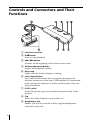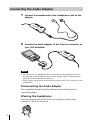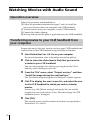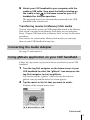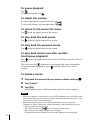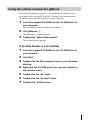
1
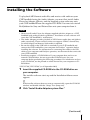
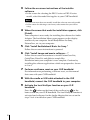
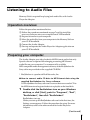
4-657-273-11 (1) Audio Adapter Operating Instructions PEGA-SA500 2001 Sony Corporation WARNING Declaration of Conformity Trade Name: SONY Model No.: PEGA-SA500 Owner’s Record Responsible Party: Sony Electronics Inc. The model number and serial number are located at the rear of the product. Record the serial number in the space provided below. Refer to them whenever you call upon your Sony dealer regarding this product. Address: 680 Kinderkamack Road, Oradell, NJ 07649 USA Model No. PEGA-SA500 Serial No.______________ CAUTION You are cautioned that any changes or modifications not expressly approved in this manual could void your authority to operate this equipment. NOTE This equipment has been tested and found to comply with the limits for a Class B digital device, pursuant to Part 15 of the FCC Rules. These limits are designed to provide reasonable protection against harmful interference in a residential installation. This equipment generates, uses, and can radiate radio frequency energy and, if not installed and used in accordance with the instructions, may cause harmful interference to radio communications. However, there is no guarantee that interference will not occur in a particular installation. If this equipment does cause harmful interference to radio or television reception, which can be determined by rotating the equipment off and on, the user is encouraged to try to correct the interference using one or more of the following measures: – Reorient or relocate the receiving antenna. – Increase the separation between the equipment and receiver. – Connect the equipment into an outlet on a circuit different from that to which the receiver is connected. – Consult the dealer or an experienced radio/ TV technician for help. If you have question about this product, call the Sony Customer Information Center at keep on next line 1-877-760-7669; or write to the Sony Customer Information Center at 12451 Gateway Boulevard, Fort Myers, FL 33913. The number below is for FCC-related matters only. 2 Telephone No.: 201-930-6972 This device complies with part 15 of the FCC Rules. Operation is subject to the following two conditions: (1) This device may not cause harmful interference, and (2) This device must accept any interference received, including interference that may cause undesired operation. The supplied interface cable must be used with the equipment in order to comply with the limits for a digital device pursuant to Subpart B of Part 15 of FCC Rules. On the supplied software • Copyright laws prohibit reproducing the software or the software manual in whole or in part, or renting the software without the permission of the copyright holder. • In no event will SONY be liable for any financial damage or loss of profits, including claims made by third parties, arising out of the use of the software supplied with this player. • In the event a problem occurs with this software as a result of defective manufacturing, SONY will replace it at SONY’s option or issue a refund. However, SONY bears no other responsibility. • The software provided with this product cannot be used with equipment other than that which it is designated for use with. • Please note that, due to continued efforts to improve quality, the software specifications may be changed without notice. Program © 2001 Sony Corporation, or its subsidiaries. All rights reserved. Documentation © 2001 Sony Corporation • CLIÉ, Jog Dial, Memory Stick, the Memory Stick logo and PictureGear are trademarks of Sony Corporation. • HotSync and Palm OS are registered trademarks, and the HotSync logo and Palm are trademarks of Palm, Inc. or its subsidiaries. • Microsoft® and Windows® are registered trademarks of Microsoft Corporation in the United States and/or other countries. • RealJukebox is trademark of RealNetworks, Inc.. • generic media and gMovie are trademarks of generic media, inc. • Adobe and Acrobat are trademarks of Adobe Systems Incorporated. • All other trademarks are trademarks of their respective owners. CAUTION Please contact your nearest Sony dealer regarding the problem you are experiencing with your Sony product. Notes • Sony does not support third-party add-on applications. If you are having a problem with a third-party application, please contact the developer or publisher of that software. • The illustrations in this manual may differ from the actual software. • Explanations in this manual assume that you are familiar with basic operations of Windows®. For how to use your computer and operating system, please refer to their respective manuals. Before using this product, be sure to read the accompanying End-User’s License Agreement. Contents Welcome ............................................. 4 What you can do with the Audio Adapter ....................... 4 CLIÉ handheld models that support the Audio Adapter ................................... 4 Unpacking Your Audio Adapter .... 5 What’s in the Supplied CD-ROM ... 5 Controls and Connectors and Their Functions ........................................ 6 Installing the Software ..................... 7 Listening to Audio Files ................... 9 Operation overview .................. 9 Preparing your computer ........ 9 Transferring audio files to the Memory Stick on your CLIÉ handheld from your computer ............................... 10 Connecting the Audio Adapter ................................. 12 Using Audio Player for Adapter application on your CLIÉ handheld ............................... 13 Playing audio files with the Audio Adapter ..................... 15 Using the online manual for Audio Player for Adapter ................................. 17 Watching Movies with Audio Sound ............................................ 18 Operation overview................ 18 Transferring movies to your CLIÉ handheld from your computer ............................... 18 Connecting the Audio Adapter ................................. 19 Using gMovie application on your CLIÉ handheld ........... 19 Using the online manual for gMovie .................................. 21 Others ............................................... 22 Specifications ........................... 22 Notes on use ............................ 23 Troubleshooting ...................... 24 3 Welcome What you can do with the Audio Adapter The Audio Adapter allows you to play back audio on the CLIÉ handheld models that have no audio playback capabilities. Connecting the remote-controller-shaped adapter to the interface connector on your CLIÉ handheld enables the CLIÉ handheld to play back audio. Audio Player for Adapter: Audio Player for Adapter is a software application that allows your CLIÉ handheld to play back MP3-format audio data stored on a Memory Stick media. It is contained on the CD-ROM supplied with this Audio Adapter. gMovie Ver.1.4: gMovieTM is a software application that allows your CLIÉ handheld to play back movies with audio sound stored on DRAM or Memory Stick® media. It is contained on the CD-ROM supplied with this Audio Adapter. Notes • Never install Audio Player for Adapter supplied with this adapter on a CLIÉ handheld with audio playback capabilities*. Installation of such software will cause the CLIÉ handheld to malfunction. • The Audio Adapter provides playback of MP3-format audio data and gMovie audio sound only. Please note that it does not support ATRAC3-format data , for which MagicGateTM Memory Stick media is required. For specifications of the MP3 formatted files available for playback, see the online manual of Audio Player for Adapter. • Some CLIÉ handhelds may be slow to respond when they are connected to this adapter. This is not malfunction. * PEG-N710C, PEG-N760C (as of September 2001) CLIÉ handheld models that support the Audio Adapter • PEG-S300 4 • PEG-S320 • PEG-N610C Unpacking Your Audio Adapter ❑ Audio adapter (1) ❑ Headphones (1 pair) ❑ CD-ROM (1) ❑ Operating Instructions (1) ❑ Warranty card (1) What’s in the Supplied CD-ROM • Software and application for playing MP3 audio files RealJukebox 2 Basic for Sony (The rest is omitted as “RealJukebox for Sony”) Audio Player for Adapter • Software and application for playing back movies with audio sound PictureGear Ver. 4.4 Lite gMovie Ver. 1.4 QuickTime 4.1.2 • Software for displaying the online manual of Audio Player for Adapter and gMovie Adobe Acrobat Reader • Software for performance enhancement of multimedia function DirectX 6* * If you have already installed DirectX 6 or higher on your computer, you need not install it. 5 Controls and Connectors and Their Functions 1 Interface connector 2 B/x button Starts or stops playback. 3 ./> button Searches for the beginning of the current or next track. 4 Volume adjustment button Adjusts the headphone volume. 5 Busy lamp Lights when the Audio Adapter is running. 6 Lock release button Press and hold this button down to connect/disconnect the interface connector to/from your CLIÉ handheld. For connection, make sure that the connector is firmly seated in place when you release the button. 7 HOLD switch In the ON position, prevents accidental operation of the Audio Adapter. 8 Clip Hooks the Audio Adapter to your pocket, etc. 9 Headphones jack Enables you to listen to audio with the supplied headphones connected to this jack. 6 Installing the Software To play back MP3-format audio files and movies with audio on your CLIÉ handheld using the Audio Adapter, you must first install Audio Player for Adapter, gMovie, and the required system softwares onto your CLIÉ handheld from the supplied CD-ROM. You must also install RealJukebox for Sony and PictureGear onto your computer from it. Notes • Never install Audio Player for Adapter supplied with this adapter to a CLIÉ handheld with audio playback capabilities*. Installation of such software will cause the CLIÉ handheld to malfunction. • The Audio Adapter provides playback of MP3-format audio data and gMovie audio sound only. Please note that it does not support ATRAC3-format data, for which MagicGate Memory Stick media is required. • Be sure the cradle or the USB cable is attached to your CLIÉ handheld and connect the CLIÉ handheld to your computer for HotSync® operation before installing the software. For information on connecting the cradle or the USB cable to your computer and HotSync operation, see the manual that came with your CLIÉ handheld. • Installation requires a CD-ROM drive. If your computer does not have an internal CD-ROM drive, be sure to provide CD-ROM access for your computer before performing the following procedure. For information on how to use CD-ROMs, see the printed or online manual for your computer or CDROM drive. * PEG-N710C, PEG-N760C (as of September 2001) 1 Insert the supplied CD-ROM into the CD-ROM drive on your computer. The installer software starts up and the Installation Menu screen appears. z If the installer software does not start up automatically, open the CD-ROM window and double-click the “Setup” icon (Setup.exe). 2 Click “Install Audio Adapter system files.” (Continued) 7 3 Follow the on-screen instructions of the installer software. • In the screen for selecting the PEG-S series or PEG-N series model, select the model that applies to your CLIÉ handheld. Notes • If you have more than one model, install the software onto each model. • In the screen for selecting a user name, select name that you will be using. 4 When the screen that ends the installation appears, click [Finish]. Your computer is now ready for installing the software for Audio Adapter. The Installation Menu screen appears on the display monitor of your computer. Install RealJukebox for Sony, PictureGear, etc. to your computer. 5 Click “Install RealJukebox2 Basic for Sony.” Follow the on-screen instructions to proceed. 6 Click “Install image and movie software….” Follow the on-screen instructions to install PictureGear Lite, QuickTime, DirectX 6 and gMovie sample files. Installation onto your computer is now complete. Continue by installing the software applications which are prepared as shown in 1 to 4. 7 Perform a software reset on your CLIÉ handheld. For information on performing a software reset, see the manual that came with your CLIÉ handheld. 8 With the cradle or USB cable attached to the CLIÉ handheld, connect the CLIÉ handheld to your computer. 9 Activate the local HotSync function on your CLIÉ handheld. Press the button on the front of the cradle or tap in the home screen on your CLIÉ handheld. The local HotSync function is activated and softwares for the Audio Adapter that are set on the steps 2 to 4 is installed on your CLIÉ handheld. 8 Listening to Audio Files Memory Stick is required for playing back audio files with Audio Player for Adapter. Operation overview Follow the procedure mentioned below: 1 Follow the procedure mentioned on page 7 and 8 to install the necessary software onto your computer and CLIÉ handheld. 2 Prepare to transfer to your computer. 3 Move the audio files from your computer to the Memory Stick on your CLIÉ handheld. 4 Connect the Audio Adapter. 5 Start up and operate the Audio Player for Adapter application on your CLIÉ handheld. Preparing your computer The Audio Adapter provides playback of MP3-format audio data only. Special software is required for managing or creating MP3-format audio files on your computer. Use commercially available MP3-compatible audio management software, or the RealJukebox for Sony software provided on the supplied CD-ROM. * RealJukebox is a product of RealNetworks, Inc. ● How to convert audio CD data to MP3-format data using the supplied RealJukebox for Sony software. Use RealJukebox for Sony software to convert data on an audio CD to the MP3-format and register the data to a playlist on the hard disk. 1 Double-click the RealJukebox icon on your Windows desktop, or click [Start], point to “Programs”, “Real”, “RealJukebox”, then click “RealJukebox”. RealJukebox starts up. When you start up the RealJukebox software for the first time, the Settings screen appears. Follow the procedure for setup. For more information, refer to the online manual for Audio Player for Adapter. (Continued) 9 2 Make the following settings on the main window of RealJukebox. These settings are required for first-time use only. 1 Click “Tools” and “Preferences” on the menu bar, and select “Audio Quality.” • Select “MP3 Audio” under “Select a Format.” • Select “96 kbps Stereo” under “Select a Quality Level.” • Click for “Secure my Music Files when encoding” under “Secure Files” to uncheck it. The copyright warning window appears. 2 Read the copyright warning window carefully, and click the radio button for “I accept the above terms” to check it. 3 Click “OK.” 3 Insert the audio CD with the data to be converted to MP3-format in the CD-ROM drive. The “Auto-record” dialog box appears. 4 Click “Yes, record the CD now”, then click [OK]. Recording starts. When recording is completed, MP3-format audio data is saved to the folder at C:\My Music\(Artist’s name)\(CD Title). To cancel the recording, click . Notes • If you have purchased commercially available MP3-compatible audio management software, refer to the manual or help files for that software. • Some MP3 formats are not supported for successful playback depending on the audio management software. Transferring audio files to the Memory Stick on your CLIÉ handheld from your computer 1 Make sure the write-protect tab on the Memory Stick media is not in the LOCK position, then insert the media into the Memory Stick slot on your CLIÉ handheld. 2 Turn the Jog Dial navigator on the home screen of your CLIÉ handheld to select the “AudioPlayer” icon, then press the Jog Dial navigator. You can also start up Audio Player for Adapter by tapping the “AudioPlayer” icon. Audio Player for Adapter starts up. 10 3 Using the USB cable or the cradle which comes with the CLIÉ handheld, attach your CLIÉ handheld to your computer. 4 Tap , “Options”, then “Transfer” consecutively. Audio Player for Adapter changes to Transfer mode. 5 Double-click the “My Computer” icon on your Windows desktop. Your CLIÉ handheld in Transfer mode appears as a removable drive in the “My Computer” window. 6 7 Double-click the “Removable Drive” icon. Double-click the “PALM”, “PROGRAMS”, then “MSAUDIO” folders. If these folders do not exist, create them on the Memory Stick media using Windows Explorer. Make sure that the Memory Stick media has sufficient capacity. 8 Drag and drop the MP3-format audio files (to be played back on your CLIÉ handheld) into the folder you opened in step 7. Notes • Do not exit or operate HotSync while transferring music data (while Memory Stick lamp is flashing). • For information on transferring MP3-format audio files to your CLIÉ handheld, see the online manual for Audio Player for Adapter. • If the automatic shut-off function of your CLIÉ handheld is activated in the middle of the above steps, the connection between the CLIÉ handheld and your computer is interrupted. Turn on the CLIÉ handheld once again and exit the Transfer mode, and then follow the step 4 on the previous page to re-enter the Transfer mode. You can also use the Memory Stick slot on your computer For more information, refer to the online manual for Audio Player for Adapter. 11 Connecting the Audio Adapter 1 Connect the headphones to the headphones jack on the adapter. 2 Connect the Audio Adapter to the Interface connector on your CLIÉ handheld. Notes • Do not connect any equipment that is connected to other equipment, such as an amplifier, to the headphones jack on this adapter. Such a connection may cause the CLIÉ handheld to malfunction. • Do not apply strong shock to the connector while using. This action may cause malfunction. Disconnecting the Audio Adapter Press and hold down the lock release button on the Audio Adapter to remove the adapter. Wearing the headphones Insert the ear piece with the “R” mark in your right ear, and the other with the “L” mark in your left ear. 12 Using Audio Player for Adapter application on your CLIÉ handheld Audio Player for Adapter allows you to play back audio files. Before starting playback, be sure the battery is fully charged. Notes • The automatic shut-off function of your CLIÉ handheld is disabled during playback. • Playback automatically stops when battery power becomes low; however, you can still use other software applications such as Memo Pad or Adress Book. Make sure to recharge the battery as soon as possible before it is completely drained. • When Audio Player for Adapter or gMovie is starting up, Beam Transfer is not possible. “Beam Receive” under “Preferences” may be set to OFF, in some cases. 1 Insert the media into the Memory Stick slot on your CLIÉ handheld. 2 Turn the Jog Dial navigator on the home screen of your CLIÉ handheld to select the “AudioPlayer” icon, and then press the Jog Dial navigator to start up Audio Player. You can also tap the “AudioPlayer” icon to start up the software. Audio Player for Adapter starts and loads the music data from the Memory Stick media. Do not remove the Memory Stick media while the data is being loaded (also while the Memory Stick lamp on your CLIÉ handheld is flashing). Otherwise, the data may be destroyed or corrupted, or the CLIÉ handheld may malfunction. Notes • When the built-in battery power in the CLIÉ handheld is not charged sufficiently, the malfunctions may occur. For example, the Audio Player for Adapter does not start up or operate, or the power is turned off suddenly while using. Be sure to charge the battery sufficiently before using. • Depending on the number of music selections stored on the Memory Stick media, it may take some time to load the music data. All Audio Player for Adapter operations are disabled while the data is being loaded. This is not a malfunction. 3 Tap . Playback starts from the first music selection. During playback, the music data that you loaded with RealJukebox for Sony software or your MP3-compatible audio management software is displayed. (Continued) 13 Playback automatically stops at the end of the last music selection. To stop playback Tap . Other operations To pause Tap . To go to the beginning of the current track Tap . To go to the beginning of Tap twice or more. Tap . To go to the beginning of later tracks Tap twice or more. To rewind Press and hold . To fast forward Press and hold . previous tracks To go to the beginning of the next track To adjust the volume You can adjust the volume by one of the three following ways. • Tap or . • Turn the Jog Dial navigator*. • Press the scroll button on your CLIÉ handheld. * If it is set to adjust volume in the “Select JOG Func” in the menu of Audio Player for Adapter, see the online manual of Audio Player for Adapter for more information. To minimize sound leakage (volume limiter, AVLS*) Tap 14 to change it to . * AVLS, which stands for “Automatic Volume Limiter System”, limits the volume, to minimize sound leakage, damage to your hearing, and potential danger caused by your inability to hear surrounding sounds. Playing audio files with the Audio Adapter If you turn off your CLIÉ handheld while Audio Player for Adapter is running, you can start playback of songs by just pressing the playback button. Otherwise, turn on your CLIÉ handheld and start Audio Player for Adapter, and then follow this procedure: 1 2 Connect the Audio Adapter to your CLIÉ handheld. 3 4 Connect the headphones. Insert the Memory Stick media into the Memory Stick slot. Press N on the Audio Adapter. Playback starts from the first song. Playback stops automatically when the song reaches the end. To stop playback Press x on the Audio Adapter. Note If playback does not start even when you press N on the Audio Adapter, hold N down again for a few seconds. N/x button ./> button Volume adjustment button (Continued) 15 To perform the following operations Pause Press x. Go to the beginning of the Press .. current track Go to previous tracks Press . repeatedly. Go to the beginning of the next Press >. track Go to the beginning of Press > repeatedly. succeeding tracks To rewind Press . and hold. To fast forward Press > and hold. Adjust the volume Press + or –. Locking the controls (Hold) To prevent the controls from being accidentally operated when you carry the player, use the HOLD function. Slide the HOLD switch of the Audio Adapter to ON (see the illustration below). None of the controls on the Audio Adapter will operate. ON HOLD switch Even if you set the HOLD switch on the Audio Adapter to ON, you can control your CLIÉ handheld with its own buttons. 16 Using the online manual for Audio Player for Adapter Detailed information on Audio Player for Adapter is available in the online manual provided on the supplied CD-ROM. To view the online manual, Acrobat Reader must be installed on your computer. 1 Insert the supplied CD-ROM into the CD-ROM drive of your computer. The installation screen automatically appears. 2 Click [Manuals…]. The [Manuals] folder appears. 3 Double-click “Audio Player for Adapter Manual.pdf.“ The online manual appears. When Acrobat Reader is not installed 1 Insert the supplied CD-ROM into the CD-ROM drive of your computer. 2 3 Click [Exit]. 4 Right-click the CD-ROM drive icon and select [Open] in the shortcut menu. 5 6 7 Double-click the “pc” folder. Double-click the [My computer] icon on your Windows desktop. Double-click the “Acrobat” folder. Double-click “ar500enu.exe.” 17 Watching Movies with Audio Sound Operation overview Follow the procedure mentioned below: 1 Follow the procedure mentioned on page 7 and 8 to install the necessary software onto your computer and CLIÉ handheld. 2 Transfer movies from your computer to your CLIÉ handheld. 3 Connect the Audio Adapter. 4 Start up and operate the gMovie application on your CLIÉ handheld. Transferring movies to your CLIÉ handheld from your computer Prepare the movies that you want to watch on your CLIÉ handheld and transfer them to the CLIÉ handheld using the HotSync function. 1 Start PictureGear Ver. 4.4 Lite on your computer. For more information, refer to the online manual for gMovie. 2 Click to select the slides (movie files) that you want to transfer to your CLIÉ handheld. You can select multiple the slides by pressing down the Ctrl or Shift key while clicking on each still. 3 From the “File” menu, select “Output services,” and then “Install the image during the next HotSync.” The ”Install the image during the next HotSync” window appears. 4 Click V to display the user’s name list, and select the one for the CLIÉ handheld to which you wish to transfer movies. If necessary, click [Movie settings] and specify the size and the compression rate of the movies in the “Detailed settings for CLIÉ handheld movies” dialogbox. 5 Click [OK]. The selected movies and the transfer destination are registered to PictureGear Ver. 4.4 Lite. 18 6 Attach your CLIÉ handheld to your computer with the cradle or USB cable, then press the HotSync button on in the home screen on your CLIÉ the cradle or tap handheld for HotSync operation. The registered movies are automatically transferred to the CLIÉ handheld of the selected user. Transferring movies to Memory Stick media You can also transfer movies in CLIÉ-compatible format to the Memory Stick which is inserted to the Memory Stick drive on your computer. Select “Output CLIE format file to Memory Stick” in step 2 in the above procedure. Once movies are stored on the Memory Stick media, you can enjoy them on your CLIÉ handheld at any time . Connecting the Audio Adapter See page 12 and connect it. Using gMovie application on your CLIÉ handheld Follow the steps below to play back movies transferred to your CLIÉ handheld. 1 Turn the Jog Dial navigator on the home screen of your CLIÉ handheld to select the “gMovie” icon and press the Jog Dial navigator to start up gMovie. You can also tap the “gMovie” icon to start up the software. gMovie starts up and the movie list screen appears. 2 Tap the movie in the list that you want to watch. Playback of the selected movie starts. (Continued) 19 To pause playback Tap . To restart playback, tap . To adjust the volume To lower the volume, tap the left end of To raise the volume, tap the right end of . . To return to the movie list screen Tap in the top right corner of the screen. To play back the next movie Tap in the top right corner of the screen. To play back the previous movie Tap in the top right corner of the screen. To play back movies one after another (continuous playback) Press in the top right corner of the screen with the stylus for at least 1 second. The icon turns into , and movies are played back one after another. To resume normal playback, press with the stylus for at least 1 second. To delete a movie 1 2 3 Play back the movie that you want to delete and tap . Tap “Delete”. Tap [OK]. The selected movie is deleted and the movie list screen appears. Notes • When this adapter is connected to your CLIÉ handheld, some movie files with audio sound may not play back smoothly compared with the situation you do not connect it. This is not malfunction. • When the built-in battery is not charged sufficiently, it may occur the situations as follows. Be sure to charge the battery sufficiently before using. – Audio sound cannot play back. – The audio sound icon does not appear in the screen. – Busy lamp on the Audio Adapter does not light. – The manual operation buttons on the Audio Adapter are deactivated. 20 Using the online manual for gMovie Detailed information on gMovie is available in the online manual provided on the supplied CD-ROM. To display the online manual, Acrobat Reader must be installed on your computer. 1 Insert the supplied CD-ROM into the CD-ROM drive of your computer. The installation screen automatically appears. 2 Click [Manuals…]. The [Manuals…] folder appears. 3 Double-click “gMovie Manual.pdf.” The online manual appears. If Acrobat Reader is not installed 1 Insert the supplied CD-ROM into the CD-ROM drive of your computer. 2 3 Click [Exit]. 4 Right-click the CD-ROM drive icon and select [Open] in the shortcut menu. 5 6 7 Double-click the “pc” folder. Double-click the [My computer] icon on your Windows desktop. Double-click the “Acrobat” folder. Double-click “ar500enu.exe.” 21 Others Specifications CLIÉ handheld models that support the Audio Adapter: • PEG-S300 • PEG-S320 • PEG-N610C Interface: Connector on the bottom of the CLIÉ handheld Design: Remote control type Output: Stereo headphones mini jack Power: Supplied from the CLIÉ handheld (3.5 to 4.2 V) Power consumption: Approx. 200 mW Continuous audio playback hours: Approx 3 hours of audio playback (while fully charged PEG-S300) Approx 4 hours of audio playback (while fully charged PEG-S320) Approx 4 hours of audio playback (while fully charged PEG-N610) * To charge the battery of the CLIÉ handheld fully, charge the battery for more than 2 hours after the remaining battery charge indication on the Application Launcher screen becomes full. Maximum dimensions (W/H/D): Approx. 30 × 74 × 12 mm (1.2 × 2.9 × 0.5 in.) Weight: Approx. 40 g (1.4 oz.) (excluding headphones) Operating temperature: 5 to 35 °C Accessories: See page 5. 22 Notes on use Placement limitations • To prevent malfunction, do not use or store the adapter in locations subject to: – Extremely high temperatures The temperature rises extremely high in a car that is parked in the sun, or a car with its windows closed during the summer. Leaving the adapter in a car under these conditions may cause deformation of the adapter case or malfunction of the adapter. – Direct sunlight or heat sources Use or storage of the adapter in direct sunlight, or near a heat source may cause deformation of the adapter case or malfunction of the adapter. – Strong vibrations – Strong magnetic fields – Sand Protect the adapter from sand in sandy locations such as the beach. Sand may cause the adapter to malfunction or damage it irreparably. On use • Do not drop the adapter or subject it to strong physical shocks. • Keep the adapter away from TV sets, AM radio receivers, radio tuners and other sources of radio interference. • Prevent the connector of the adapter (or the cord) from contacting any metal objects which may cause a short circuit. (Continued) 23 On cleaning • Clean the adapter with a soft dry cloth or tissue paper. If the adapter is badly soiled, moisten a soft cloth with a mild detergent solution, wring it out well, and use it to wipe the adapter. Wipe off any remaining moisture with a soft, dry cloth. • Do not use any type of solvent, such as alcohol, thinner, or benzine. Use of such solvents may cause deformation of the adapter case or damage to the finish. • When using a chemical cleaning cloth, follow the instructions included with the cloth. • Use of volatile sprays, such as insect spray, or leaving the adapter on a rubber or vinyl product may cause deformation of the adapter case, or the coating to peal off. On moisture condensation If the adapter is brought directly from a cold to a warm location, moisture may condense inside the adapter. Use of the adapter in such a condition may cause a fire or malfunction within the adapter. When moisture has condensed, allow the adapter to sit at least an hour before using it. Troubleshooting Playback • Buttons on the Audio Adapter do not work. Slide the HOLD switch on the Audio Adapter to OFF. Unless you turn off your CLIÉ handheld while Audio Player for Adapter is running, pressing a button on the Audio Adapter does not start the CLIÉ handheld. Charge the built-in battery in the CLIÉ handheld sufficiently. • I hear some skips and noise during playback. Check the MP3 format. For the MP3 formats available for playback, see “What you can do with the Audio Player” in the online manual of Audio Player for Adapter. • I cannot start up Audio Player for Adapter or cannot play back audio sound files. Disconnect and connect the connector several times. Charge the built-in battery in the CLIÉ handheld sufficiently. • I cannot hear the sound of movie files by gMovie. Charge the built-in battery in the CLIÉ handheld sufficiently. 24 Connection with your computer • Connection abruptly drops. Connect the AC power adapter to the cradle. Check the cradle or USB cable and your computer for appropriate connection. Attach the cradle or USB cable firmly to your CLIÉ handheld. • I cannot transfer as many music pieces as expected. (Available recording time is not long enough.) The Memory Stick media contains data other than audio files. This decreases the memory capacity that you can use for music transferring. Copy the data in the Memory Stick media to your computer, for example, to increase the capacity. • I see the drive but not its contents on my computer after I connect my CLIÉ handheld to my computer. Insert the Memory Stick media into your CLIÉ handheld first, and then connect it to your computer. • I don’t see the removable media on my computer during Transfer mode. Exit the Transfer mode after making sure that the power of your CLIÉ handheld is ON, and then retry music transferring. • The operation of my CLIÉ handheld is unstable while it is connected to my computer. If the cradle or the connection USB cable is connected to your computer via a USB hub or USB extension cable, the operation is not guaranteed. Connect the cradle or the connection USB cable directly to your computer. • A warning window for device removal appears on the desktop. Click [OK] and proceed. Do not tap “Stop” or remove your CLIÉ handheld from the cradle during Transfer mode. 25 Others • I hear no operation sounds from my CLIÉ handheld. You hear no operation sounds (clicking sounds) from your CLIÉ handheld while Audio Player for Adapter or gMovie is running. However, you do hear warning and error sounds from your CLIÉ handheld. • I cannot insert the Memory Stick media. Insert it in an appropriate direction. • HotSync screen appears on your CLIÉ handheld when pressing the buttons of Audio Adapter. Charge the built-in battery in the CLIÉ handheld. • Error display appears while using Audio Player for Adapter or gMovie application software. When the battery power is low, these software applications may not run in order to protect the contents in the memory. Fully recharge the battery on your CLIÉ handheld and start it up again. • The remaining power indication in the screen of Audio Player for Adapter is different from the one in the home screen (main menu) on your CLIÉ handheld. This is not malfunction. • I cannot use the Memory Stick media that I used with other devices before. If the Memory Stick media is formatted with your computer, copy necessary data into your computer. Then, follow the instructions in the operation instructions of your CLIÉ handheld to format the media. • I cannot use the Audio Adapter for a while after I insert the Memory Stick media. If the Memory Stick with many music pieces recorded is inserted, no operations may be allowed. This is not a malfunction. Wait until the name of the music piece appears on the Audio Player window or the Memory Stick indicator turns off. 26 27 For the latest support information, check our official Sony CLIÉ Web site http://www.sony.com/clie Printed in Japan