1
inst_us.book 13 ページ
2004年9月2日 木曜日 午前10時19分
INSTALLING THE PRINTER DRIVER AND UTILITIES (SOFTWARE INSTALLATION)
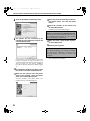
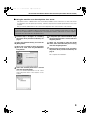
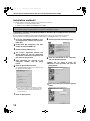
you are asked if you wish to install
12 When
the display font, select an answer and
click the [Next] button.
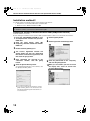
the finish installation window
15 When
appears, click the [Close] button.
When the message "Now connect the interface
cable to the PC. This will finalize the driver's
installation and settings." appears, click the [OK]
button.
NOTE
A message prompting you to restart your computer
may appear after installation is finished. If this
message appears, click [Yes] to restart your
computer.
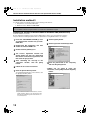
the on-screen
13 Follow
install the printer driver.
instructions to
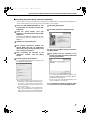
If you are using Windows 2000 and a warning
message regarding the digital signature appears
while the printer driver files are being copied (the
warning message may appear several times), be
sure to click the [Continue Anyway] button.
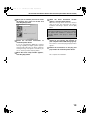
the finish setup window appears,
14 When
click the [OK] button.
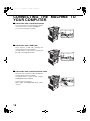
sure that the machine power is
16 Make
turned on and connect the machine to
your computer with a USB cable (page 18).
The machine is found and a plug and play window
appears.
the instructions in the plug and
17 Follow
play window to install the printer driver.
This completes the installation.
13