1
Call forward
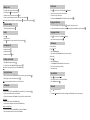
Making a call
• Pre-dialing: enter the phone number and press
.
• Press
• Direct dialing: press . Enter the phone number.
• Handsfree: enter the phone number and press
twice.
Call Forward.
• Then select the type of call forward.
• Headset: connect the headset to the phone, enter phone number and press
Note: to place a call from a specific line, make a long press on
.
, select the desired line and press
Extension dialing
.
• Set the status to enabled/disabled, fill in destination number and press
.
.
Paging and Intercom
• To locate your handsets, press the paging key
• Dial the 3-digit extension and press
on the base. Press again to cancel.
• To make an internal call to another handset, press
Redial
key, select the desired handset from the list and press
Language selection
• Press
.
• Highlight a record.
• Press
to make the call, you may select the line by long pressing
.
• Handset mode: press
.
• Headset mode: press
.
Press
•
Select the desired language and press
Language.
.
Access phonebook :
• Press
.
• Select the Directory type.
• Select a contact and press Options soft key to select an operation.
twice.
Add new entry :
• Press
.
• Select the Directory type.
• • Select Options and press Add soft key to add a new entry.
• Enter first name, last name and numbers.
• Press Save soft key.
Putting a call on hold
• Select Hold with navigator and press
to open main menu. Select Settings
•
Phonebook
Accepting a call
• Handsfree mode: press
to open main menu. Select Services
• Select the line for which you want to set call forward.
.
• To retrieve the call, select Unhold with navigator and press
.
Note: with more than one active call, select call with Switch softkey .
3-party conference
• Once in line with 1st caller, press 2nd Call softkey, then select the type of call and press
• Dial 2nd party number or select handset and press
Do not Disturb
.
• Press
, select Services DND.
• Select the line for which you want to set DND feature.
• Select Activate and press
.
.
Note: you may be asked to select the line to use for the second call.
Call transfer
Attended transfer:
• Once in line with 1st caller, press 2nd Call softkey, then select the type of call and press
• Dial the second telephone number or select handset.
• When the call is answered, select Transfer from call options list to complete the transfer.
Blind transfer:
• Once in line with 1st caller, press Transfer softkey.
• Dial the destination telephone number and press Transfer soft key.
Handset to handset transfer :
• Once in line with 1st caller, press 2nd Call soft key, then select Intercom.
• Select the handset to transfer the call to and press Transfer.
Voicemail
.
• Press
to access voicemail.
OR
• Go to Menu Voicemail to check number of messages. Press Call softkey to retrieve your messages.
.