1
Quantum Scalar i6000 Release Notes
6-66883-12 Rev A
February 2012
Change
Request
Number
Service
Request
Number
Description
Workaround
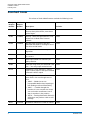
33403
Once you configure the primary and
secondary SKM servers on the library
remote web client and encryption keys are
generated, if you switch the key servers
(i.e., you try to make the primary server the
secondary server, or vice versa), SKM will
not function.
The library remembers which server
is primary and which is secondary.
Once configured on the library, do
not switch the primary SKM server to
the secondary, or vice versa.
33507
After restoring a saved library
configuration that has the “Perform scans
immediately when media is imported into
the library” policy enabled, the library
performs a scan on all tapes in the
partitions with this policy enabled because
the tapes appear as newly imported.
Working as designed. To keep this
from happening, deselect the
“Perform scans immediately when
media is imported into the library”
policy before saving the library
configuration.
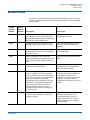
33661
The library allows you to install 4096-bit
TLS CA (root) certificate for encryption key
management but will not work with it.
Make sure the TLS CA (root)
certificate is 2048 bits.
34027
When adding FC I/O blades or EE blades to
a library that previously did not have them
installed, Ethernet connections were not
made between the MCB and the newly
installed I/O blades.
When FC I/O blades or Ethernet
Expansion blades are installed in the
library, the following rules regarding
control management blades (CMBs)
apply:
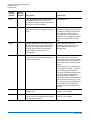
• Any module (including the control
module) that contains FC I/O
blades or EE blades must also
contain a CMB.
• A CMB must be installed in the
control module and all modules
between the control module and
the module containing the FC I/O
blade or EE blade. The CMB
provides daisy-chained Ethernet
communication between the
Management Control Blade (MCB)
located in the control module and
the FC I/O blades and EEBs.
8
34370
Ticket reports sent directly from library via
e-mail contain no data (Tools > Reports >
Tickets, then select Export > Email).
Viewed and saved reports contain data as
expected.
Log in from the remote interface and
download the file (Tools > Reports
> Tickets, then select Export >
Save). Then e-mail the report as
desired.
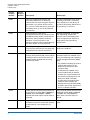
35493
Upgraded firmware, then rolled back
firmware to previous version and received
a RAS ticket for a non-existent FC I/O
blade.
Manually close the erroneous RAS
ticket.
Known Issues