1
MCD107
Quick Start Guide
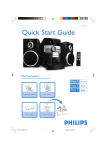
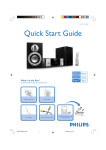
What’s in the Box?
You should find these items upon opening the box.
Remote Control
Audio/video cable
Quick Start Guide
User Manual
MCD107_51_QSG_Eng.indd
1
MP3 link cable
8/20/2009
11:45:30 AM
1
2
Tip
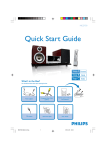
Connect the speaker cables.
See the User Manual for how to connect
other equipment to this apparatus.
Connect the AC power cord to the wall
socket.
FM antenna
Speaker
(right)
Speaker
(left)
AC power
Set clock
1 In standy-by mode, press and hold CLOCK/DISPLAY to activate the clock setting mode.
» The 12 hour or 24 hour format is displayed.
2
Press PROG repeatedly to select 12 hour or 24 hour format.
3
Press CLOCK/DISPLAY to confirm.
» The hour digits are displayed and begin to blink.
4
Press 5/6 to set the hour.
5
Press CLOCK/DISPLAY to confirm.
» The minute digits are displayed and begin to blink.
6
7
Press 5/6 to set the minute.
Press CLOCK/DISPLAY to confirm.
MCD107_51_QSG_Eng.indd
2
8/20/2009
11:45:35 AM
Play discs
1
Press DISC to select the disc source.
2
Press / to open the disc compartment.
3
Insert a disc with the printed side facing up, then close the disc door.
» Play starts automatically.
• To stop play, press 9 .
Play from USB devices
With the apparatus, you can use USB flash memory (USB 2.0 or USB1.1),
USB flash players (USB 2.0 or USB1.1), memory cards (requires an additional card reader to
work with this apparatus).
1
2
Insert the USB plug of a USB device into the
socket.
Press USB.
» Play starts automatically. If not, press 2; .
MCD107_51_QSG_Eng.indd
3
8/20/2009
11:45:36 AM
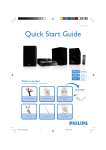
Programming and tuning to radio stations
1
Press TUNER to select FM.
2
Press and hold PROG/ANGLE for more than 2 seconds.
» All available stations are programmed in the order of waveband reception strength.
» The first programmed radio station is broadcast automatically.
3
Press ¡ or ™ until the desired preset station is displayed.
Tip
Detailed playback features and additional functions are described in the accompanied
owner's manual.
C Royal Philips Electronics N.V. 2009
All rights reserved.
http://www.philips.com
MCD107_51_QSG_V1.0
MCD107_51_QSG_Eng.indd
4
8/20/2009
11:45:37 AM