1
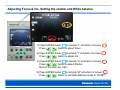
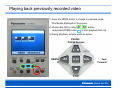
Adjusting Focus & Iris, Setting the shutter and White balance
1) Press ENTER button
to indicate “F” at bottom of screen
Press
button to adjust focus.
2) Press ENTER button
to indicate “I” at bottom of screen
Press
button to adjust Iris.
3) Press ENTER button
to indicate “S” at bottom of screen
Press
button to adjust Shutter.
Most of the case, set 1/60.
4) Press ENTER button
to indicate “W” at bottom of screen
Press
button to set White Balance mode to “W.SET”.
.