1
PHONE BOOK 15
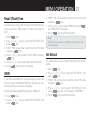
The telephone can store up to 25 entries in the phone book
with name and call number. When the function is supported
by the telephone provider service and the caller, the
handset displays the name of the caller (when stored in the
phone book).
Store Entries
1. Press [
] key to access phone book memory.
2. Press [
=KEYTHE,#$ONTHEHANDSETWILLDISPLAY
the stored number.
3. Press [
=KEYTHE,#$ONTHEHANDSETWILLDISPLAY
] key,
h!$$.%7%.429vTHENPRESS;
4. Enter name (maximum 16 characters) and press
[
] key, enter number and press [
] key when
finished.
Note:
7HENTHECAPACITYISFULLh-%-/29&5,,vWILLDISPLAY
2. Any incorrect input can be deleted by pressing [
]
key.
Key assignment overview
Key
Capital letter
1
<space> 1
2
ABC2
3
$%&
4
'()
5
*+,
6
-./
7
0123
8
TUV8
9
789:
0
0
*
#
:“ $ £
¥#