1
C200ZOOM_QSG_E 7/3/01 7:37 PM Page 2
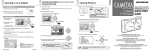
Confirm the Contents
Attach the Strap
1. Make sure the lens barrier is closed.
Please check the contents of the box to confirm that you have all of the
accessories shown below. If any of these are missing or damaged,
please contact your point of purchase.
Camera
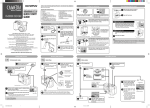
Insert the Batteries and SmartMedia Card
Dedicated USB
(Universal Serial Bus) cable
Battery
compartment cover
The lens extends and the flash pops up.
When the lens does not extend, the lens barrier is not fully opened.
Slide the lens barrier open until it clicks.
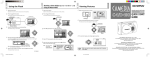
Turn the Power Off
Push the zoom lever toward W
(Wide angle) to shoot wideangle shots.
1. Close
the lens barrier halfway. Just before the lens barrier
comes in contact with the lens, it will make a click that you can
feel with your fingers.
Pull the zoom lever toward T
(Telephoto) to zoom in.
Lens barrier
Lens barrier
2. Slide the battery compartment 5. Open the card cover.
lock from
to
. Slide the
battery compartment cover to
the side and lift it up to open.
Video cable
Enlarge Your Shots
1. Slide the lens barrier open until clicks.
Card cover
C-200 ZOO
M
Strap
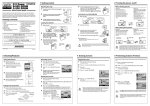
Shoot the Picture
2. Bring
the camera into position and
look through the viewfinder.
The lens will recess into the camera.
Do not push the lens barrier against the lens.
2. Wait until the lens fully retracts, and then close the lens barrier
the rest of the way to turn the power off.
Four AA (R6) alkaline batteries
SmartMedia card,
Anti-static card case, Labels (2),
Write-protect adhesive seals (4),
Instructions
Made in Japan
Basic manual,
Quick Start Guide, Warranty,
User card (not included for
some regions)
Software CD-ROMs
(including reference manual,
the USB driver and other
necessary software)
the SmartMedia card
3. Insert the batteries into the 6. Insert
into the camera as shown in
Attach the strap to the camera as shown in the diagram.
camera as shown in the diagram, making sure that the
negative and positive poles
are correctly aligned.
the diagram, making sure
that it is pushed all the way
in.
7.
4. Close
the battery compartment cover, and slide the
battery compartment lock
from
to
.
3. Press
the shutter button gently, and confirm
the green lamp next to
the viewfinder is illuminating.
If the green lamp is blinking, it means the subject
is out of focus. If this is
the case, gently press
the shutter button again.
Monitor
HQ
Zoom bar
Green Lamp
T
W
W
4. Full-press the shutter button.
Close the card cover so it
clicks into place.
T
Zoom status
(Displayed during
zoom lever operation.)
NOTE
Pressing the monitor button ( ) turns the
monitor on.
It is also possible to take pictures while
looking at the monitor.
HQ
T
T
W
Made in Japan
Monitor
W
3. Close the flash.