1
Introduction
Thank you for purchasing a NETGEAR ME101 802.11b Wireless Ethernet Bridge. With this
bridge you can connect a gaming console, personal computer, printer, or other Ethernetenabled device to communicate with your wireless router or access point. If you have a hub,
you can connect more than one Ethernet-enabled device to communicate with your wireless
router or access point through the bridge.
This guide shows you how to connect the bridge and configure it with your wireless router or
access point. Setup is easy – follow the instructions in this guide and your network will be up
and running quickly.
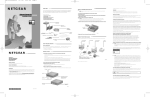
Power adapter
Cat 5 crossover
Ethernet cable
Resource CD for Wireless
Ethernet Bridge, Installation Guide,
Support information card,
Warranty card
ME101 Wireless Ethernet Bridge
Package Contents
The product package should contain the following items:
•
ME101 802.11b Wireless Ethernet Bridge
•
Power adapter
•
Ethernet crossover cable
•
Resource CD for Wireless Ethernet Bridge, including:
-
Configuration Utility software
-
User’s Guide for the Model ME101 802.11b Wireless Ethernet Bridge in
Adobe® Acrobat® PDF file format
•
Installation Guide
•
Warranty card
•
Support information card
1