1
Chapter 3
used, the onboard MC’97 (Modem Codec’97) controller will be enabled; if not,
it is disabled. Disable the controller if you want to use other controller cards to
connect to a modem. Settings: Auto, Disabled.
FloppyController
This is used to enable or disable the onboard Floppy controller.
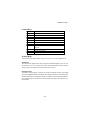
Option
Description
Au to
BIOS will automatically determine whether to enable the
onboard Floppy controller or not.
Enabled
Enables the onboard Floppy controller.
Disabled
Disables the onboard Floppy controller.
Serial Port A/B
These items specify the base I/O port addresses of the onboard Serial Port 1
(COM A)/Serial Port 2 (COM B). Selecting Auto allows AMIBIOS to automatically determine the correct base I/O port address. Settings: Auto, 3F8/COM1,
2F8/COM2, 3E8/COM3, 2E8/COM4 and Disabled.
Serial PortB Mode
This item sets the operation mod e for Serial Port B. Settin gs: Normal,
1.6uS, 3/16 Baud and ASKIR (the last three operation modes are setting
options for IR function).
IRDuplex Mode
This field specifies a duplex value for the IR device connected to COM B.
Full-Duplex mode permits simultaneous two-direction transmission. HalfDuplex mode permits transmission in one direction only at a time. Settings:
Half Duplex and Full Duplex.
IR Pin Select
Set to IRRX/IRTX when using an internal IR module connected to the IR
connector. Set to SINB/SOUTB. when connecting an IR adapter to COM
B.
Parallel Port
Thi s fiel d specifies the b ase I/ O port address of the o nboard paral lel po rt.
Selecting Auto allows AMIBIOS to automatically determine the correct base I/
3-20