1
Motion Computing and Motion are registered trademarks of
Motion Computing, Inc. All other trademarks and registered
trademarks are the property of their respective owners.
NOTICE: The information in this publication is subject to change
without notice. MOTION COMPUTING, INC. SHALL NOT BE HELD
LIABLE FOR TECHNICAL OR EDITORIAL ERRORS OR OMISSIONS
CONTAINED HEREIN NOR FOR ACCIDENTAL OR CONSEQUENTIAL
DAMAGES RESULTING FROM THE FURNISHING, PERFORMANCE,
OR USE OF THIS MATERIAL.
Optional Accessories
Optional Accessoires • Optional Zubehör
Optional Accesorios • Optional Acessorios
Model T008
Motion Computing et Motion sont des marques déposées de
Motion Computing, Inc. Toutes les autres marques, déposéesou
non, citées dans ce manuel appartiennent à leurs propriétaires
respectifs.
NOTICE : Les informations contenues dans cette publication
sont susceptibles d’être modifiées sans avis. LA SOCIÉTÉ
MOTION COMPUTING, INC. NE POURRA PAS ÊTRE TENUE POUR
RESPONSABLE EN CAS D’ERREUR TECHNIQUE DU ÉDITORIALE,
OU D’OMISSIONS, DANS LE PRÉSENT DOCUMENT, NI POUR TOUT
INCIDENT OU DOMMAGE CONSÉCUTIF RÉSULTANT DE LA MISE
À DISPOSITION, DE L’EXPLOITATION OU DE L’UTILISATEUR DE CE
DOCUMENT.
Motion Computing und Motion sind eingetragene
Markenzeichen von Motion Computing, Inc. Alle weiteren
Warenzeichen und eingetragenen Warenzeichen sind Eigentum
ihrer jeweiligen Inhaber.
HINWEIS: Änderungen der in diesem Handbuch enthaltenen
Informationen sind ohne Vorankündigung vorbehalten. MOTION
COMPUTING, INC. ÜBERNIMMT KEINERLEI HAFTUNG FÜR IN
DIESER DOKUMENTATION ENTHALTENE TECHNISCHE ODER
REDAKTIONELLE FEHLER ODER AUSLASSUNGEN ODER FÜR
UNBEABSICHTIGTE SCHÄDEN ODER FOLGESCHÄDEN, DIE UNTER
UMSTÄNDEN AUS DER LIEFERUNG, DER LEISTUNG ODER DER
BENUTZUNG DIESES MATERIALS RESULTIEREN.
Motion Computing y Motion son marcas registradas de Motion
Computing, Inc. Las demás marcas son y marcas registradas son
propiedad de sus respectivos propietarios.
AVISO: La información de esta publicación está sujeta a
cambios sin previo aviso. MOTION COMPUTING, INC. NO
SERÁ RESPONSIBLE POR ERRORES U OMISIONES TÉCNICOS
O EDITORIALES DE ESTE DOCUMENTO NI POR DAÑOS
ACCIDENTALES O RESULTANTES POR USO, RENDIMIENTO O
EQUIPACIÓN DE ESTE MATERIAL.
Motion Computing e Motion são marcas registradas da Motion
Computing, Inc. Todas as outras marcas registradas e marcas
comerciais são de propriedade de seus respectivos proprietários.
AVISO: As informações desta publicação estão sujeitas à
alteração, sem aviso prévio. A MOTION COMPUTING, INC. NÃO
SE RESPONSABILIZARÁ POR ERROS TÉCNICOS OU EDITORIAIS
OU OMISSÕES CONTIDAS NESTE DOCUMENTO, NEM POR
DANOS ACIDENTAIS OU CONSEQUENTES RESULTANTES DO
FORNECIMENTO, DESEMPENHO OU USO DESTE MATERIAL.
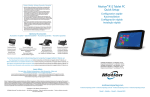
J-Series
J-Series FlexDock
Gamme J FlexDock
J-Serie FlexDock
serie J FlexDock
série J FlexDock
Additional battery
Batterie supplémentaire
Zusätzlicher Akku
Batería adicional
Bateria adicional
J-Series Mobile Keyboard
Motion® Tablet PC
Quick Setup
Clavier mobile de J-Series
J-Serie Mobile Tastatur
Teclado móvil serie J
Teclado Móvel J-Series
Additional pen
Stylet supplémentaire
Zusätzlicher Stift
Lápiz adicional
Caneta adicional
For more accessories, go to:
motioncomputing.com/accessories
Pour davantage d’accessoires, rendez-vous sur :
motioncomputing.fr/products/motion_accessories.asp
Weitere Informationen zum Zubehör erhalten Sie hier:
motioncomputing.de/products/motion_accessories.asp
Para obtener más información sobre accesorios, visite:
motioncomputing.es/products
Para obter mais acessórios, acesse:
motioncomputing.pt/products
motioncomputing.com
Copyright © 2011 Motion Computing, Inc.
All Rights Reserved
PN 024-02-0191 A01
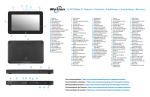
Features • Fonctions • Funktionen • Caracteristicas • Recursos
Caution • Attention • Achtung
1
Cautela • Precaución
1
Read the Safety and Regulatory Guide before starting the tablet.
Also, for detailed information about the tablet, see the Motion
2
Documentation folder on the tablet desktop and our web site
at motioncomputing.com/support.
• Veuillez lire le Guide des conseils de sécurité et réglementations avant
de démarrer la tablette. Pour obtenir plus d'informations sur la
tablette, consultez le dossier « Motion Documentation » sur le bureau de la tablette et notre site internet à l'adresse motioncomputing.fr/support.
• Lesen Sie vor Inbetriebnahme des Tablet PC das Sicherheits- und
Vorschriftshandbuch.Detaillierte Informationen zum Tablet finden Sie
außerdem im Ordner Motion Benutzerhandbuch auf Ihrem Tablet
PC-Desktop und unserer Webseite unter motioncomputing.de/support.
• Lea la Guía de seguridad y normativa antes de empezar a utilizar el
tablet. Del mismo modo, para obtener información detallada sobre
el tablet, consulte la carpeta de documentación de Motion en el
escritorio del tablet y en nuestro sitio Web en motioncomputing.
com/support.
• Leia o Guia Regulatório e de Segurança antes de ligar o tablet. Além
disso, para obter informações detalhadas sobre o tablet, consulte
a pasta de Documentação do Motion no desktop do tablet ou em
nosso website em motioncomputing.com/support.
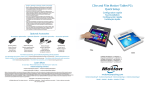
Starting the tablet
2
Mise sous tension • Einschalten
Inicio del tablet • Ligando o tablet
1
2
3
4
10
3
4
5
6
7
11
12
13
14
15
8
16
9
31
30
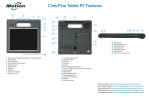
1Speakers
2Microphone and ambient
light sensor
3 Camera button
4 Motion QuickNav
5 Motion Dashboard button
6 Escape button
7 Directional pad
8Microphones
9 Peripheral connector
10 Camera light (optional)
11 Camera (optional)
12 Docking connector
(door attached)
13 Battery (left side)
14 Release latch—right
battery
15 Release latch—left battery
16 Battery (right side)
17 Pen tether post
18 Pen holder
19 Express card slot
(optional)
20 Smart card slot (optional)
21 Power button
22 Fingerprint reader
23 Windows Security button
(Ctrl+Alt+Del)
24 Battery status light
25 Shoulder strap connection
(cover removed)
26 Power adapter port
27 Video port (VGA)
28 USB ports
29 Ethernet port
30 Earphone port
31 Microphone port
29
28
27
26
1Haut-parleurs
2 Microphone et capteur de
lumière ambiante
3 Bouton de l’appareil photo
4 Motion QuickNav
5 Bouton Motion Dashboard
6 Touche Echap
7 Commande à cinq directions
8Microphones
9 Connecteur périphérique
10 Flash de l’appareil photo
(en option)
11 Appareil photo (en option)
12 Connecteur d'ancrage
(attaché au cache)
13 Batterie (côté gauche)
14 Loquet de verrouillage—
batterie de droite
15 Loquet de verrouillage—
batterie de gauche
16 Batterie (côté droit)
17 Lien du stylet
18Stylet
19 Fente pour carte Express
(en option)
20 Fente pour carte Smart
(en option)
21 Interrupteur d'alimentation
22 Lecteur d'empreinte digitale
23 Bouton de sécurité
Windows (Ctrl+Alt+Suppr)
24 Voyant d'état de la batterie
25 Attache de la bandoulière
(capot retiré)
26 Port adaptateur secteur
27 Port vidéo (VGA)
28 Ports USB
29 Port Ethernet
30 Port casque
31 Port microphone
25
Port doors removed
Caches des ports retirés
Steckplatzabdeckung
wurde entfernt
Vista sin puertas
de puertos
Portas removida
1 Lautsprecher
2 Mikrofon und
Umgebungslichtsensor
3Kamerataste
4 Motion QuickNav
5 Taste "Motion Dashboard"
6Esc-Taste
7 Steuerungstasten in fünf
Richtungen
8Mikrofons
9Peripherieanschluss
10 Kameralicht (optional)
11 Kamera (optional)
12Docking-Anschluss
(Klappe befestigt)
13 Akku (links)
14 Riege—rechter Akku
15 Riege—linker Akku
16 Akku (rechts)
17Stift-Haltevorrichtung
18Stift
19ExpressCard-Steckplatz
(optional)
20Smartcard-Steckplatz
(optional)
21Netzschalter
22Fingerabdruckleser
23 Taste "Windows-Sicherheit"
(Strg+Alt+Entf )
24Akkustatusanzeige
25Schultergurtverbindung
(Abdeckung entfernt)
26Netzadapteranschluss
27 Videoanschluss (VGA)
28USB-Anschlüsse
29Ethernet-Anschluss
30Kopfhöreranschluss
31Mikrofonanschluss
25
24
23
22
1Altavoces
2 Micrófono y sensor de luz
ambiental
3 Botón de cámara
4 Motion QuickNav
5 Botón Motion Dashboard
6 Botón de escape
7 Teclas de dirección
8Micrófonos
9 Conector de periféricos
10 Luz de cámara (opcional)
11 Cámara (opcional)
12 Conector de base (puerta
colocada)
13 Batería (lado izquierdo)
14 Pestillo de liberación—
batería derecha
15 Pestillo de liberación—
batería izquierda
16 Batería (lado derecho)
17 Poste de cordón del lápiz
18 Compartimento del lápiz
19 Ranura para tarjetas Express
(opcional)
20 Ranura para tarjetas
inteligentes (opcional)
21 Botón de encendido
22 Lector de huellas
23 Botón de seguridad de
Windows (Ctrl+Alt+Supr)
24 Luz de estado de la batería
25 Conexión de la correa para el
hombro (vista sin cubierta)
26 Puerto del adaptador
de alimentación
27 Puerto de vídeo (VGA)
28 Puertos USB
29 Puerto Ethernet
30 Puerto para auriculares
31 Puerto para micrófonos
21
20
19
18
17
1Alto-falantes
2 Microfone e sensor de luz
ambiente
3 Botão da câmera
4 Motion QuickNav
5 Botão Motion Dashboard
6 Botão Escape
7 Botões direcionais
8Microfones
9 Conector periférico
10 Luz da câmera (opcional)
11 Câmera (opcional)
12 Conector do docking
(porta anexa)
13 Bateria (lado esquerdo)
14 Latch de liberação—
bateria da direita
15 Latch de liberação—
bateria da esquerda
16 Bateria (lado direito)
17 Posição da correia da caneta
18 Suporte da caneta
19 Slot de express card
(opcional)
20 Slot de cartão inteligente
(opcional)
21 Botão de energia
22 Leitor de impressão digital
23 Botão de segurança do
Windows (Ctrl+Alt+Del)
24 Luzes de status da bateria
25 Conexão da alça de ombro
(capa removida)
26 Porta do adaptador
de energia
27 Porta de Vídeo (VGA)
28 Portas USB
29 Porta Ethernet
30 Porta do fone de ouvido
31 Porta do microfone