1
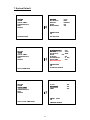
5.1 REC SETTING
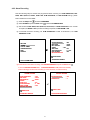
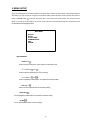
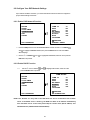
This page allows you to set the recording rate and recording quality, and enables you to continue
recording when the disk is full.
MAIN MENU
REC SETTING
REC RATE
REC QUALITY
DISK FULL
AUDIO
MULTIPLEXER
RECORD
ALARM
CLOCK / TIMER
COMMUNICATION
DISK
SYSTEM
: 20 F/S
: BEST
: REWRITE
: OFF
: ON
MAIN PAGE
SET REC RATE
GOTO REC PAGE
REC RATE:
This option is for adjusting the number of pictures recorded per second o nto a storage disk. The
recording rate controls the frequency at which the number of video pictures can be recorded.
?
There are 11 different recording rates you can select from: 60F/S (60 Fields Per Second),
30F/S, 20F/S, 12F/S, 5.5F/S, 2.4F/S, 1.22F/S, 0.71F/S, 1 F/4S, 1F/6S, 1F/8S.
Please refer to the table in Section 4.1.2 for details on recording times.
REC QUALITY:
This option determines the image quality to be recorded. The DVR stores images in the
compressed format and allows the image quality to be altered by the image size. There are 4 levels
of image quality you can select from: BEST, HIGH, STANDARD, and BASIC. Selecting the BEST
image for use provides higher-resolution recorded images, and normally takes up more storage
space than a HIGH, STANDARD or BASIC image does.
DISK FULL:
This option determines the way to utilize storage media in case of a full disk.
REWRITE: When the hard disk is full, the device continues recording by displacing the old data.
STOP: When the hard disk is full, the device will stop recording.
31