1
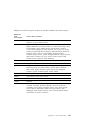
6. For more information about what caused an error message to appear and what
action to take, refer to the following chart.
Problem
Go to:
POST error code or message appears.
“POST Message Charts” on page 67.
After more than one beep, application
program or operating system appears.
“Diagnostic Programs” on page 96.
Blank screen, unreadable screen, or other
unusual response occurs.
“Troubleshooting Charts” on page 86.
If you are unable to resolve a problem and need assistance, refer to Chapter 6,
“Getting Help, Service, and Information” on page 99.
66
Using Your Personal Computer