1
Hardware Options and Upgrades
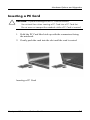
Inserting a PC Card
CAUTION: To prevent damage to the PC Card connectors:
Use minimal face when inserting a PC Card into a PC Card slot.
Do not move or transport the notebook while a PC Card is inserted.
1. Hold the PC Card label-side up with the connectors facing
the notebook.
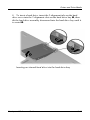
2. Gently push the card into the slot until the card is seated.
Inserting a PC Card
Startup and Reference Guide––Part 2
8-5