1
Index
A
ac adapter
plugging into the hub, 1-5, C-2
plugging into the wall, 1-5
Activity LED, 3-2
AdvanceStack Assistant, v
at a glance, iii
ASCII console, 1-14
AUI/Xcvr LED, 3-3
AUI/Xcvr slot, 3-4
auto-partitioning
basic operation, 3-5
Index
B
back of the hub
installing optional modules, 1-3
BBS
obtaining software from, 2-11
brackets, mounting
how to order, 1-8
bulletin board
obtaining software from, 2-11
C
cables
cabling problems, 2-6
network connections, A-2
twisted-pair connector pin-outs, A-3
cables and connections, A-2
collision detection, 3-5
Collision LED, 3-2
CompuServe
obtaining files from, 2-11
connections
hub-to-hub networking, 1-10
network, 1-9
out-of-band management, 1-14
connector specifications, B-2
countries
ac adapters for, 1-2
customer service
types of, 2-11
D
Declaration of Conformity, C-10
description, iii
Index-2
diagnosing with the LEDs, 2-3
diagnostic tests, 2-8
testing the hub only, 2-8
testing twisted-pair cabling, 2-8
E
electrical specifications, B-2
electromagnetic specifications, B-2
environmental specifications, B-2, C-2
Ethernet networks, iii
external power supply, 1-2
F
fax
using to get HP product information, 2-11
features, v
fiber-optic backbone, 1-13
front of the hub
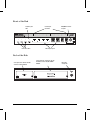
status LEDs, 3-2
ftp
obtaining files from HP, 2-11
H
Hourly support
calling for, 2-14
HP AdvanceStack SNMP Module
LED pattern during self-test, 2-3
part of hub installation, 1-3
HP FIRST FAX Retrieval Service
using, 2-14
HP FTP Library Service
using, 2-12
hub
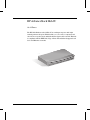
at a glance, iii
cables, A-2
connecting to fiber-optic backbone, 1-13
connecting to network backbones, 1-12
description, iii
features, v
included parts, 1-2
installation problems, 2-6
installing, 1-2
mounting, 1-7, C-2
operation, 3-5
replacing, 2-10
specifications, B-2
troubleshooting, 2-2