1
6.3 Main Text.fm Page 9 Friday, February 15, 2008 10:17 AM
DISCRETE CODES FOR LEARNING REMOTES
Remote control discrete On and Off IR commands are used by
installers when programming macro commands into universal remotes.
Using an On-only or Off-only command is more effective than a toggle
On/Off command when trying to ensure the satellite receiver is reliably
in one state or the other. To use discrete power commands, complete
the following:
1
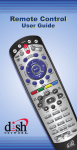
Program the DISH Network remote to the desired remote address
(see Changing the Remote and Receiver Address below).
2
Hold the SAT mode button until all mode buttons light, then
release.
3
Press POWER (not TV POWER).
4
Press VOLUME UP for discrete power on, or VOLUME DOWN
for discrete power off.
5
Press any other button when done to end this procedure.
AVOIDING REMOTE CONFLICTS
When your remote control uses UHF, you may experience interference
from other nearby remotes. The instructions in this section describe
how to avoid remote conflicts.
CHANGING THE REMOTE AND RECEIVER ADDRESS
One quick way to avoid remote conflicts is by changing the address on
your remote and receiver. If you notice that your receiver is changing
channels or opening menus but you’re not using the remote control, a
quick change of address should fix the problem.
1
Press SYSTEM INFO on the receiver's front panel. The System
Information screen displays and shows the Remote Address.
Write down the address shown:
2
Press and hold SAT on your remote control for about three
seconds, until all of the mode buttons light up, and then let go of
SAT.
3
Use the NUMBER PAD to enter any number between 1 and 16,
but not the one you wrote in step 1.
9