1
First Things First
Connection D
TV
IN
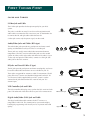
Good Picture and Sound Quality
To use this connection you must have:
•
TV with RF input
•
Coaxial cables
SATELLITE
DISH
DSS
RECEIVER
CABLE
OR
OFF-AIR ANTENNA
IN FROM ANT
VIDEO
R
VIDEO
R
AUDIO
L
OUT TO TV
AUDIO
L
SATELLITE IN
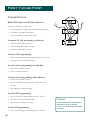
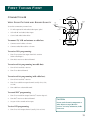
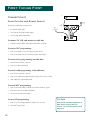
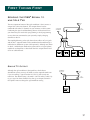
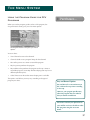
To connect TV and antenna or cable box:
1. Connect coaxial cables as shown.
To receive DSS® programming:
•
Tune TV to channel 14 if you receive signals off-air.
•
Tune TV to channel 65 if you receive signals from cable.
To receive off-air programming (no cable box):
1. Turn off DSS® receiver.
2. Tune TV to desired channel.
To receive cable programming (with cable box):
1. Turn off DSS® receiver.
2. Tune TV to cable box output channel (usually CH2, CH3, or CH4).
3. Tune cable box to desired channel.
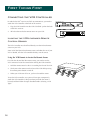
CAUTION
Do not stack electronic components or
other objects on top of the DSS®
receiver. See Safety Information, inside
front cover.
13