1
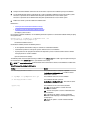
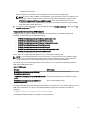
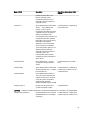
You can also choose to install, reinstall, and uninstall features with one execution of the msiexec.exe program. For
example, msiexec.exe /i SysMgmt.msi REMOVE=BRCM /qb
This command runs the installation for managed system software, and uninstalls the Broadcom agent. This execution is
in an unattended but not silent mode.
Related Links:
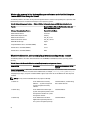
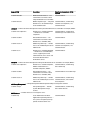
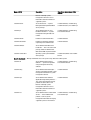
Software Feature IDs
MSI Return Code
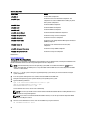
An application event log entry is recorded in the SysMgmt.log file. The following table shows some of the error codes
returned by the msiexec.exe Windows Installer Engine.
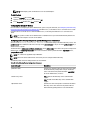
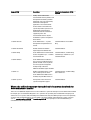
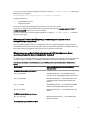
Table 8. Windows Installer Return Codes
Error Code
Value
Description
ERROR_SUCCESS
0
The action is completed successfully.
ERROR_INVALID_PARAMETER
87
One of the parameters was invalid.
ERROR_INSTALL_USEREXIT
1602
The user canceled the installation.
ERROR_SUCCESS_REBOOT_REQUI
RED
3010
A restart is required to complete the installation. This
message is indicative of a successful installation.
NOTE: For more information on all the error codes returned by the msiexec.exe and InstMsi.exe Windows Installer
functions, see support.microsoft.com.
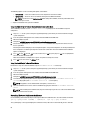
System Recovery On Failed Installation
The Microsoft Software Installer (MSI) provides the ability to return a system to its fully working condition after a failed
installation. MSI does this by maintaining an undo operation for every standard action it performs during an install,
upgrade, or uninstall. This operation includes restoration of deleted or overwritten files, registry keys, and other
resources. Windows temporarily saves all files that it deletes or overwrites during the course of an installation or
removal, so that they can be restored if necessary, which is a type of rollback. After a successful installation, Windows
deletes all of the temporary backup files.
In addition to the rollback of MSI Standard Actions, the library also has the ability to undo commands listed in the INI file
for each application if a rollback occurs. All files that are modified by the installation actions are restored to their
original state if a rollback occurs.
When the MSI engine is going through the installation sequence, it ignores all actions that are scheduled as rollback
actions. If a Custom Action, MSI Standard Action, or a installation action fails, then a rollback starts.
You cannot roll back an installation once it is completed; transacted installation is only intended as a safety net that
protects the system during an installation session. If you want to remove an installed application, you should uninstall
that application.
NOTE: Driver installation and removal is not executed as part of the installation transaction and therefore cannot
be rolled back if a fatal error occurs during execution.
NOTE: Installations, uninstallations, and upgrades that you cancel during installer cleanup, or after the installation
transaction is completed, are not rolled back.
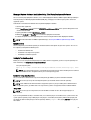
Failed Updates
Apply the MSI patches and updates provided by vendors to the original vendor MSI packages provided. If you
intentionally or accidentally repackage an MSI package, or make changes to it directly, patches and updates may fail.
MSI packages must not be repackaged; doing so changes the feature structure and Globally Unique Identifier (GUID),
38