1
Chapter 11. Working With Virtual Machines
The default format of the internal name is i-<user_id>-<vm_id>-<instance.name>, where
instance.name is a global parameter. When vm.instancename.flag is set to true, if a display name is
provided during the creation of a guest VM, the display name is appended to the internal name of the
guest VM on the host. This changes the internal name format to i-<user_id>-<vm_id>-<displayName>.
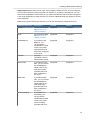
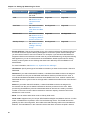
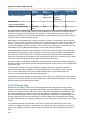
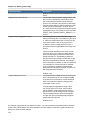
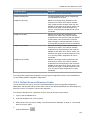
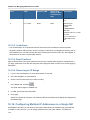
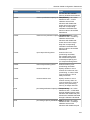
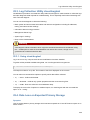
The following table explains how a VM name is displayed in different scenarios.
User-Provided
Display Name
vm.instancename.flag
Hostname on the Name on
VM
vCenter
Internal Name
Yes
True
Display name
i-<user_id><vm_id>displayName
i-<user_id><vm_id>displayName
No
True
UUID
i-<user_id><vm_id><instance.name>
i-<user_id><vm_id><instance.name>
Yes
False
Display name
i-<user_id><vm_id><instance.name>
i-<user_id><vm_id><instance.name>
No
False
UUID
i-<user_id><vm_id><instance.name>
i-<user_id><vm_id><instance.name>
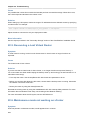
11.7. Stopping and Starting VMs
Once a VM instance is created, you can stop, reset, or delete it as needed. In the CloudPlatform UI,
click Instances, select the VM, and use the Stop, Start, Reset, Reboot, and Destroy buttons.
Reseting leads to restarting a VM. You can reset when a VM is either running or stopped.
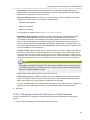
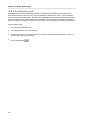
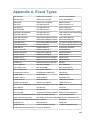
11.8. Assigning VMs to Hosts
At any point in time, each virtual machine instance is running on a single host. How does
CloudPlatform determine which host to place a VM on? There are several ways:
• Automatic default host allocation. CloudPlatform can automatically pick the most appropriate host to
run each virtual machine.
• Instance type preferences. CloudPlatform administrators can specify that certain hosts should have
a preference for particular types of guest instances. For example, an administrator could state that
a host should have a preference to run Windows guests. The default host allocator will attempt to
place guests of that OS type on such hosts first. If no such host is available, the allocator will place
the instance wherever there is sufficient physical capacity.
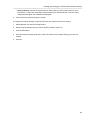
• Vertical and horizontal allocation. Vertical allocation consumes all the resources of a given host
before allocating any guests on a second host. This reduces power consumption in the cloud.
Horizontal allocation places a guest on each host in a round-robin fashion. This may yield better
performance to the guests in some cases.
• End user preferences. Users can not control exactly which host will run a given VM instance, but
they can specify a zone for the VM. CloudPlatform is then restricted to allocating the VM only to one
of the hosts in that zone.
90