1
Jack PC
EFI Series
Hardware User Manual
Revision C
06/06/2006
*CDC01927*
1
Jack PC Hardware User Manual - Training Department
Revision C 0506
COPYRIGHT NOTICE
© 2006 Chip PC Inc., Chip PC (Israel) Ltd., Chip PC (UK) Ltd. All rights reserved.
This manual and the software and hardware described herein, in whole or in part, may not be
reproduced, translated, or reduced to any machine-readable form without prior written approval.
CHIP PC SHALL NOT BE LIABLE FOR TECHNICAL OR EDITORIAL ERRORS OR OMISSIONS
CONTAINED HEREIN; NOR FOR INCIDENTAL OR CONSEQUENTIAL DAMAGES
RESULTING FROM THE FURNISHING, PERFORMANCE, OR USE OF THIS MATERIAL.
The information contained in this document represents the current view of Chip PC on the issues
discussed as of the date of publication. Because Chip PC must respond to changing market
conditions, it should not be interpreted to be a commitment on the part of Chip PC, and Chip PC
cannot guarantee the accuracy of any information presented after the date of publication.
This Guide is for informational purposes only. CHIP PC MAKES NO WARRANTIES, EXPRESS
OR IMPLIED, IN THIS DOCUMENT.
U.S. GOVERNMENT RESTRICTED RIGHTS
The Software and documentation are provided with RESTRICTED RIGHTS. Use, duplication, or
disclosure by the Government is subject to restrictions as set forth in subparagraph (c)(1)(ii) of
the Rights in Technical Data and Computer Software clause at DFARS 252.227-7013 or
subparagraphs (c)(1) and (2) of the Commercial Computer Software—Restricted Rights at 48
CFR 52.227- 19, as applicable. MANUFACTURER is Chip PC Inc.
PATENTS
The product(s) described herein are protected by multiple international patents.
TRADEMARKS
Xcalibur, Xtreme PC, Jack PC, Chip PC and the Chip PC logo are either trademarks or registered
trademarks of Chip PC.
Products mentioned in this document may be registered trademarks or trademarks of their
respective owners
The Energy Star emblem does not represent endorsement of any product or service.
Registration Note: The unit is covered with Chip PC Limited Warranty for one year; Additional 2
years are pending on product registration at Chip PC website: www.chippc.com/support
The information and specifications in this document are subject to change without notice.
2
Jack PC Hardware User Manual - Training Department
Revision C 0506
TABLE OF CONTENT
1
SAFETY NOTICES ............................................................................................................................................................4
1.1
2
2.1
2.2
2.3
2.4
3
Safety Instructions............................................................................................................... 5
INTRODUCTION................................................................................................................................................................6
Power Options..................................................................................................................... 8
Intended Audience .............................................................................................................. 9
Main Topics Overview......................................................................................................... 9
More Information ................................................................................................................. 9
HARDWARE SETUP
10
3.1 Site Preparation ................................................................................................................ 10
3.2 Package Contents............................................................................................................. 10
3.3 Identifying the Parts of the Jack-PC
........................................................................... 11
3.4 Existing LAN Installation
............................................................................................. 12
3.5 New Installation
.......................................................................................................... 16
3.6 Connecting the Cables
............................................................................................... 21
3.7 Turning the Jack-PC ON
............................................................................................. 22
3.8 Unplugging the System When Using External Power....................................................... 22
3.9 Reseting the Jack-PC ....................................................................................................... 22
4
5
6
JACK-PC MODELS
...................................................................................................................................................23
JACK-PC SPECIFICATIONS
....................................................................................................................................24
WIRING CONFIGURATIONS
...................................................................................................................................26
6.1 LAN wiring basics.............................................................................................................. 26
6.2 LAN wiring color coding
.............................................................................................. 27
6.3 Non-standard LAN cabling
......................................................................................... 28
6.4 Testing LAN Cabling
................................................................................................... 29
6.5 Switch Settings.................................................................................................................. 29
6.6 PoE Settings ..................................................................................................................... 29
6.7 Pre-standard PoE
....................................................................................................... 31
7
TROUBLESHOOTING
..............................................................................................................................................32
7.1 Basic Troubleshooting flow ............................................................................................... 32
7.2 Reseting the Jack-PC to Factory Default Settings (RFD)
.......................................... 33
7.3 LAN Troubleshooting flow
........................................................................................... 36
7.4 PoE Troubleshooting flow
........................................................................................... 38
8
9
ACCESSORIES LIST
................................................................................................................................................39
REGULATORY COMPLIANCE
.................................................................................................................................44
9.1
9.2
9.3
9.4
9.5
9.6
10
11
12
13
Jack-PC Requirements Compliance ................................................................................. 44
FCC Statements................................................................................................................ 44
IEC/EN Notice ................................................................................................................... 44
Modifications ..................................................................................................................... 44
Cables ............................................................................................................................... 44
Peripheral Devices ............................................................................................................ 44
CHIP PC LIMITED HARDWARE WARRANTY
........................................................................................................49
CHIP PC LIMITED SOFTWARE WARRANTY
.........................................................................................................52
CHIP PC SOFTWARE LICENSE AGREEMENT
.....................................................................................................54
MICROSOFT END USER LICENSE AGREEMENT (EULA)
...................................................................................56
3
Jack PC Hardware User Manual - Training Department
Revision C 0506
Welcome and congratulations on your purchase of the Jack PC!
This User Manual contains the information you will need in order to set up your Jack PC's
hardware.
For information concerning the Jack-PC's software aspects, please refer to the Software User
Manuals, that can be found at www.chippc.com
1
SAFETY NOTICES
This section contains important safety notices. Please read carefully as improper handling of the
product may result in serious personal injury and/or termination of warranty!
Caution: Never open the product’s enclosure and never attempt to replace or fix any internal
part! Any attempt to repair the product, install or replace components by an unauthorized person
could expose that person to risk electrical shock and will cause the product warranty to be void.
Only trained and qualified personnel should be allowed to install, replace, or service
this equipment. For any problem, please contact the nearest authorized service provider.
Caution: To prevent possible electrical shock when installing the product, do the following:
Make sure that the connected display is properly grounded through the mains plug.
Any peripheral device connect to the Jack-PC, must be connected to properly wired receptacles.
Caution: when using an external power supply (5VDC AC/DC adapter) use only Chip PCsupplied, UL-listed direct plug in AC/DC adapter, (Chip PC part number: CPN1491 or CPN1503
or CPN1504). Using a different power supply might expose the user to various risks, damage the
device and will void the product's warranty!
Caution: When using USB devices that power from the Jack-PC's UBS ports, be aware that
heavy electrical loads on the USB ports can cause instable operation and excessive heat buildup;
therefore it is better to use the USB device's external power supply.
Caution: This product is designed for indoor use only!
Important Note: When preparing a new installation, note the following cautions:
• Do not drill next to electricity/telephone lines.
• Test for existence of power lines or enforcement beams prior to drilling the wall
cutout.
• Make sure to comply with any building standards that might exist in the
building that the Jack PC is designated to be installed.
Important Note: The product is to be installed in compliance with the requirements of
the Canadian electrical Code (CEC) and the National Electrical Code in USA.
4
Jack PC Hardware User Manual - Training Department
Revision C 0506
1.1
Safety Instructions
Please read the following safety instructions carefully before using the product:
•
•
•
•
•
•
Be sure not to expose the product to excessive humidity.
When using an external power supply, place the DC power cord in such a way to
avoid people stepping on it.
When using an external power supply, if the product is not used for a long period of
time, it is better to turn off the device by removing the power supply from the mains
socket.
The product should be stored and used only in temperature and humidity controlled
environments as defined in the product environmental specifications.
When using an external power supply (5VDC AC/DC adapter) use only Chip PCsupplied, UL-listed direct plug in AC/DC adapter (Chip PC part number: CPN1491 or
CPN1503 or CPN1504). Using a different power supply might expose the user to
various risks, damage the device and will void the product's warranty!
The product is to be installed in compliance with the requirements of the Canadian
electrical Code (CEC) and the National Electrical Code in USA.
If one of the following situations occurs, be sure to get the product checked by a qualified service
technician:
•
•
The product’s power supply is overheated, damaged, broken, causes smoke
or shortens the mains power socket.
Liquid penetrates the product case.
•
The product is exposed to excessive moisture or water.
•
The product has been mechanically damaged.
•
The product has obvious signs of breakage or internal loose parts.
•
In EU: Installation done not in accordance with EU required standards
•
In US: Installation done not in accordance with US required standards
.
5
Jack PC Hardware User Manual - Training Department
Revision C 0506
2
INTRODUCTION
The Jack PC is a versatile, feature-rich thin client computer fully integrated into an existing LAN
Jack, it is the most secure, modular, and manageable Thin-Client solution offering connection to
any type of popular Terminal, Citrix or Legacy servers.
With the Jack PC, you can quickly and easily convert an existing enterprise LAN jack into a fullyworking, remotely-managed computer without installing additional cabling. The Jack PC is
connected at the back side through Ethernet cable to the building's LAN. The front panel is
connected (through cables or wirelessly) to the display, keyboard, mouse and other peripherals.
For extended functionality, Jack PC supports a wide set of accessories, such as External USB
PC/SC Smart Card Reader, various adapters such as USB-to-PS/2, USB-to-Serial and more. See
Accessories list for more details.
6
Jack PC Hardware User Manual - Training Department
Revision C 0506
The Jack PC can be fitted into wall, floor or furniture housing according to site specific needs.
Installation is easy and quick and enables an organization-wide usage of LAN Jacks for various
uses offered by the Flex-Jack system (see www.chippc.com for more details about additional
Flex-Jack devices).
The Jack PC is secured inside the wall and behind the faceplate, eliminating exposure to
damage, disconnection or theft. Highest security is also featured in the Jack PC local image
software with its unique modular operating system and Digital Signature layer, which provide a
virus-immune to the highest security standard.
Jack PC deployment and on-going maintenance are fully automated by using Xcalibur Global
Management software, offering a real plug-and-play solution - Just connect the Client to your
network and the rest will happen automatically. Configuration is quick and painless, management
is fast and effective, and installation couldn't be easier. For more information about Xcalibur
Global see www.chippc.com)
With its great performance, high security, easy deployment and management, the Jack PC is the
thin-client-of-choice for enterprises and organizations all over the world.
The Jack PC unfolds important advantages to enterprise IT and network managers, and to
decision makers:
•
•
•
•
•
•
•
•
•
Minimize installation space and wiring - Just connect the display, keyboard and
mouse
Get highest physical security computer - Locks into the housing, no exposed/
removable components.
Get the world first computer powered by standard PoE (PoE IEEE 802.3af) port.
Just like IP telephony! No need for power supply and wiring.
Save on lowest heat and power consumption - only 5W!
Enjoy the most flexible and highest performance thin client in the market today Resident Citrix ICA, Microsoft RDP, local browser IE 6 and other plug-ins for local
applications.
Benefit from the best remote management software - with Xcalibur Global. Location
memory feature for accurate location pinpointing. 100% remote configuration - now as
part of your Active Directory – managed with policies just like PCs.
Part of Flex Jack system - where a variety of compatible modules can be inserted into
the same infrastructure housings (see accessories list).
Patented - protected by multiple International Patents.
Certified - to meet Global Certification to the highest standards.
7
Jack PC Hardware User Manual - Training Department
Revision C 0506
2.1
Power Options
Power-over-Ethernet (PoE) becomes a common technology as many sites adding PoE to
support VOIP telephony and wireless access points. Jack PC devices are especially built to be
powered by Power-over-Ethernet infrastructure. However, where there is no PoE switch
available, Jack PCs can be powered through a Midspan injector or with the external power supply
supplied by Chip PC.
1) PoE Switch Available
The Jack PC thin clients are connected at the back side through Ethernet cables to the building
LAN and receive Power-over-Ethernet through the existing CAT-5 enterprise infrastructure. Jack
PC, is the world’s lowest power desktop, consumes only 5W at full work mode, which means
significant costs-savings to the enterprise.
The Jack PC supports the industry PoE standard 802.3AF. Check that your switch has 802.3AF
support, if you are not sure – check with your Switch provider, see section 6.6 for more
information.
2) Switch + Midspan PoE Injector
If Power-over-Ethernet is not available, Midspan power injectors can be added to complement
existing LAN switches and create PoE infrastructure for all/specific ports.
3) Standard LAN Switch + External Power Supply
Another option is to use Jack PC devices with external DC power jack enabling standard wall
mounted power supply connection. Jack PC devices should only be used with Chip PCsupplied power supplies (Chip PC part number: CPN1491 or CPN1503 or CPN1504).
8
Jack PC Hardware User Manual - Training Department
Revision C 0506
2.2
Intended Audience
This User Manual is primarily intended for IT staff and administrators, though end-users and
others might find it helpful as well.
2.3
Main Topics Overview
This User Manual covers the hardware aspects of your new Jack PC, including hardware setup
and installation, wiring and network configuration, troubleshooting etc.
Our complementary Software User Manual covers the software aspects such as: software setup
and device settings (network definitions, display, keyboard and mouse properties, connections to
server(s) and more).
2.4
More Information
Questions about the Jack PC should be directed to Chip PC support; to an authorized Chip PC
service provider; or the Technical Support Department of the distributor from which you
purchased your Jack PC. Please have all pertinent information available when requesting help,
including any error messages that may have appeared either on the Jack PC or on the server. In
case you are unable to solve your problem you can contact Chip PC’s technical support through
https://www.chippc.com/support/
If you have any corrections / remarks on this user manual, please email them directly to:
[email protected]
9
Jack PC Hardware User Manual - Training Department
Version 0506
3
HARDWARE SETUP
3.1
Site Preparation
Before installing the Jack PC make sure that:
3.2
•
The site wiring is appropriate (power and network).
•
The site is away from devices that can generate electrical noise,
electromagnetic interference, heat, vibration and such.
•
The environmental requirements of the Jack PC as defined in the product
specifications are met.
•
Caution: This product is designed for indoor use only!
•
Warning: If you are not familiar with LAN wiring practice, use RJ-45
Termination Connector Block to avoid wiring (Part number CPN02164 or
CPN02166 - see accessories list). This connector can only be used to
connect the Jack PC to an existing LAN jack.
Package Contents
Unpack and identify the following parts:
1. Jack PC device (model EFI6700 or EFI680 or EFI6900).
2. IDC Termination Connector Block
3. Flex-Jack Metal Housing
4. Lower Cardboard Template that can be used for marking wall cutout in New
Installation
5. Extraction Tool to remove device after it was installed
6. RJ-45 Termination Connector Block (optional) (Note: This part must be ordered
separately in case you want to install the Jack PC in to an existing LAN jack. Chip PC
part number: CPN02164 or CPN02166 – see accessories list)
7. Warranty Registration Card
Package Contents
1. Jack PC device (Model
EFI6700 or EFI6800 or
EFI6900)
2. IDC Termination
Connector Block
3. Flex-Jack Metal
Housing
4. Lower Cardboard Template
5. Extraction Tool
6. RJ-45 Termination
Connector Block
(optional)
7. Warranty Registration Card
10
Jack PC Hardware User Manual - Training Department
Version 0506
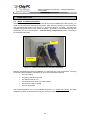
3.3
Identifying the Parts of the Jack-PC
Model EFI-6700 and 6800
Jack-PC Parts & I/O Ports
4 USB 2.0-compatible ports that can be
used for:
• Standard USB keyboard* including most
wireless models
• Standard USB mouse* including most
wireless models
• USB printers*
• External USB PC/SC Smart Card
Reader
• External mass-storage devices, such as
USB Flash Key, CD, Floppy, DVD,
Camera etc.
* In case a USB-to-PS/2 converter or USBto single/dual Serial ports adapter (to
support serial printers) is needed,
purchase it only from Chip PC to insure
compatibility. (See Accessories list)
Extraction Point – insert Extraction tool
(latch) and turn it clockwise to remove
installed device
“Reset-to-Factory-Default” (RFD) Push
Button.
Model EFI-6900
“Power/Fail” LED
“Reset” Button
Audio-Out 3.5 mm Jack for standard
speakers, headset or multimedia systems
“LAN Link & Activity” LED
DC Power Jack for wall-mounted power
supply, where no PoE available - the
device may be powered externally
Audio-In 3.5 mm Jack for standard
computer microphone
Analog Monitor Port
DVI-I Monitor Port. Supports Dual-Screen
(optional)
11
Jack PC Hardware User Manual - Training Department
Version 0506
3.4
Existing LAN Installation
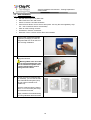
Tools you will need for Existing Jack Installation:
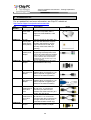
1
•
Power-over-Ethernet Tester (where PoE is available (see power options 1 and 2 in
the introduction chapter) – it is recommended to verify that the LAN jack receives
power with this tester) - this is an optional accessory that you need to purchase
separately (Chip PC part number: CPN02239 – see accessories list).
•
Screwdriver / Powered-screwdriver
•
RJ-45 Termination Connector Block (this is an optional accessory that you need
to purchase separately)
•
Half-round File to trim wall cutout
•
Cloth to clean Housing contacts
•
Extraction Tool to remove device after it was installed
Use Power-over-Ethernet tester
(Chip PC part number: CPN02239)
to check existence of PoE in the
Jack designated for installation.
Note: In case there is no PoE
available, Jack PC can be powered
by External power supply (see step
13).
2
Remove the existing LAN Jack from
the wall.
Separate the LAN Jack module from
the front panel.
3
Pull out the LAN cable, holding the
RJ-45 Termination Connector Block,
4
Connect the LAN jack and RJ-45
connector on the RJ-45 Termination
Connector Block (this is an optional
accessory that you need to purchase
separately, in case you did not order
this part – go to New installation
paragraph (3.5), and continue the
instructions in the table from step 3).
12
Jack PC Hardware User Manual - Training Department
Version 0506
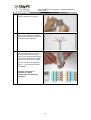
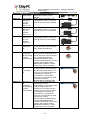
5
Insert the RJ-45 Termination
Connector Block into the Flex-Jack
Housing bottom part until you hear a
clicking sound indicating it has
locked properly into place.
6
Place the Flex-Jack Housing inside
the Jack hole. Trim wall cutout if
necessary.
7
Test the Flex-Jack has current
before you continue.
Make sure that the Flex-Jack
Housing is fully inserted, levelheaded and that the Housing
contacts are located at the bottom
part as shown in picture.
Secure with 4 screws.
8
Gently clean the Flex-Jack Housing
contacts from dust, debris and other
objects.
13
Jack PC Hardware User Manual - Training Department
Version 0506
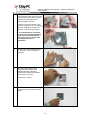
9
The Jack PC device should be
inserted with the contacts (shown in
the picture) facing downwards, as
shown in the picture.
10
Insert the Jack PC device into the
Housing until you hear a clicking
sound indicating the device has
locked properly into place.
Verify device locking by gently
pulling device outwards.
Where using PoE check now to see
that the Power/Fail LED is
illuminated in green, and that the
Link LED is lighted if not use the
troubleshooting guide.
If the device is not locked, remove
the unit, and make sure that the latch
locking hole is intact and is free from
foreign objects. If you are still unable
to lock the unit, try using a different
Metal Housing.
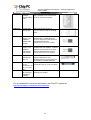
12
Connect Keyboard, Mouse, Monitor
and any other required peripheral to
device ports.
For additional instructions on how to
connect your peripheral devices, see
paragraph 3.6.
Note: In case a USB-to-PS/2
converter or USB-to single/dual
Serial ports adapter (to support serial
printers) is needed (Chip PC part
number: CPN01487).
You can connect the Jack PC to a
Wireless network using the Wireless
LAN USB dongle 802.11g (Chip PC
part number: CPN02302).
Purchase all accessories only from
Chip PC to assure compatibility, for
more details please see the
accessories list.
14
Jack PC Hardware User Manual - Training Department
Version 0506
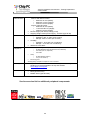
12a Model EFI-6900 offers dual-screen
support.
In order to get this functionality,
connect a Y-cable to the DVI monitor
port.
Purchase the Y-cable only from Chip
PC to assure compatibility. (Chip PC
part number: CPN02176 - see
accessories list).
In order to connect only one VGA
monitor, you will need to use Chip
PC DVI to VGA adapter.
Purchase the DVI to VGA adapter
only from Chip PC to assure
compatibility. (Chip PC part number:
CPN02159 - see accessories list).
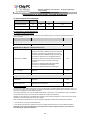
13
To power the device from an external
power source, connect the power
supply to the DC power jack.
Check that the Power/Fail LED is
illuminated in green, and that the
Link LED is lighted if not use the
troubleshooting guide.
Jack PC devices should only be
used with Chip PC-supplied
power supplies (Chip PC part
number: CPN1491 or CPN1503
or CPN1504 – see accessories
list).
14
Press the Reset button – and start
working. Enjoy!
15
Jack PC Hardware User Manual - Training Department
Version 0506
3.5
New Installation
Tools you will need for New Installation:
•
Drill with 65 mm (2.6 Inch) Hole Saw
•
Half-round File to trim wall cutout
•
Cutter to remove LAN cable insulation
•
Corona Punch-Down Tool to secure wires (Note: use only the tool supplied by Chip
PC – see accessories list for more details)
•
Cloth to clean Housing contacts
•
Screwdriver / Electric-screwdriver
•
Extraction Tool to remove device after it was installed
1
Use the lower Cardboard template
supplied in packaging to mark the
designated wall cut out for the FlexJack Housing installation.
2
Drill the wall cut out at the
designated location.
Warning: Make sure not to drill
next to electricity/telephone lines.
Test for existence of power lines
or enforcement beams prior to
drilling the wall cutout!
2a
In case you wish to install the Jack
PC externally, you can use the FlexJack External Mounting Box (Chip
PC part number CPN02172 or
CPN02173).
Insert the cable through the exiting
holes, or cut a new wire path using
one of the thinner areas.
Simply install the External Mounting
Box using standard drill and screws.
16
Jack PC Hardware User Manual - Training Department
Version 0506
3
Trim the cut out gently and check
that the housing fits in properly.
4
Pull out the LAN cable and remove 4
cm/1.5 inch of its plastic insulation.
Separate wire pairs by color and roll
the shielding wires together.
5
Open the IDC Termination
Connector Block red cover. Secure
the wires with an Corona PunchDown Tool by using the appropriate
color scheme, according to TIA568
version A or B as shown in picture.
Note: use only the tool supplied by
Chip PC – (see accessories list for
more details)
Follow the instruction in
paragraph 6 – Wiring
Configurations for additional
information.
17
Jack PC Hardware User Manual - Training Department
Version 0506
6
Close the IDC Termination
Connector Block and insert it into the
Housing bottom part until you hear a
clicking sound indicating it has
locked properly into place.
In case the Connector Block in not
locked in to position, you can slightly
bend the metal tab to create more
pressure on the Connector Block.
It is recommended to verify that
the wires are connected properly
to the Flex-Jack terminal block
before securing it in to the wall!
See chapter 6 for more
information.
6
Place the Flex-Jack Housing inside
the Jack hole. Trim wall cutout if
necessary.
7
Make sure that the Flex-Jack
Housing is fully inserted, levelheaded and that the Housing
contacts are located at the bottom
part as shown in picture.
Secure with 4 screws.
8
Gently clean the Flex-Jack Housing
contacts from dust, debris and other
objects.
18
Jack PC Hardware User Manual - Training Department
Version 0506
9
Test the Flex-Jack has current
before you continue.
The Jack PC device should be
inserted with the contacts (shown in
the picture) facing downwards, as
shown in the picture.
10
Insert the Jack PC device into the
Housing until you hear a clicking
sound indicating the device has
locked properly into place.
Verify device locking by gently
pulling device outwards.
Where using PoE check now to see
that the Power/Fail LED is
illuminated in green, and that the
Link LED is lighted if not use the
troubleshooting guide.
If the device is not locked, remove
the unit, and make sure that the latch
locking hole is intact and is free from
foreign objects. If you are still unable
to lock the unit, try using a different
Metal Housing.
12
Connect Keyboard, Mouse, Monitor
and any other required peripheral to
device ports.
For additional instructions on how to
connect your peripheral devices, see
paragraph 3.6.
Note: In case a USB-to-PS/2
converter or USB-to single/dual
Serial ports adapter (to support serial
printers) is needed (Chip PC part
number: CPN01487).
You can connect the Jack PC to a
Wireless network using the Wireless
LAN USB dongle 802.11g (Chip PC
part number: CPN02302).
Purchase all accessories only from
Chip PC to assure compatibility, for
more details please see the
accessories list.
19
Jack PC Hardware User Manual - Training Department
Version 0506
12a Model EFI-6900 offers dual-screen
support.
In order to get this functionality,
connect a Y-cable to the DVI monitor
port.
Purchase the Y-cable only from Chip
PC to assure compatibility. (Chip PC
part number: CPN02176 - see
accessories list).
In order to connect only one VGA
monitor, you will need to use Chip
PC DVI to VGA adapter.
Purchase the DVI to VGA adapter
only from Chip PC to assure
compatibility. (Chip PC part number:
CPN02159 - see accessories list).
13
To power the device from an external
power source, connect the power
supply to the DC power jack.
Check that the Power/Fail LED is
illuminated in green, and that the
Link LED is lighted if not use the
troubleshooting guide.
Jack PC devices should only be
used with Chip PC-supplied
power supplies (Chip PC part
number: CPN1491 or CPN1503
or CPN1504 – see accessories
list).
14
Press the Reset button – and start
working. Enjoy!
20
Jack PC Hardware User Manual - Training Department
Version 0506
3.6
Connecting the Cables
See section 3.3. for a complete overview of all connectors of your Jack PC device.
Connect USB peripheral device (USB keyboard, mouse, printer etc.) to a USB port.
Note: USB devices may be connected after product being powered although some devices
would not work properly due to driver loading problems. In this case, Press the Reset
Button and the USB devices will work properly.
Connect the monitor video cable to the Display connector, and connect the monitor power
cable to a power source and turn the monitor ON.
Note: Models EFI6700-6800 support only Analog displays. Model EFI-6900 supports both
Analog and DVI displays, to use an Analog display you will need to purchase from Chip PC
the DVI to VGA adaptor cable (see Accessories list).
In case no PoE is available, connect the power adapter DC cord into the device’s DC
jack, and connect the wall-mount power supply to the mains power socket. Once the
Jack-PC receives power, the Power/Fail LED will blink.
Note: the device can be connected to both PoE and mains power socket (using the
external power supply) simultaneously – without causing any damage to the unit. In such
case the unit will work in a fail-safe mode, and in case one of the sources will drop, it will
automatically continue to operate using the second power source.
Note: The Power/Fail LED will change to steady green once the system finished booting up.
In case a self-test procedure has failed, the Power/Fail LED will remain steady red. In this
case use the troubleshooting chapter of this manual.
Connect Microphone to the Audio-In jack (pink).
Connect headphones/external speakers to the Audio-Out jack (green).
21
Jack PC Hardware User Manual - Training Department
Version 0506
3.7
Turning the Jack-PC ON
After you have connected all peripherals and cables, follow these steps to turn your Jack PC
ON:
• In case you have Power-over-Ethernet, the device will get power immediately as
you fully insert the Jack PC to the Flex-Jack housing. It will remain powered as long
as it is connected to the PoE infrastructure (either to a PoE switch, or to a Midspan
power injector).
• In case you are using an External power supply, it is recommended to turn ON
all peripherals connected to the system such as monitor & printer and then
connect the power supply to the Jack-PC and then to the mains socket.
The green Power/Fail LED will illuminate during the system boot.
Once the system is up, the Power/Fail LED will be lit in steady green. The system loading
screen will appear, followed by several status messages. If IP address successfully received
from DHCP, the desktop screen will be shown.
The Jack PC device does not have a power switch as it is fully manageable through
software. During inactivity periods it switches automatically to various Low Power Modes.
Power consumption reduced bellow 1W but still the device is monitoring the LAN for
Xcalibur Global Management Software commands or upgrades. When keyboard or mouse
activities are detected, the device will switch to full power in less than 0.1 seconds.
3.8
Unplugging the System When Using External Power
If you are not going to use the system for a long period of time you should do the following:
3.9
•
Log off from any open connections/sessions.
•
Unplug the system from the mains socket.
Reseting the Jack-PC
Pressing the RESET Button will cause the Jack PC to reboot, execute self-test procedures
and return to its last configuration.
Note: The RESET Button performs reset only to the Jack-PC device and not to the
server; therefore, if there is some problem at the server level, Reset will not solve it!
22
Jack PC Hardware User Manual - Training Department
Version 0506
4
JACK-PC MODELS
Jack PC EFI-6700
Jack PC EFI-6800
Jack PC EFI-6900
Oparating System
Windows CE .NET
4.2
Windows CE .NET
4.2
Windows CE .NET 4.2
Class
Wall-Integrated
Wall-Integrated
Wall-Integrated
CPU
AMD Au 1550 RISC
AMD Au 1550 RISC
AMD Au 1550 RISC
CPU FSB
333 MHz
500 MHz
500 MHz
Equiv. x86
800 MHz
1.2 GHz
1.2 GHz
Flash/RAM
32/64 MB
64/128 MB
64/128 MB
Video Memory
4 MB
8 MB
8 MB
Video Output
Analog
Analog
DVI/Analog
(Dual screen support)
Audio Support
In/Out 20-bit Stereo
In/Out 20-bit Stereo
In/Out 20-bit Stereo
USB Ports
4
4
4
Max Resolution
1280x1024 pixels
1280x1024 pixels
1600x1200 pixels
(future)
Max Colors
16 M (24 bit)
16 M (24 bit)
16 M (24 bit)
Model Jack PC EFI 6700/6800
Model Jack PC EFI 6900
23
Jack PC Hardware User Manual - Training Department
Version 0506
5
JACK-PC SPECIFICATIONS
CPU
•
•
Memory
Mass Storage
Display
•
•
•
•
•
•
•
EFI 6700 AMD Au 1550 Alchemy processor, 333 MHz RISC
(equivalent to 800MHz x86 TC Processors)
EFI 6800-6900 AMD Au 1550 Alchemy processor, 500 MHz RISC
(equivalent to 1.2 GHz x86 TC Processors)
EFI 6700 64 MB DDR
EFI 6800-6900 128 MB DDR, 400 MHz
EFI 6700 32 MB Disk-On-Chip with True File System
EFI 6800-6900 64 MB Disk-On-Chip with True File System
Color VGA / SVGA / XGA, DB-15HD female connector
EFI 6700/6800
o Resolution 1280x1024x16M (24bit True Color) @70Hz
o 128-bit 3D graphics acceleration engine with separate 4
MB display memory SDRAM (6700) and 8 MB display
memory SDRAM (6800).
o Supports VESA standard CRT & LCD
o Analog Out
o Up to 5m extension cable
EFI 6900
o Resolution 1600x1200x16M (24bit True Color) @70Hz
(future)
128-bit 3D graphics acceleration engine with separate 8
MB display memory SDRAM.
o Supports VESA standard CRT & LCD
o DVI-I connector supporting Analog/DVI monitors
o Y-cable for dual screen support – should be purchased
separately from Chip PC. See accessories list for more
information
o Up to 30m active extension DVI cable
4 USB 2.0-compatible ports
Cable adaptors (USB-to-PS/2, USB-to-Serial, 1 or 2 ports, should
be purchased separately from Chip PC. See accessories list for
more information
Audio Output - 3.5 mm (1/8 inch) Audio-Out Jack; full 20-bit Stereo
Audio Input - 3.5 mm (1/8 inch) Audio-In Microphone Jack
CODEC with VOIP support
Power ON/Self Test Passed (Green)
Power STBY/Self-Test Failed (Red)
LAN Link/Activity (Green/Amber)
10/100 Fast Ethernet, twisted pair (RJ-45) with Auto negotiate
TCP/IP with DNS and DHCP
Point-to-Point Protocol (PPP)
SNMP support allows remote configuration of device settings,
reporting of device configuration
Compliant with standards: IEEE 802.3-LAN & 802.3U-LAN
Microsoft Windows CE.NET kernel
OS version 4.2 or 5.0
Power-over-Ethernet (PoE) IEEE 802.3af
Maximum power consumption: 5W
Power consumption (sleep mode): Less than 1W
Voltage range: 48 VDC nominal 36-56 VDC per 802.3AF standard
In case PoE is not available - external wall-mount power supply
can be used: Use only Chip PC-supplied, UL-listed direct plug in
AC/DC adapter (Chip PC part number: CPN1491 or CPN1503 or
CPN1504) – See accessories list for more information
24
o
Input / Output
•
•
Audio Support
•
•
•
•
•
•
•
•
•
•
Status Lights
Network
Operating
System
Power
•
•
•
•
•
•
•
•
Jack PC Hardware User Manual - Training Department
Version 0506
Physical
Characteristics
Environmental
•
•
Dimensions:
Jack PC with EU/UK Frame:
o 8.60cm/3.44 inch (Width);
o 8.60cm/3.44 inch (Height);
o 3.95cm/1.58 inch (Depth)
Jack PC with US Frame:
o 6.96cm/2.78 inch (Width);
o 11.40cm/4.56 inch (Height);
o 3.95cm/1.58 inch (Depth)
Device weight (with frame): 350gr [12 oz]
Shipping weight without power supply - 0.42 65 Kg [0.93 lbs]
Temperature range:
o Operating: 32ºF to 104ºF (0ºC to 40ºC)
o Storage: 32ºF to 140ºF (0ºC to 60ºC)
Humidity:
o Operating - 20 to 80% non condensing
o Storage – 10 to 90% non condensing
Altitude: 0 to 20,000 ft
•
EMC/EMI (Electro-Magnetic Compliance/Interference):
•
•
•
•
Regulatory
Compliance
•
•
o
CE Mark (EN55022 Class B, EN61000-3-2/3, EN55024)
o
FCC Mark (Part 15, Subpart B)
o
VCCI Mark
Safety
o
CE Mark (EN/IEC 60950-1)
o
cUL (UL/cUL 60950-1)
EPA Energy Star
See Regulatory Compliance Chapter for more information
Warranty
§
1 year automatic Limited Hardware Warranty, additional 2 years
pending on product registration at Chip PC website:
www.chippc.com/support
Panel Colors
§
§
§
White (default)
Black (special order)
Metallic Silver (special order)
See Accessories list for additional peripheral components.
25
Jack PC Hardware User Manual - Training Department
Version 0506
6
WIRING CONFIGURATIONS
6.1
LAN wiring basics
Some facts about the LAN cabling:
•
The wires inside LAN cables are made of 4 x twisted pairs marked with similar color
(i.e. Orange and White-Orange).
•
For the 10/100 LAN function to work – only 4 wires (2 pairs) are needed as minimum:
two RX lines and two TX lines (1 and 2, 3 and 5).
•
Giga LAN uses all 8 wires in the cable + the shielding.
•
4 unused wires (4,6,7,8) are optional and typically unused in 100 Base-T networks
although sometimes these 4 wires are used for analog telephony.
•
Shield may be needed (connected) to reduce noise and enable full cable length (100
meters). In CAT 5 and higher the shielding is mandatory.
•
Power from PoE enabled switch can pass thorough the same same minimal RX and
TX lines although it is preferred to have all 8 wires wired.
•
Power from Midspan power injector can not pass thorugh the minimal 4 wires as it is
using the additional unused 4 to deliver power to the powered device.
•
Cable should be straight (pin to pin) altough it may also work in crossed configuration
as the Jack-PC supports MDIIIX functionality.
•
LAN cabling is typicaly limited in range to 100 meter (328 feet).
Figure 6.1 - Non-shielded LAN cable
26
Jack PC Hardware User Manual - Training Department
Version 0506
6.2
LAN wiring color coding
In general wire colors are not critical for proper operation as long as wires are connected
correctly. There are two wiring codes commonly in use - TIA-568A and TIA-568B. They only
differs by the wires color coding as shown in the figure bellow.
It is important to note that A and B cables are identical, the only difference between them is
how their wires were connected at the ends.
Pin Numbering
(tab down)
TIA/EIA 568A
TIA/EIA 568B
Figure 6.2 - TIA-568A and B wiring color coding
Typically site cabling is done according to one of these two conventions although other
options are possible (see next paragraph for non-standard cabling).
Some wiring tips:
• The text printed on the cable may be very confusing. Avoid referring it at all.
•
If you are doing a new installation and you want to confirm which color
convention used for a particular cable, the best option is to look at the far end
of that cable. At the far end you will either have an RJ-45 plug or IDC wiring to
the patch panel. Luckily the RJ-45 jacks are transparent and you will be able to
see the wires' colors. Holding the RJ-45 plug with its tab facing away from you
and contacts facing up according to Figure 6.2 – check wire color from left (pin
1) to right. If you see the combination on the left side then you have 568A if you
see the combination on the right side – then it is 568B. If you see something
different – you have a non standard wiring – go to the next paragraph for nonstandard cabling.
•
If the cable far end connected to a patch panel – check the colors and compare
them with the markings. Typically patch panels provides the two options (A and
B) with color markings.
•
In any case do not trust the marking on the cables as same colors may be
assembled differently and therefore you should not rely on cable markings.
Check wiring before assembly. Color coding may also vary between cable to
cable in one site.
•
If you cut / remove existing LAN jack – check the wiring before you cut and
mark it on the cable (A / B).
27
Jack PC Hardware User Manual - Training Department
Version 0506
6.3
Non-standard LAN cabling
In some cases cable could be a non standard cable or the far end (patch panel) connected in
a non-standard way (not in accordance to TIA-568-A or B). In such case you will have to do
slightly more work mapping the existing non-standard connections.
Please refer to the table bellow. This table should be filled at the far end by looking at the
actual connections. Fill out the second column and then use the third column to connect the
wires to the Flex-Jack terminal block according to the numbering shown in the third colum.
RJ-45 Pin
Color (Fill
actual color)
1
2
3
4
5
6
7
8
Metal
Shield
Flex-Jack
terminal block
contact #
3
2
4
6
5
TIA-568-A
Color
TIA-568-B Color
White - Green
Green
White - Orange
Blue
White - Blue
White - Orange
Orange
White - Green
Blue
White - Blue
1
7
8
Tab
Orange
White - Brown
Brown
Shield
Green
White - Brown
Brown
Shield
Table 6.1 - Non-standard wiring table
See picture bellow of the Flex-Jack terminal block connections and numbering. Note that
contact numbre 8 is at the left (closest to the A/B marking on the label).
Tab
Figure 6.1 - Flex-Jack terminal block numbering
For example, if you have a non-standard wire, and you wrote in the first line of the table
above (RJ-45 Pin number 1) = green, then you need to connect the green wire (on the Jack
PC side) to connector number 3 in the Flex-Jack terminal block.
28
Jack PC Hardware User Manual - Training Department
Version 0506
6.4
Testing LAN Cabling
In a new installation it is difficult to test the cable before you terminated it with Flex-Jack
terminal block. After assembling the terminal block (hopefully in the proper way..) you can use
the Jack PC as a tester. You should see the Power/Fail LED light up after few seconds,
(indicating that the unit receives power) and after about 30 seconds the Link light should turn
on (indicating that there is a connecting to the network, and that the LAN wires are connected
properly.
If Power-over-Ethernet is not available – use an external power supply to power the Jack-PC
(only the one provided by Chip PC).
If PoE is available to that port and still nothing happens (two LEDs not illuminated) – try the
external power supply. If now the device is powered and the Link is on – you have a PoE
problem. If the Link LED is off – you may have a wiring problem or the other end is not
connected to anything.
Note: In most cases wrong LAN wiring will not damage the Jack PC or the switch.
6.5
Switch Settings
This paragraph covers only the LAN settings of a standard LAN switch. Power settings for
PoE will be covered at the next paragraph.
The Jack-PC has a standard 100Base-T LAN NIC with autonegotiate feature enabled by
default.
The switch settings required for managed switch are identical to a standard PC:
•
Port enabled
•
Autonegotiate-enabled
•
100Base-T-not disabled
•
Full duplex-not disabled
•
MDIIX-may be enabled or disabled
• Fast Link-enabled
Tip: In general if you can't make your switch working – try first to connect the cable to a small
unmanaged switch. If this step will be succesful – you will know that you can trust the rest of
the installation and you can just focus on the switch settings.
6.6
PoE Settings
The Jack-PC primary power source is Power-over-Ethernet (PoE) based on the industry
standard IEEE 802.3af. The power source should be able to provide Class 0 power (15.4W
maximum) although it will use much less than 15.4W in reality. See table 3 for IEEE 802.3af
power classification details.
If your PSE is capable of providing PoE based on IEEE 802.3af and still the device is not
powered, then you should check the following PSE settings (depending on specific product
features the following settings may be adjustable by the administrator):
•
The PoE port is enabled
•
The PoE port is set to provide Class 0 or Class 3 power level
• The PoE port is set to IEEE 802.3af (not pre-standard)
If power class is not set correctly, the Jack-PC may not start or it may start and disconnect
during the boot process or during operation.
It is important to note that the Jack-PC does not consume the full 15.4W. This class 0 setting
is only essential to assure proper PSE response to peak power requirements. In steady state
29
Jack PC Hardware User Manual - Training Department
Version 0506
the Jack-PC will consume only 4-6W maximum. Power may vary if demanding USB
peripheral devices or dual monitors are attached to the device.
Class
Usage
Minimum Power
Levels Output at
the PSE
Maximum Power
Levels at the
Powered Device
0
Default
15.4W
0.44 to 12.95W
1
Optional
4.0W
0.44 to 3.84W
2
Optional
7.0W
3.84 to 6.49W
3
Optional
15.4W
6.49 to 12.95W
4
Reserved for Future
Use
Treat as Class 0
Reserved for Future
Use: A class 4
signature cannot be
provided by a
compliant powered
device
Table 6.2 - IEEE 802.3af PSE and Powered Device Power Classifications
Therefore for swiches with overall power limitations, Jack-PC would not usually exceed the
rack limitations. If the PSE is not capable of supplying class 0 power to the Jack-PCs it may
still be possible to operate at class 2 (7W maximum) although this setting is marginal and may
cause random PoE power down events.
A practical example:
Lets take a rack with Catalyst 6500 series switches (240 ports):
Chip PC Jack-PC EFI-6900 typically requires 5W during normal use and 6W during fullscreen video player operation.
As a comparison - Cisco IP Phone 7960G requires 7W when the phone is ringing at
maximum volume and requires 5W on or off hook.
This is a significant reduction from the 15.4W maximum power allowed for within IEEE
802.3af for class 0 devices. It can be seen that PSE power requirements can be significantly
reduced by budgeting for the power the device actually requires, rather than simply allocating
the maximum power defined within IEEE 802.3af.
To calculate actual switch power use, we can multiply 7W by the number of ports (240) =
1680W.
30
Jack PC Hardware User Manual - Training Department
Version 0506
6.7
Pre-standard PoE
Currenly there is a global standard for Power-over-Ethernet maintained by the IEEE. This
standard identified as IEEE 802.3af and is accepted by all vendors.
Unfortunately, before it was accepted there were other PoE detection methods that were sold
by many vendors. These PoE methods called today pre-standard. Detection method is the
mechanism that PSE (Power Sourcing Equipment) uses to poll the the PD (Powered Device)
to assure that the connected device is indeed a PD and is capable of receiving the power.
In particular there are two main pre-standard methods:
• Bulk Capacitor (sometimes called PowerDsine method) – this method uses a big
capacitor connected between the powered lines to identify a PD to the PSE.
• Cisco high frequency signaling – this method uses a high-passs filter between the
TX and the RX lines to identify the PD.
These two pre-standard methods are not natively supported by new equipment such as JackPC. Chip PC currently develops jack installable mosules that will enable detection of prestandard PSEs.
If PoE does not work and you suspect that your equipment is pre-standard – check the switch
/ injector specification for detailed information.
Some tips about Pre-standard PoE:
•
In general every PoE equipment sold before 2002 is probably pre-standard.
•
You can use the PowerDsine single port power injector (can be purchased as an
accessory from Chip PC) to test your installation and confirm that wiring is OK.
•
Some modular switches contains internal inline power modules (for example Cisco
Catalyst 6500 series). In this case you can replace these modules to 802.3af
modules to power specific Jack-PC connected ports.
•
Some switches / PoE injectors supports both pre-standard and standard power. Make
sure that these are configured properly for 802.3af and not pre-standard power.
For more information about how to set-up Cisco Catalyst see Appendix A
31
Jack PC Hardware User Manual - Training Department
Version 0506
7
7.1
TROUBLESHOOTING
Basic Troubleshooting flow
Immediately after you fully insert the Jack-PC device into the installed Flex-Jack housing, you
sould see the Power/Fail LED illuminated green. After about 30 seconds you should see the
Link LED illuminated orange (see figure 7.1). If nothing happens - no lights – use the basic
troubleshooting flow below. If only Power is lighted – go directly to LAN troubleshooting flow
(make sure you have read Chapter 6 – LAN and wiring configurations before continuing to
the troubleshooting flow).
Power
Link LED
Figure 7.1 – Jack-PC Power/Fail and Link LEDs (illuminated)
Naturally troubleshooting the first installation in a particular site is the most difficult. If nothing
works after initial installation completed you have several potential suspects:
•
The LAN cabling
•
The patch panel at the far end
•
The switch at the far end
•
The terminal block at the Flex-Jack housing
•
The Jack-PC used for testing
•
The PoE equipment
The overall motivation (as in any troubleshooting flow) is to isolate and identify the faulty
component/s. Keep in mind that there may be more than one problem!
32
Jack PC Hardware User Manual - Training Department
Version 0506
7.2
Reseting the Jack-PC to Factory Default Settings (RFD)
In some cases it is recommended to perform RFD procedure to regain control of the device:
•
If device becomes unstable and you want to recover it
•
If device settings are not matching available display and as a result no video is visible
•
If device settings do not enable normal keyboard/mouse interaction
Jack PC should be booted in Safe Mode state in order to reset the device to the factorydefaults or in order to upgrade the device’s firmware.
Note: You will need a paper clip in order to press the RFD button (marked on the unit with
explanation mark). The device should be connected to a monitor, and a mouse, and the
device should be powered (by PoE or an external power supply).
Follow these steps to boot the device in to Safe Mode and to reset it to the factory-default
settings:
•
•
Check the device is ON (Power/Fail LED should be steady green).
Use a paper clip (or similar tool) and press and hold the RFD Button
and at the same time press the Reset-button for one (1) second and
release it, without releasing the RFD button – keep holding it.
•
Wait few seconds until the Power/Fail LED will blink green and
change to orange and couple of seconds later to red only then
release the RFD button.
•
The device should be now static, with only the Power/Fail LED
lighting in red, you should not proceed to the next step it the
Power/Fail LED is not steady red.
•
Now, press the RFD button for one (1) more second and release it,
and (the Power/Fail LED would turn green) and immediately press
and hold it again (like doing a double click) - keep holding until the
progress bar displayed on the monitor (the system-splash screen)
has finished loading (the display might turn off and on) and until you
see the log-on screen showing (SAFE MODE) on the title.
•
When a hardware reset is initiated as described above, the device
has now boot into safe-mode state. This mode is designed to allow
the device to complete boot in any scenario. When device is in safemode, only basic OS components are loaded and therefore device
settings are unchangeable. Administrators can only perform firmware
or hotfix installation during this mode.
In order to reset the device to factory default, on the WBT screen
press (using the mouse) the "Reset …" button, and Check "Clear
Device Settings" and/or "Remove Plug-ins" if you wish them to be
removed. (it is recommended you keep installed plug-ins by unchecking the "Remove Plug-ins" option, unless you have a reason
for removing then (corrupt installation, upgrade etc.) – after selecting
the desired option – click on YES in order to reset the device. The
device will then automatically restart.
•
•
If you want to exit the safe mode without resetting to factory defaults,
simply, reboot the device by pressing the Reset button (on the Jack
PC unit).
33
Jack PC Hardware User Manual - Training Department
Version 0506
Reset To Default Flow
Press and hold
while holding & press and release
Wait for Red light and release
Press once (press and release) and immediately press again and hold until the system logs
in to safe mode.
.
34
Jack PC Hardware User Manual - Training Department
Version 0506
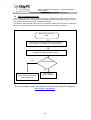
Always start your troubleshooting flow here:
Both Link and Power LEDs
are OFF
Check if the Jack PC is fully inserted
to the Flex-Jack Metal Housing
Connect external power
supply
Device failure
Contact Chip PC
support
No
Power/Fail LED
green?
Yes
No
Link LED lighted
(after 30 seconds)?
Yes
Go to LAN Flow
Go to PoE Flow
35
Jack PC Hardware User Manual - Training Department
Version 0506
7.3
LAN Troubleshooting flow
If power is OK through external power supply but still there is no LINK you should suspect the
wiring. The following flow will guide you through the troubleshooting procedure in such a
case:
Device powered but NO
Link LED
Check at the far end that the
port is connected to the switch
Check at the far end if
TIA-568-A or B is used
Something
Else
TIA-568?
See Figure 6.2
B
A
Check Flex-Jack
Terminal block
according to nonstandard wiring
table
Check Flex-Jack
Terminal block label
for proper A wiring
Fix wiring if needed
Yes
Finished
Problem resolved?
No
Go to next page
36
Check Flex-Jack
Terminal block label
for proper B wiring
Jack PC Hardware User Manual - Training Department
Version 0506
Connect at the far end a
simple 4 ports LAN switch
Switch
configuration /
port problem
Yes
Problem resolved?
No
Check:
• That the cable connected is the one you are
testing at the far end (might be labeling
problem) - check the port is working with
another device
• The patch panel contacts and labeling
• That the Flex-Jack Terminal block contacts are
not contaminated.
• Connect Flex-Jack LAN Jack in to the FlexJack housing and use LAN cable tester to
check the cable (If cable tester not available –
connect a laptop computer and check for LAN
connectivity)
Press again the cable wires into the terminal
block. Check that wire insulation penetrated by
each terminal.
Finished
Yes
Problem resolved?
No
Replace LAN cabling /
try another cable
37
Jack PC Hardware User Manual - Training Department
Version 0506
7.4
PoE Troubleshooting flow
If the Jack-PC device is working properly when an external power supply is connected to it,
but it is unpowered when connected to PoE capable port without the power supply, we have a
PoE problem. See the flow bellow to debug this problem.
In geneal the most important thing here is to isolate the cabling and connection components
(wiring, Flex-Jack, patch panel) and the power source (power injector or switch).
Device not powered by
POE
Check at the far end that the port is connected to a
powered port in the switch or to a power injector
Disconnect at the patch panel the port and connect to
PowerDsine single port power injector
Yes
Device Powered?
No
- Check PSE configuration
- Check if pre-standard POE
See paragraph 6
Check wiring
(go to LAN flow)
If you are unable to solve your problem, please contact Chip PC support at
www.chippc.com/support
38
Jack PC Hardware User Manual - Training Department
Version 0506
8
ACCESSORIES LIST
For an updated list, and more information, see Chip PC website at:
http://www.chippc.com/products/accessories
Part
Number
CPN01804
Name
Description
Image
USB PC/SC
Smart Card
reader
USB PC/SC smart card reader .
ISO-7816 compatible, EMV-I
approved, SCM SCR335, USB
interface
CPN01517
10 High
security PKI
Apollo smartcards (blank)
Infineon Apollo for Win 2000, Win
XP and Win 2003 also supports
Xcalibur PKI solutions, Secure
logon and secure e-mail, high
security smart-card, blank (no
printing)
CPN01487
USB to
2xPS/2 ports
adapter
USB to 2xPS/2 ports adapter
supporting PS/2 Keyboard, PS/2
mouse and PS/2 Barcode readers.
Note: This device has a special firmware
version installed. Other similar adapters
available from other vendors may or may
not work properly!
CPN02159
DVI to VGA
adapter
DVI to VGA adapter (to be used
with EFI6900 model only)
CPN02160
USB to 1xRS232 Serial port
adapter
USB to 1 RS-232 Serial port
adapter (Note: for Xtreme PC you
will be required to upgrade your
device to the latest Firmware!)
CPN02161
USB to 2xRS232 Serial port
adapter
USB to 2 RS-232 Serial port
adapter (Note: for Xtreme PC you
will be required to upgrade your
device to the latest Firmware!)
CPN02176
Dual-screen Y
Cable DVI-I to
DVI-D and
VGA
CPN02078
Dual-screen Y
Cable DVI-I to
DVI-D and
DVI-A
CPN02432
DVI to HDMI
adapter
Dual-screen Y Cable DVI-I to DVID and VGA - to connect two
monitors (one with DVI and
another with VGA connector) to a
single Jack PC device
Dual-screen Y Cable DVI-I to DVID and DVI-A - to connect two
monitors (with DVI connectors) to
a single Jack PC device (to be
used with EFI6900 model only)
DVI to HDMI (High-Definition
Multimedia Interface) adapter
39
Jack PC Hardware User Manual - Training Department
Version 0506
CPN02433
DVI to HDMI
cable adapter
CPN01491
Power Supply
wall-mount,
EU, 100240VAC,
5VDC, 2.4A
Power Supply
wall-mount,
US, 100240VAC,
5VDC, 2.4A
Power Supply
wall-mount,
UK, 100240VAC,
5VDC, 2.4A
CPN01503
CPN01504
DVI to HDMI (High-Definition
Multimedia Interface) cable
adapter
Power Supply wall-mount, EU,
100-240VAC, 5VDC, 2.4A (to be
used where PoE is not available)
Power Supply wall-mount, US,
100-240VAC, 5VDC, 2.4A (to be
used where PoE is not available)
Power Supply wall-mount, UK,
100-240VAC, 5VDC, 2.4A (to be
used where PoE is not available)
CPN02163
Jack PC IDC
Termination
Kit
Jack PC IDC Termination Kit to
connect the Flex-Jack Housing to
the LAN/PoE infrastructure
CPN02165
Jack PC IDC
Termination
Kit with Strong
Location
Authentication
CPN02164
Jack PC RJ45
Termination
Kit
CPN02166
Jack PC RJ45
Termination
Kit with Strong
Location
Authentication
Jack PC IDC Termination Kit with
Strong Location Authentication to
connect the Flex-Jack Housing to
the LAN/PoE infrastructure.
Includes a dedicated chip for
Location Authentication to be used
together with Xcalibur Global
Management software - Please
contact Chip PC for availability
Jack PC RJ-45 Termination Kit to
connect the Flex-Jack Housing to
RJ-45 cable (length 150mm, 5.9
Inch) You can use this device for
evaluating the Jack PC by
connecting it to a local switch
using the connected RJ-45 cable.
Can also be used for
Network/Wiring troubleshooting.
Jack PC RJ-45 Termination Kit
with Strong Location
Authentication to connect the FlexJack Housing to Flex-Jack
Housing to RJ-45 cable (length
150mm) You can use this device
for evaluating the Jack PC by
connecting it to a local switch
using the connected RJ-45 cable.
Can also be used for
Network/Wiring troubleshooting).
Includes a dedicated chip for
Location Authentication to be used
together with Xcalibur Global
Management software - Please
contact Chip PC for availability
40
Jack PC Hardware User Manual - Training Department
Version 0506
CPN02248
Corona
Punch-Down
Tool
Corona Punch-Down Tool to
connect the network wires to the
Flex-Jack Housing
CPN02221
PowerDsine
Midspan
Power-overEthernet
(PoE) Injector
US (Single
Port)
PowerDsine
Midspan
Power-overEthernet
(PoE) Injector
UK (Single
Port)
PowerDsine Midspan Injector US
(Single Port) to enable single port
Power-over-Ethernet (PoE). Can
also be used for PoE
troubleshooting
CPN02216
PowerDsine
Midspan
Power-overEthernet
(PoE) Injector
EU (Single
Port)
PowerDsine Midspan Injector EU
(Single Port) to enable single port
Power-over-Ethernet (PoE). Can
also be used for PoE
troubleshooting
CPN02244
PowerDsine
Power-overEthernet
(PoE) Kit - UK
PowerDsine Kit - UK (Single Port)
to enable single port Power-overEthernet (PoE). Can also be used
for PoE troubleshooting. Includes
PoE tester - to identify if PoE exist
in the Jack
CPN02184
PowerDsine
Power-overEthernet
(PoE) Kit - EU
PowerDsine Kit - EU (Single Port)
to enable single port Power-overEthernet (PoE). Can also be used
for PoE troubleshooting. Includes
PoE tester - to identify if PoE exist
in the Jack
CPN02218
PowerDsine
Power-overEthernet
(PoE) Kit - US
PowerDsine Kit - US (Single Port)
to enable single port Power-overEthernet (PoE). Can also be used
for PoE troubleshooting. Includes
PoE tester - to identify if PoE exist
in the Jack
CPN02243
PowerDsine Midspan Injector UK
(Single Port) to enable single port
Power-over-Ethernet (PoE). Can
also be used for PoE
troubleshooting
41
Jack PC Hardware User Manual - Training Department
Version 0506
CPN02239
PowerDsine
PoE Tester
PowerDsine PoE Tester, used to
identify if PoE exist in the Jack
CPN02171
Jack PC
Extraction
Tool, T-6
Jack PC Extraction Tool, T-6, used
to remove an installed Jack PC
unit from the Flex-jack Housing
CPN02167
Flex-Jack
Housing EU/UK
Flex-Jack Housing - EU/UK for use
with Flex-Jack devices such as
Jack PC
CPN02168
Flex-Jack
Housing - US
Flex-Jack Housing - US for use
with Flex-Jack product such as
Jack PC
CPN02170
Flex-Jack Blank Panel
with EU/UK
Frame
Flex-Jack - Blank Panel with
EU/UK Decorative Frame - used to
close an unused Flex-Jack Please contact Chip PC for
availability
CPN02182
Flex-Jack Blank Panel
with US
Frame
Flex-Jack - Blank Panel with US
Decorative Frame - used to close
an unused Flex - Please contact
Chip PC for availability
CPN02172
Flex-Jack
External
Mounting Box
- EU/UK
Flex-Jack External Mounting Box EU/UK - to install a Flex-Jack
device such as Jack PC externally
42
Jack PC Hardware User Manual - Training Department
Version 0506
CPN02173
Flex-Jack
External
Mounting Box
- US
Flex-Jack External Mounting Box US - to install a Flex-Jack device
such as Jack PC externally
CPN02431
EU/UK WallSide Frame
EU/UK Wall-Side Frame to
connect Jack PC with an existing
Jack
CPN02169
Flex-Jack
Legacy, Prestandard
CISCO POE
module
Flex-Jack, Pre-standard CISCO
PoE module - enables devices
such as Jack PC to work with Prestandard PoE devices.
Flex-Jack
Legacy, Prestandard
PowerDsine
PoE module
Flex-Jack, Pre-standard
PowerDsine PoE module - enables
devices such as Jack PC to work
with Pre-standard PoE devices.
CPN02302
Wireless LAN
USB dongle
802.11g
CPN02289
LAN Cable, 2
RJ-45
connectors, 20
cm, 7.87 Inch,
Blue
RJ-45 to RJ45 Connector
(Female-toFemale)
XG-705A Wireless LAN USB 2.0
dongle, IEEE 802.11 b/g Enabling Xtreme PC and Jack PC
to connect to wireless networks
LAN Cable, CAT 5 RJ-45
connectors, 20 cm, 7.87 Inch, Blue
CPN02194
CPN02434
*Please contact Chip PC for availability
*Please contact Chip PC for availability
RJ-45 to RJ-45 Connector
(Female-to-Female)
For an updated list, and more information, see Chip PC website at:
http://www.chippc.com/products/accessories
43
Jack PC Hardware User Manual - Training Department
Version 0506
9
REGULATORY COMPLIANCE
This product has been tested and found to comply with the limits of the regulations needed to
receive the following marks:
• EMI/EMC: FCC Class B; CE Mark; VCCI.
•
Electrical Safety: UL60950-1; cUL Listing; CE Mark (IEC/EN 60950).
•
This product is ENERGY STAR labeled and meets the ENERGY STAR guidelines for
energy efficiency.
9.1
Jack-PC Requirements Compliance
•
FCC Compliance - The Jack PC meets Class B requirements.
•
IEC/EN Compliance - The Jack PC meets Class B requirements.
9.2
FCC Statements
FCC Part 15 – Class B
This product has been tested and found to comply with the limits for a Class B digital device, pursuant to
Part 15 of the FCC Rules. These limits are designed to provide reasonable protection against harmful
interference in a residential installation.
This product generates, uses and can radiate radio frequency energy and, if not installed and used in
accordance with the instructions, may cause harmful interference to radio communications. However,
there is no guarantee that the interference will not occur in a particular installation. If this product does
cause harmful interference to radio or television reception, which can be determined by turning the
product OFF and on, the user is encouraged to try to correct the interference by one or more of the
following measures:
•
Reorient or relocate the receiving antenna.
•
Increase the separation between the product and receiver.
•
Connect the product into an outlet on a circuit different from that to which the receiver is
connected.
•
9.3
Consult the dealer or an experienced Radio/TV technician for help.
IEC/EN Notice
This product conforms to requirements of EN55022 for Class B product.
9.4
Modifications
The Jack PC is especially designed for many years of continuous operation. No maintenance
or upgrade is possible for this product except for normal software configuration and loading
that do not require opening of the product’s external enclosure.
Never open the product’s enclosure and never attempt to replace any internal part. Doing so
might damage the product and will terminate the product warranty immediately.
9.5
Cables
Connections to this device must be made with shielded cables with metallic RFI/EMI
connector hoods in order to maintain compliance with FCC Rules and Regulations.
9.6
Peripheral Devices
Only peripherals (input/output devices, printers, etc.) certified to comply with the Class B limits
might be attached to this product. Operation with non-certified peripherals is likely to result in
interference to radio and TV reception.
44
Jack PC Hardware User Manual - Training Department
Version 0506
ENVIRONMENTAL & REGULATORY DETAILED INFORMATION
A. System Dimensions and Weight
Configuration
Depth, cm
Width, cm
Height, cm
Weight, kg
With decorative frame
3.6
8.6
8.6
0.35
Without decorative frame
3.6
5.8
5.8
0.25
B. Declarations and Certifications
B1. regulatory compliance Information
This system received the following approvals and may be labeled with one or more of these marks depending on
point of purchase:
Approvals
Certificate #/Standard
Yes / No / N/A
Energy Saving
USA: Energy Star Compliance
N/A
Yes
EMC/EMI (Electro-Magnetic Compliance/Interference):
EN55022 Class B, EN61000-3-2/3, EN55024
CISPR 22:1997 Class A Radiated, Power line Conducted
EN 50081-1:1992 Emissions- Residential, Commercial
EN 55022:1998 Class A Radiated, Power line Conducted
EN 61000-3-2:1995 Power Line Conducted Emissions
European EU – CE Mark
EN 61000-3-3:1995 Power Line Fluctuation and Flicker
Yes
EN 55024:1998 Immunity- Information Technology
Equipment
EN 61000-4-2:1995 Electro-Static-Discharge (ESD)
EN 61000-4-3:1997 Radiated Susceptibility
EN 61000-4-4:1995 Electrical Fast Transient Burst
USA - FCC Mark
47CFR FCC Part 15, Subpart B:2003 Class B Commercial
Equipment
Yes
Japan - VCCI Mark
N/A
Yes
European EU
EN/IEC 60950-1:2001 Safety for Information Technology
Equipment
Yes
USA & Canada - cUL
UL/cUL 60950-1:2003 Safety for Information Technology
Equipment (UL File # E17001)
Yes
Safety
B2. US fcc Information
This product has been tested and found to comply with the limits for a Class B digital device pursuant to Part 15 of
the FCC rules. These limits are designed to provide reasonable protection against harmful interference when the
equipment is operated in a commercial environment.
This product generates, uses, and can radiate radio frequency energy and, if not installed and used in accordance
with the instruction manual, may cause harmful interference to radio communications.
Operation of this equipment in a residential area is likely to cause harmful interference in which case the user will be
required to correct the interference at their own expense.
Note: This device complies with Part 15 of the FCC Rules. Operation is subject to the following two conditions:
1. This device may not cause harmful interference.
2. This device must accept any interference received, including interference that may cause undesired operation.
CAUTION: If you make any modification to the equipment not expressly approved by DTI, you could void
your authority to operate the equipment.
45
Jack PC Hardware User Manual - Training Department
Version 0506
1
C. Performance Data
C1. Electromagnetic Compatibility
Systems marked with the symbol “CE” indicate compliance to the EMC Directive and the Low Voltage Directive of the
European Union.
C2. System Configuration
The Energy Consumption and Declared Noise Emissions data is based on a device running the highest resolution
and color depth setting, in 100BaseT full duplex network with ICA session presenting graphic intensive screen saver.
Standard USB optical mouse and USB keyboard connected.
1
This document is informational only and reflects laboratory performance. Your product may perform differently, depending on the
software, components and peripherals you operate. Accordingly, the customer should not rely upon this information in making
decisions about electrical tolerances or otherwise. No warranty as to accuracy or completeness is expressed or implied. The
information in this document may change without notice; please note the revision number on the last page.
D. Energy consumption
Energy
Service Level Consumptio
n (Wattage)
Heat
Dissipation
(BTU/hr)
Energy Save
Requirements Meets EU
ECO label (2001/686/EC
and 2001/687/EC)
Description of Service Level
Yes / No / N/A
*Maximum
6.00
13.6
The system is running programs to
maximize the power consumption
N/A
Minimum
2.8
8.9
The system is in a waiting mode, such as
at the local desktop no session is running
N/A
ACPI S3
0.6
2
The system is in a low-power/sleep mode
Yes
Off (standby)
0.6
2
The system is turned off but is still
connected to its power source
Yes
Energy consumption is tested at 230 Volts / 50 Hz. Heat dissipation is calculated based on the measured watts,
assuming the service level is attained for one hour. Off data is not meant to show compliance to US Executive Order
13221.
*Maximum Energy Consumption results are based solely upon the testing of the System Configuration listed above.
E. Declared Noise Emissions in accordance with ISO 9296
Sound Power
Service Level
(L
WAd
-12
, bels) (1 bel=10 decibels, re 10
Sound Pressure Operator
Position
(L
pAm
Watts)
-5
, decibels) (re 2x10
Pa)
Inside active ICA
session
0.00
0.00
Idle – local desktop
0.00
0.00
46
Jack PC Hardware User Manual - Training Department
Version 0506
F. Product materials information
F1. Restricted Substances
This Chip PC product (plastic case parts, printed wiring boards, power supplies, and microprocessors) does NOT
contain any of the following substances (in concentrations exceeding natural background levels)
•
Asbestos
•
Cadmium and its compounds above 100 parts per million (ppm)
•
Halogenated dioxins or furans (i.e. polychlorinated dibenzodioxines, polychlorinated
dibenzofurans)
•
Halogenated flame retardants (chlorinated, brominated) in plastic parts over 25g
•
Mercury (except for fluorescent bulbs used in display units)
•
PCBs (polychlorobiphenyls) or PCTs (polychloroterphenyls)
•
PBBs (polybromobiphenyls) or PBDEs (polybrominated diphenylethers)
•
PVC (polyvinyl chloride) other than in cables and interconnect parts
•
CFCs (chlorofluorocarbons), HCFCs (hydrofluorocarbons) and other ozone depleting
substances
None of the substances included in the Montreal Protocol annex A, B, or C is used in Chip PC’s manufacturing
plants.
F2. ADDITIONAL MATERIALS INFORMATION
•
The cables may use PVC as an insulating material to ensure product safety
•
The case material is all metal
•
This product does not contain one or more mercury bulbs
2
Waste Handling. Local regulations should be observed when disposing of this product due to the presence of the materials and
substances as listed above.
F3. FLAME RETARDANTS USED IN MECHANICAL PLASTIC PARTS > 25 GRAMS AND PRINTED WIRING
BOARDS
Part
Flame Retardant
ISO 1043-4
ISO 11469
Mechanical Plastic Parts > 25 grams PC+ABS
Triaryl Phosphate Ester
FR(40)
ISO 11469
Printed Wiring Board
TBBPA
FR(16)
N/A
Mechanical Plastic Parts > 25 grams ABS
None
None
ISO 11469
F4. COMPLIANCE WITH ROHS – LEAD-FREE INFORMATION
This product was redesigned to comply with the European Union’s Directive 2002/95/EC, Restrictions of Hazardous
Substances (”RoHS” Directive) and similar regulations that may be adopted by other countries. All products
manufactured after the 1st of January 2006 are fully compliant with the European Union’s Directive 2002/95/EC
unless written differently on product will contain only allowed substances.
ROHS Declaration
This product does not contain RoHS restricted substances as homogeneous materials:
a) Greater than quantity limit of 0.1% (1000 PPM) for:
1. Lead (Pb)
2. Mercury
3. Hexavalent Chromium in non-metallic applications (paints, pigments and plastics)
4. Polybrominated Biphenyls (PBB)
5. Polybrominated Diphenyl Ethers (PBDE);
b) Hexavalent Chromium in metallic applications: Corrosion preventative coatings (conversion coatings) containing
Hexavalent Chromium shall not be used in metal parts, components, materials or products. And impurities shall not
exceed 0.1% (1000 PPM) in any metallic application;
c) Greater than quantity limit of 0.01% (100 PPM) for:
1. Cadmium.
47
Jack PC Hardware User Manual - Training Department
Version 0506
G. Packaging
No CFCs (chlorofluorocarbons), HCFCs (hydrofluorocarbons) or other ozone depleting substances are used in
packaging material. Chromium, lead, mercury, or cadmium are not intentionally added to packaging materials and
are not present in a cumulative concentration greater than 100 ppm as incidental impurities. Printed user
documentation is bleached in a chlorine-free process. (Europe Only)
Criteria
Yes / No
• No halogenated plastics or polymers are used for packaging material
Yes
• Complies with the EU Directive 94/ 62/ EEC
Yes
• Depending on your point of purchase, packaging materials are labeled in accordance with DIN
6120 – “Marking of packing materials and packages for their recycling”
Yes
H. Batteries
This product does not contain any batteries
I. External Power Supply (optional)
Chip PC supplies its products, when applicable, with a power supply compliant with all needed regulatory compliance
standards, such as UL-listed, Tuv-GS, FCC, CE etc.
J. DESIGN FOR ENVIRONMENT
Visit www.chippc.com/environment for more information.
K. Longevity and Upgrading
All Chip PC products are designed for easy assembly, disassembly, and disposal. To extend the life of your Chip PC
product, you can install or upgrade certain software components (e.g., image, Plug-Ins). As Chip PC products are
built for long life, products are in general not designed for repair.
L. Recyclables
For recyclables, this system incorporates the following design guidelines:
Minimal use of non-separable connections, such as gluing and welding between different materials.
Yes
Minimal use of composite structure materials.
Yes
Painting/varnishing plastic material has been avoided.
Yes
Mechanical plastic parts greater than 100 grams consist of one material or of easily separable materials.
Yes
M. RECYCLING/ END-OF-LIFE SERVICE INFORMATION
Take back and recycling services are offered for this product in certain countries. If you want to dispose your product,
contact Chip PC reseller or sales office for instructions.
N. Chip PC CORPORATE ENVIRONMENTAL INFORMATION
The following information is available at www.chippc.com/environment:
• Corporate Environmental Policy
• Environmental Reports
• ISO 14001 certified environmental management systems
48
Jack PC Hardware User Manual - Training Department
Version 0506
10 CHIP PC LIMITED HARDWARE WARRANTY
Chip PC warrants that the Jack PC you have purchased from Chip PC or from an authorized
Chip PC reseller is free from defects in material and workmanship under normal use during
the Limited Warranty period of 3 years. The warranty period commences on the date of
purchase. Your sales receipt showing the date of purchase of the Jack PC is your proof of the
date of purchase. This warranty is not transferable to anyone who subsequently purchases
the product from you. This Limited Warranty does not include expandable parts.
Never open the product’s enclosure and never attempt to replace or fix any internal part! Any
attempt to repair the product, install or replace components by an unauthorized person could
expose that person to risk electrical shock and will cause the product warranty to be void
immediately.
Should the JACK PC products require service during the term of the Limited Warranty, Chip
PC would provide either mail-in or carry-in service.
Chip PC will repair or replace according to its own discretion the defective products or parts
with new products or parts. All exchanged parts and products replaced under this warranty
will become the property of Chip PC.
TO OBTAIN SERVICE UNDER THIS LIMITED WARRANTY for mail-in or carry-in you must
receive from Chip PC a valid Returned Material Authorization (RMA) and only then return the
product, freight prepaid and assured (or assume the risk of loss or damage during shipment)
in the original container or an equivalent, to the designated Chip PC Authorized Service
Center. If the unit was not registered, you should enclose a written receipt for the product,
showing the date of purchase, distributor’s or dealer’s name from whom you purchased the
product, and both the model and serial number of the product. Chip PC will pay the return
ground shipping charge within the continental United States or within EU countries.
Limitations of Remedy
THIS LIMITED WARRANTY COVERS repair or replacement at the discretion of Chip PC of
the JACK PC device, power supply and other accessories if purchased from Chip PC. THIS
LIMITED WARRANTY DOES NOT COVER losses or damages that occurred as a result of
shipping; improper installation or maintenance by anyone other than an authorized
representative of Chip PC; acts of God or accident; misuse, neglect, or misapplication of the
product; installation of options or parts by anyone other than Chip PC; exposure to extremes
of temperature or humidity; or improper electrical power. Products returned to Chip PC for
service, in warranty and post warranty that are diagnosed as No Fault Found will be subject to
a diagnostic and handling fee.
The Limited Warranty will be void in case of mechanical damage to the product or in case that
the warranty seal is broken.
THIS LIMITED WARRANTY IS IN LIEU OF ALL OTHER WARRANTIES, REMEDIES OR
CONDITIONS, WHETHER ORAL OR WRITTEN, EXPRESSED OR IMPLIED. THERE ARE NO
WARRANTIES OF MERCHANTABILITY OR FITNESS FOR A PARTICULAR PURPOSE. CHIP PC
WARRANTY OBLIGATIONS AND BUYER’S REMEDIES ARE EXCLUSIVELY STATED HEREIN.
CHIP PC LIABILITY, WHETHER BASED ON CONTRACT, TORT, WARRANTY, STRICT
LIABILITY OR ANY OTHER THEORY, SHALL NOT EXCEED THE PRICE OF THE
INDIVIDUAL UNIT WHOSE DEFECT OR DAMAGE IS THE BASIS FOR THE CLAIM. IN NO
EVENT SHALL CHIP PC BE LIABLE FOR ANY SPECIAL OR CONSEQUENTIAL
DAMAGES.
49
Jack PC Hardware User Manual - Training Department
Version 0506
CHIP PC SPECIFICALLY DOES NOT REPRESENT THAT IT WILL BE ABLE TO REPAIR
ANY PRODUCT UNDER THIS WARRANTY.
U.S.A. State Laws
Some states do not allow limitations on how long an implied warranty lasts, or allow the
exclusion or limitation of incidental or consequential damages, so the above limitations may
not apply to you. This warranty gives you specific legal rights, and you may also have other
rights, which vary from state to state.
RMA Process:
The goal of the RMA Process is to determine whether a damaged unit can be fixed at the
customer/channel site or it has to be shipped to Chip PC Service Center labs for testing &
repairing.
§
RMA Certificate Request: Chip PC offers its customers and channels a 24/7 online
service of submitting an RMA request through the MyChipPC portal to be accessed
from Chip PC website.
§
RMA Certificate Approval: Chip PC technical expert will decide whether the problem
can be resolved remotely; If yes, Chip PC technical expert will guide the
customer/channel how to do so. If the problem cannot be resolved remotely, an RMA
certificate will be issued including RMA #, date of expiration and address of the
nearest Chip PC Service Center.
§
Shipping RMA Unit: the RMA Device must be shipped to Chip PC Service Center
appropriately packaged as not to be damaged during shipment and including printed
copies of the RMA Certificate and the product Proof of Purchase. Chip PC reserves
the right to file charges additional to repairing and testing on units that arrive not
according to above specified criteria.
§
RMA Unit Status: Chip PC technical expert will test the RMA Device and decide on
one of the following actions:
o
Send replacement unit to customer
o
Repair device and send to customer.
o NFF – No Fault found, unit returned to customer.
RMA Pricing guidelines for the above will be pending on Warranty status and will
be specified in the following section “RMA Types & Related Pricing”.
§
RMA Pricing: In case warranty is void for any reason (out-of-warranty-period,
mishandling, NFF), and RMA handling is to be charged, Chip PC will issue a price
quotation and continue only after receiving customer approval. Minimal fees for
handling and initial testing might be charged in any case even when not repairing the
device.
50
Jack PC Hardware User Manual - Training Department
Version 0506
Limited Warranty Types:
Mail-In Coverage
The Customer will make the initial service request to the Chip PC Customer Service. If Chip
PC determines that a repair is required, the Customer will receive instructions on returning the
Product to Chip PC. The customer will return the product in its original package or an
equivalent. The Customer will pay incoming freight charges and is responsible for any loss or
damage to the Product while it is in transit. Upon completion of the repair, Chip PC will return
the Product to the Customer, freight prepaid. A copy of your Warranty Certificate must
accompany the Product. All non-Chip PC Product, accessories, attachments must be
removed from the Product before it is mailed in for service. Chip PC shall not be responsible
for items that are not removed.
Carry-In Coverage
The Customer will make the initial service request through Chip PC on-line RMA form. If Chip
PC determines that a repair is required, the Customer must deliver the Product to a Chip PC
Authorized Service Provider, make arrangements and pay for the transport of Product to
Customer after its repair. A copy of the Customer's Warranty Certificate must accompany the
Product. All non-Chip PC Product, accessories, attachments must be removed from the
Product prior to taking Product to the Chip PC Authorized Service Center. Chip PC or Chip
PC Authorized Service Provider shall not be responsible for items that are not removed or
that are damaged before they are received by Chip PC or the Service Center.
Upgrade Commitment on behalf of Customer
In case Chip PC discovers some failure in its Software (e.g. Operating System, Management
Software, Plug-Ins or any other aspect of its Software), the customer might be required to
upgrade his software to a specific software version within a reasonable period of time. After
the specified time has passed, Chip PC will not be held obligated to support the product under
its Warranty or Extended Warranty terms and conditions.
Note: In case Chip PC has decided to replace the device, Chip PC will guaranty to re-issue
all XPI and other rights from the RMA unit to the returned device.
51
Jack PC Hardware User Manual - Training Department
Version 0506
11 CHIP PC LIMITED SOFTWARE WARRANTY
Chip PC (Israel) Ltd (“Chip PC”) or any of its subsidiaries licensing the Software, if sale is not
directly by Chip PC , warrants that commencing from the date of delivery to Customer (but in
case of resale by a Chip PC reseller, commencing not more than ninety (90) days after
original shipment by Chip PC), and continuing for a period of the longer of (a) ninety (90) days
or (b) the period set forth in the Warranty Card accompanying the Product (if any): (a) the
media on which the Software is furnished will be free of defects in materials and workmanship
under normal use; and (b) the Software substantially conforms to its published specifications.
The date of shipment of a Product by Chip PC is set forth on the packaging material in which
the Product is shipped. Except for the foregoing, the Software is provided AS IS. This limited
warranty extends only to the Customer who is the original licensee. Customer's sole and
exclusive remedy and the entire liability of Chip PC and its suppliers under this limited
warranty will be, at Chip PC or its service center's option, repair, replacement, or refund of the
Software if reported (or, upon request, returned) to the party supplying the Software to
Customer, if different than Chip PC. In no event does Chip PC warrant that the Software is
error free or that Customer will be able to operate the Software without problems or
interruptions. In addition, due to the continual development of new techniques for intruding
upon and attacking networks, Chip PC does not warrant that the Software or any equipment,
system or network on which the Software is used will be free of vulnerability to intrusion or
attack.
Restrictions. This warranty does not apply if the Product (a) has been altered, except by Chip
PC, (b) has not been installed, operated, repaired, or maintained in accordance with
instructions supplied by Chip PC, (c) has been subjected to abnormal physical or electrical
stress, misuse, negligence, or accident; or (d) is licensed, for beta, evaluation, testing or
demonstration purposes for which Chip PC does not receive a payment of purchase price or
license fee.
DISCLAIMER OF WARRANTY. EXCEPT AS SPECIFIED IN THIS WARRANTY, ALL
EXPRESS OR IMPLIED CONDITIONS, REPRESENTATIONS, AND WARRANTIES
INCLUDING, WITHOUT LIMITATION, ANY IMPLIED WARRANTY OR CONDITION OF
MERCHANTABILITY, FITNESS FOR A PARTICULAR PURPOSE, NONINFRINGEMENT,
SATISFACTORY QUALITY OR ARISING FROM A COURSE OF DEALING, LAW, USAGE,
OR TRADE PRACTICE, ARE HEREBY EXCLUDED TO THE EXTENT ALLOWED BY
APPLICABLE LAW. TO THE EXTENT AN IMPLIED WARRANTY CANNOT BE EXCLUDED,
SUCH WARRANTY IS LIMITED IN DURATION TO THE WARRANTY PERIOD. BECAUSE
SOME STATES OR JURISDICTIONS DO NOT ALLOW LIMITATIONS ON HOW LONG AN
IMPLIED WARRANTY LASTS, THE ABOVE LIMITATION MAY NOT APPLY TO YOU. THIS
WARRANTY GIVES YOU SPECIFIC LEGAL RIGHTS, AND YOU MAY ALSO HAVE OTHER
RIGHTS WHICH VARY FROM JURISDICTION TO JURISDICTION. This disclaimer and
exclusion shall apply even if the express warranty set forth above fails of its essential
purpose.
General Terms Applicable to the Limited Warranty Statement and Software License
Disclaimer of Liabilities. IN NO EVENT WILL CHIP PC OR ITS SUPPLIERS BE LIABLE FOR
ANY LOST REVENUE, PROFIT, OR DATA, OR FOR SPECIAL, INDIRECT,
CONSEQUENTIAL, INCIDENTAL, OR PUNITIVE DAMAGES HOWEVER CAUSED AND
REGARDLESS OF THE THEORY OF LIABILITY ARISING OUT OF THE USE OF OR
INABILITY TO USE SOFTWARE EVEN IF CHIP PC OR ITS SUPPLIERS HAVE BEEN
ADVISED OF THE POSSIBILITY OF SUCH DAMAGES. In no event shall Chip PC's or its
suppliers' liability to Customer, whether in contract, tort (including negligence), or otherwise,
exceed the price paid by Customer. The foregoing limitations shall apply even if the abovestated warranty fails of its essential purpose. BECAUSE SOME STATES OR
JURISDICTIONS DO NOT ALLOW LIMITATION OR EXCLUSION OF CONSEQUENTIAL
OR INCIDENTAL DAMAGES, THE ABOVE LIMITATION MAY NOT APPLY TO YOU.
52
Jack PC Hardware User Manual - Training Department
Version 0506
The Warranty and the Software License shall be governed by and construed in accordance
with the laws of the State of Israel. If any portion hereof is found to be void or unenforceable,
the remaining provisions of the Warranty and the Software License shall remain in full force
and effect. Except as expressly provided herein, the Software License constitutes the entire
agreement between the parties with respect to the license of the Software and supersedes
any conflicting or additional terms contained in the purchase order.
If Customer has entered into a contract directly with Chip PC for supply of the Products
subject to this warranty, the terms of that contract shall supersede any terms of this Warranty
or the Warranty Card, or the Software License, which are inconsistent with that contract. The
version in effect at the date of delivery of the Products to the Customer shall apply.
Upgrade Commitment on behalf of Customer
In case Chip PC discovers some failure in its Software (e.g. Operating System, Management
Software, Plug-Ins or any other aspect of its Software), the customer might be required to
upgrade his software to a specific software version within a reasonable period of time. After
the specified time has passed, Chip PC will not be held obligated to support the product under
its Warranty or Extended Warranty terms and conditions.
53
Jack PC Hardware User Manual - Training Department
Version 0506
12 CHIP PC SOFTWARE LICENSE AGREEMENT
IMPORTANT - READ CAREFULLY BEFORE USING THIS PRODUCT WHICH CONTAINS
CHIP PC SOFTWARE AND MAY CONTAIN OTHER CHIP PC INTELLECTUAL
PROPERTY. USING THIS PRODUCT INDICATES YOUR ACCEPTANCE OF THE
FOLLOWING TERMS AND CONDITIONS.
This License Agreement is a legal agreement between you (either an individual or a single
entity) and the manufacturer (MANUFACTURER) of the product, which contains software and
firmware product(s) installed on the product and/or included in the package (SOFTWARE). By
using the product on which software has been preinstalled, installing, copying or otherwise
using the SOFTWARE, you agree to be bound by the terms of this agreement.
1. Grant of License
Chip PC grants you a license to Use one copy of the SOFTWARE. “Use” means storing,
loading, installing, executing or displaying the SOFTWARE.
You may use the SOFTWARE in or in conjunction with the Product as provided to you. You
may transfer ownership of the Product, including the right to use the SOFTWARE to another
party so long as that party agrees to accept these terms and conditions.
YOU MAY NOT USE, COPY, MODIFY, TRANSLATE OR TRANSFER THE SOFTWARE, OR
MODIFICATION THEREOF, IN WHOLE OR IN PART, EXCEPT AS EXPRESSLY
PROVIDED FOR IN THIS LICENSE. YOU MAY NOT DECOMPILE, REVERSE ENGINEER
OR OTHERWISE DECODE OR ALTER THE SOFTWARE.
2. Disclaimer of Warranty
This SOFTWARE is provided, “AS IS,” and is delivered with no warranties, either express or
implied. CHIP PC MAKES AND YOU RECEIVE NO WARRANTIES ON THE SOFTWARE,
EXPRESS, IMPLIED, OR STATUTORY, OR IN ANY OTHER PROVISION OF THIS
AGREEMENT OR COMMUNICATION WITH YOU, AND CHIP PC DISCLAIMS ANY
IMPLIED WARRANTIES OF MERCHANTABILITY, NON-INFRINGEMENT AND FITNESS
FOR ANY PARTICULAR PURPOSE. CHIP PC DOES NOT WARRANT THAT THE
FUNCTIONS CONTAINED IN THE PRODUCT WILL MEET YOUR REQUIREMENTS OR
THAT THE OPERATION WILL BE UNINTERRUPTED OR ERROR FREE.
3. Limit of Liability
UNDER NO CIRCUMSTANCES SHALL CHIPC PC BE LIABLE FOR LOSS OF DATA, COST
OF COVER, OR ANY INCIDENTAL OR CONSEQUENTIAL DAMAGES, HOWEVER
CAUSED AND ON ANY THEORY OF LIABILITY. THESE LIMITATIONS SHALL APPLY
EVEN IF CHIP PC OR ITS RESELLER HAS BEEN ADVISED OF THE POSSIBILITY OF
SUCH DAMAGES, AND NOT WITHSTANDING ANY FAILURE OF ESSENTIAL PURPOSE
OF ANY LIMITED REMEDY PROVIDED HEREIN.
YOU AGREE THAT THESE ARE THE ONLY APPLICABLE TERMS OF AGREEMENT
BETWEEN US COVERING SOFTWARE AND THAT THEY SUPERSEDE ANY OTHER
COMMUNICATIONS (ORAL OR WRITTEN) BETWEEN US RELATING TO THE
SOFTWARE.
4. Export Restrictions
You agree you will not export or transmit the SOFTWARE to any country to which export is
restricted by applicable US law or regulation without the written approval of the appropriate
US Government organization.
54
Jack PC Hardware User Manual - Training Department
Version 0506
5. U.S. Government Restricted Rights (Applicable to the US Market Only)
The SOFTWARE is provided with RESTRICTED RIGHTS. Use, duplication or disclosure by
the Government is subject to restrictions as set forth in subparagraph (c)(1)(ii) of the Rights in
Technological Data and computer software clause at DFARS 252.227-7013 or in
subparagraphs (c)(1) and (2) of the Commercial Computer Software-Restricted Rights at 8
C.F.R. 52-227-19 as applicable.
6. Ownership
The SOFTWARE is owned by Chip PC or its third party suppliers. Your license confers no title
or ownership in the Software and is not a sale of any rights in the SOFTWARE.
7. Upgrade Commitment on behalf of Customer
In case Chip PC discovers some failure in its Software (e.g. Operating System, Management
Software, Plug-Ins or any other aspect of its Software), the customer might be required to
upgrade his software to a specific software version within a reasonable period of time. After
the specified time has passed, Chip PC will not be held obligated to support the product under
its Warranty or Extended Warranty terms and conditions.
8. Termination
Chip PC may terminate your license upon notice for failure to comply with any of these
License Terms. Upon termination, you must immediately destroy the SOFTWARE, together
with all copies, adaptations and merged portions in any form.
9. Patents
Chip PC Software is protected by multiple international patents.
55
Jack PC Hardware User Manual - Training Department
Version 0506
13 MICROSOFT END USER LICENSE AGREEMENT (EULA)
EULA for Microsoft® Windows® CE Operating System for
Windows-based Terminal Devices
IMPORTANT - READ CAREFULLY
This End User License Agreement (EULA) is a legal agreement between you (either an
individual or a single entity) and the manufacturer (MANUFACTURER) of the special purpose
computing device (SYSTEM) you acquired which includes certain Microsoft software
product(s) installed on the SYSTEM and/or included in the SYSTEM package (SOFTWARE).
The SOFTWARE includes computer software, the associated media, any printed materials,
and any online or electronic documentation. By installing, copying or otherwise using the
SOFTWARE, you agree to be bound by the terms of this EULA. If you do not agree to the
terms of this EULA, MANUFACTURER and Microsoft Licensing, Inc. (MS) are unwilling to
license the SOFTWARE to you. In such event, you may not use or copy the SOFTWARE, and
you should promptly contact MANUFACTURER for instructions on return of the unused
product(s) for a refund.
Software License
The SOFTWARE is protected by copyright laws and international copyright treaties, as well
as other intellectual property laws and treaties. The SOFTWARE is licensed, not sold.
1. Grant of License
SOFTWARE includes software already installed on the SYSTEM (SYSTEM SOFTWARE)
and, if included in the SYSTEM package, software contained on the CD-ROM disk and/or
floppy disk(s) labeled “Desktop Software for Microsoft Windows CE” (DESKTOP
SOFTWARE). This EULA grants you the following rights to the SOFTWARE:
• SYSTEM SOFTWARE
You may use the SYSTEM SOFTWARE only as installed in the SYSTEM.
• DESKTOP SOFTWARE
DESKTOP SOFTWARE might not be included with your SYSTEM. If DESKTOP SOFTWARE
is included with your SYSTEM, you may install and use the component(s) of the DESKTOP
SOFTWARE in accordance with the terms of the end user license agreement provided with
such component(s). In the absence of a separate end user license agreement for particular
component(s) of the DESKTOP SOFTWARE, you may install and use only one (1) copy of
such component(s) on a single computer with which you use the SYSTEM.
• Use of Windows CE Operating System for Windows-based Terminal Devices with
Microsoft Windows NT Server, Terminal Server Edition
If the SOFTWARE is Windows CE operating system for Windows-based Terminal devices,
the following special provisions apply. In order to use the SYSTEM in connection with
Windows NT Server, Terminal Server Edition, you must possess (1) a Client Access License
for Windows NT Server, Terminal Server Edition and (2) an end user license for Windows NT
Workstation or an end user license agreement for Windows NT Workstation for Windowsbased Terminal Devices (please refer to the end user license agreement for Windows NT
Server, Terminal Server Edition for additional information).
MANUFACTURER may have included a Certificate of Authenticity for Windows NT
Workstation for Windows-based Terminal Devices with the SYSTEM. In that case, this EULA
constitutes an end user license for the version of Windows NT Workstation for Windowsbased Terminal Devices indicated on such Certificate of Authenticity.
• Back-up Copy
56
Jack PC Hardware User Manual - Training Department
Version 0506
If MANUFACTURER has not included a back-up copy of the SYSTEM SOFTWARE with the
SYSTEM, you may make a single back-up copy of the SYSTEM SOFTWARE. You may use
the back-up copy solely for archival purposes.
2. Description of Other Rights and Limitations
• Speech/Handwriting Recognition
If the SYSTEM SOFTWARE includes speech and/or handwriting recognition component(s),
you should understand that speech and handwriting recognition are inherently statistical
processes; that recognition errors are inherent in the processes; that it is your responsibility to
provide for handling such errors and to monitor the recognition processes and correct any
errors. Neither MANUFACTURER nor its suppliers shall be liable for any damages arising out
of errors in the speech and handwriting recognition processes.
• Limitations on Reverse Engineering, Decompilation and Disassembly
You may not reverse engineer, decompile, or disassemble the SYSTEM SOFTWARE, except
and only to the extent that such activity is expressly permitted by applicable law
notwithstanding this limitation.
• Single SYSTEM
The SYSTEM SOFTWARE is licensed with the SYSTEM as a single integrated product. The
SYSTEM SOFTWARE installed in Read Only Memory (ROM) of the SYSTEM may only be
used as part of the SYSTEM.
• Single EULA
The package for the SYSTEM SOFTWARE may contain multiple versions of this EULA, such
as multiple translations and/or multiple media versions (e.g., in the user documentation and in
the software). Even if you receive multiple versions of the EULA, you are licensed to use only
one (1) copy of the SYSTEM SOFTWARE.
• Rental
You may not rent or lease the SOFTWARE.
• Software Transfer
You may permanently transfer all of your rights under this EULA only as part of a sale or
transfer of the SYSTEM, provided you retain no copies, you transfer all of the SOFTWARE
(including all component parts, the media, any upgrades or backup copies, this EULA and, if
applicable, the Certificate(s) of Authenticity), and the recipient agrees to the terms of this
EULA. If the SOFTWARE is an upgrade, any transfer must include all prior versions of the
SOFTWARE.
• Termination
Without prejudice to any other rights, MANUFACTURER or MS may terminate this EULA if
you fail to comply with the terms and conditions of this EULA. In such event, you must destroy
all copies of the SOFTWARE and all of its component parts.
3. Upgrades
If the SYSTEM SOFTWARE and this EULA are provided separate from the SYSTEM by
MANUFACTURER and the SYSTEM SOFTWARE is on a ROM chip, CD ROM disk(s) or
floppy disk(s), and labeled “For ROM Upgrade Purposes Only” (“ROM Upgrade”), you may
install one copy of the ROM Upgrade onto the SYSTEM as a replacement copy for the
SYSTEM SOFTWARE originally installed on the SYSTEM and use it in accordance with
Section 1 of this EULA.
4. Copyright
All title and copyrights in and to the SOFTWARE (including but not limited to any images,
photographs, animations, video, audio, music, text and “applets,” incorporated into the
SOFTWARE), the accompanying printed materials, and any copies of the SOFTWARE, are
owned by MS or its suppliers (including Microsoft Corporation). You may not copy the printed
materials accompanying the SOFTWARE. All rights not specifically granted under this EULA
are reserved by MS and its suppliers (including Microsoft Corporation).
57
Jack PC Hardware User Manual - Training Department
Version 0506
5. Product Support
Product support for the SOFTWARE is not provided by MS, its parent corporation, Microsoft
Corporation, or their affiliates or subsidiaries. For product support, please refer to
MANUFACTURER’s support number provided in the documentation for the SYSTEM. Should
you have any questions concerning this EULA, or if you desire to contact MANUFACTURER
for any other reason, please refer to the address provided in the documentation for the
SYSTEM.
6. Export Restrictions
You agree that you will not export or re-export the SOFTWARE to any country, person, or
entity subject to U.S. export restrictions. You specifically agree not to export or re-export the
SOFTWARE: (i) to any country to which the U.S. has embargoed or restricted the export of
goods or services, which as of March 1998 include, but are not necessarily limited to Cuba,
Iran, Iraq, Libya, North Korea, Sudan and Syria, or to any national of any such country,
wherever located, who intends to transmit or transport the products back to such country; (ii)
to any person or entity who you know or have reason to know will utilize the SOFTWARE or
portion thereof in the design, development or production of nuclear, chemical or biological
weapons; or (iii) to any person or entity who has been prohibited from participating in U.S.
export transactions by any federal agency of the U.S. government.
If the SOFTWARE is labeled “North America Only Version” above, on the Product
Identification Card, or on the SOFTWARE packaging or other written materials, then the
following applies: The SOFTWARE is intended for distribution only in the United States, its
territories and possessions (including Puerto Rico, Guam, and U.S. Virgin Islands) and
Canada. Export of the SOFTWARE from the United States is regulated under “EI controls” of
the Export Administration Regulations (EAR, 15 CFR 730-744) of the U.S.
Commerce Department, Bureau of Export Administration (BXA). A license is required to
export the SOFTWARE outside the United States or Canada. You agree that you will not
directly or indirectly, export or re-export the SOFTWARE (or portions thereof) to any country,
other than Canada, or to any person or entity subject to U.S. export restrictions without first
obtaining a Commerce Department export license. You warrant and represent that neither the
BXA nor any other U.S. federal agency has suspended, revoked or denied your export
privileges.
7. Note on Java Support
The SYSTEM SOFTWARE may contain support for programs written in Java. Java
technology is not fault tolerant and is not designed, manufactured, or intended for use or
resale as on-line control product in hazardous environments requiring fail-safe performance,
such as in the operation of nuclear facilities, aircraft navigation or communication systems, air
traffic control, direct life support machines, or weapons systems, in which the failure of Java
technology could lead directly to death, personal injury, or severe physical or environmental
damage.
8. Limited Warranty
• Limited Warranty
MANUFACTURER warrants that the SOFTWARE will perform substantially in accordance
with the accompanying written materials for a period of ninety (90) days from the date of
receipt. Any implied warranties on the SOFTWARE are limited to ninety (90) days. Some
states/jurisdictions do not allow limitations on duration of an implied warranty, so the above
limitation may not apply to you.
• Customer Remedies
MANUFACTURER’S and its suppliers’ entire liability and your exclusive remedy shall be, at
MANUFACTURER’S option, either (a) return of the price paid, or (b) repair or replacement of
the SOFTWARE that does not meet the above Limited Warranty and which is returned to
58
Jack PC Hardware User Manual - Training Department
Version 0506
MANUFACTURER with a copy of your receipt. This Limited Warranty is void if failure of the
SOFTWARE has resulted from accident, abuse, or misapplication. Any replacement
SOFTWARE will be warranted for the remainder of the original warranty period or thirty (30)
days, whichever is longer.
• No Other Warranties
EXCEPT AS EXPRESSLY PROVIDED IN THE LIMITED WARRANTY SECTION ABOVE,
THE SOFTWARE IS PROVIDED TO THE END USER “AS IS” WITHOUT WARRANTY OF
ANY KIND, EITHER EXPRESSED OR IMPLIED, INCLUDING, BUT NOT LIMITED TO,
WARRANTIES OF NON-INFRINGEMENT, MERCHANTABILITY, AND/OR FITNESS FOR A
PARTICULAR PURPOSE. THE ENTIRE RISK OF THE QUALITY AND PERFORMANCE
OF THE SOFTWARE IS WITH YOU.
• No Liability for Consequential Damages
MANUFACTURER OR MANUFACTURER’S SUPPLIERS, INCLUDING MS AND ITS
SUPPLIERS, SHALL NOT BE HELD TO ANY LIABILITY FOR ANY DAMAGES
SUFFERED OR INCURRED BY THE END USER (INCLUDING, BUT NOT LIMITED TO,
GENERAL, SPECIAL, CONSEQUENTIAL OR INCIDENTAL DAMAGES INCLUDING
DAMAGES FOR LOSS OF BUSINESS PROFITS, BUSINESS INTERRUPTION, LOSS OF
BUSINESS INFORMATION AND THE LIKE), ARISING FROM OR IN CONNECTION WITH
THE DELIVERY, USE OR PERFORMANCE OF THE SOFTWARE.
If you acquired this EULA in the United States, this EULA is governed by the laws of the State
of Washington.
If you acquired this EULA in Canada, this EULA is governed by the laws of the Province of
Ontario, Canada. Each of the parties hereto irrevocably attorns to the jurisdiction of the courts
of the Province of Ontario and further agrees to commence any litigation, which may arise
hereunder in the courts located in the Judicial District of York, Province of Ontario. If this
EULA was acquired outside the United States, then local law may apply. Should you have
any questions concerning this EULA, please contact the MANUFACTURER of your SYSTEM.
U.S. GOVERNMENT RESTRICTED RIGHTS
The SOFTWARE and documentation are provided with RESTRICTED RIGHTS. Use,
duplication, or disclosure by the Government is subject to restrictions as set forth in
subparagraph (c)(1)(ii) of the Rights in Technical Data and Computer Software clause at
DFARS 252.227-7013 or subparagraphs (c)(1) and (2) of the Commercial Computer
Software—Restricted Rights at 48 CFR 52.227- 19, as applicable. MANUFACTURER is
Microsoft Corporation/One Microsoft Way/ Redmond, WA 98052-6399.
59
Jack PC Hardware User Manual - Training Department
Version 0506
Appendix A
Cisco Catalyst Specific PoE Information
This appendix discusses Cisco specific information required in order to connect Jack-PCs to
Cisco Catalyst PoE enabled switches.
When trying to troubleshoot PoE problem with Cisco Catalyst switch, first check that the
switch supports IEEE 802.3af PoE. Some Cisco switches are not capable of supporting this
new standard.
Product
Catalyst 6500
Catalyst
4500
Cisco
Catalyst Catalyst Catalyst
EtherSwitch
3750
3560
3550
Module
PoE
Configuration
Options
96-port 10/100
48-port 10/100
or 10/100/1000
48-port
10/100 or
10/100/1000
48-, 24port
10/100
48-, 24port
10/100
24-port
10/100
36-, 16-port
10/100
IEEE 802.3af
Compliant
Yes
Yes
Yes
Yes
No
No
Cisco Prestandard PoE Yes
Support
Yes
Yes
Yes
Yes
Yes
Table A1 – Cisco Catalyst PoE compatibility table
Even if the Cisco Catalyst product can support 802.3af it may have older inline power
modules that can only support pre-standard PoE. You need to check the specific inline power
modules installed to verify compliance to IEEE 802.3af standard (see table A2 for example).
PoE Daughter Card
Description
WS-F6K-VPWR=
Catalyst 6500 series prestandard PoE daughter card
for 10/100 Ethernet modules.
WS-F6K-VPWRGE=
Catalyst 6500 series prestandard PoE daughter card
for 10/100/1000 Ethernet modules.
WS-F6K-GE48-AF= Catalyst 6500 series IEEE 802.3af compliant PoE
daughter card for 10/100/1000 Ethernet modules.
WS-F6K-FE48X2AF=
Catalyst 6500 series IEEE 802.3af compliant PoE
daughter card.
WS-F6K-48-AF=
Catalyst 6500 series IEEE 802.3af compliant PoE
daughter card for 10/100 and 10/100/1000 Ethernet
modules.
Table A2 - Catalyst 6500 Series Power-over-Ethernet Daughter Cards
If your switch has a module capable of providing PoE to end stations, you can set each
interface on the module to automatically detect and apply PoE if the end station requires
power.
Another advantage / complexity of Cisco Catalyst PoE – intelligent power management to
avoid overload in large switch rack. This means that although there may be 240 x 15.4W
60
Jack PC Hardware User Manual - Training Department
Version 0506
powered ports in a rack, the maximum capacity would not reach 240 x 15.4W = 3696W due to
power supply and heat dissipation problems. To better manage actual power as opposed to
standard maximum power, Cisco came up with intelligent power management features.
For example, the Catalyst 4500/6500 series switch has three PoE modes:
• Auto PoE interface. The supervisor engine directs the switching module to power up
the interface only if the switching module discovers the PD and the switch has
enough power. You can specify the maximum wattage that is allowed on the
interface. If you do not specify the wattage, then the switch will deliver no more than
the hardware-supported maximum value.
• Static - High priority PoE interface. The supervisor engine pre-allocates power to
the interface, even when nothing is connected, guaranteeing that there will be power
for the interface. You can specify the maximum wattage that is allowed on the
interface. If you do not specify the wattage, then the switch pre-allocates the
hardware-supported maximum value. If the switch does not have enough power for
the allocation, the command will fail. The supervisor engine directs the switching
module to power up the interface only if the switching module discovers the powered
device.
• Never - Data interface only. The supervisor engine never powers up the interface,
even if an unpowered phone is connected. This mode is only needed when you want
to make sure power is never applied to a PoE-capable interface.
To properly operate Jack-PCs you should either:
•
Use Static mode and allocate 10,000 mW of power per Jack-PC port. This will assure
proper operation at all time.
Or
• Use Auto mode with same setting (10,000 mW).
If you get an error doing this operation – you need to check your PoE limitations (refer to the
product manual for additional information).
Additional Cisco PoE Resources:
General PoE information can be fond at
http://www.cisco.com/en/US/netsol/ns340/ns394/ns147/ns412/netbr09186a00801f4329.html
Cisco PoE White paper
http://www.cisco.com/en/US/netsol/ns340/ns394/ns147/ns412/networking_solutions_white_paper0
9186a008026641c.shtml
Cisco Catalyst 4500 PoE configuration:
http://www.cisco.com/univercd/cc/td/doc/product/lan/cat4000/12_2_25a/conf/poe.htm#wp1051434
Additional Catalyst 4500 configuration and settings:
http://www.cisco.com/univercd/cc/td/doc/product/lan/cat4000/12_2_25a/conf/poe.htm#wp1073691
Catalyst 6500 Series Power-over-Ethernet Daughter Cards Field-Upgrade Installation
http://www.cisco.com/univercd/cc/td/doc/product/lan/cat6000/cfgnotes/78_10826.htm
Understanding IP Phone In-Line Power Provisioning on the Catalyst 6500/6000 Switch
http://www.cisco.com/warp/public/788/AVVID/cat6k_inline_pwr.html
61